
Do you ever import or enter data in Excel that contains leading zeros, like 00123, or large numbers like 1234 5678 9087 6543? Examples of these are social security numbers, phone numbers, credit card numbers, product codes, account numbers, or postal codes. Excel automatically removes leading zeros, and converts large numbers to scientific notation, like 1.23E+15, in order to allow formulas and math operations to work on them. This article deals with how to keep your data in its original format, which Excel treats as text.
Convert numbers to text when you import text data
Use Excel's Get & Transform (Power Query) experience to format individual columns as text when you import data. In this case, we're importing a text file, but the data transformation steps are the same for data imported from other sources, such as XML, Web, JSON, etc.
-
Click the Data tab, then From Text/CSV next to the Get Data button. If you don’t see the Get Data button, go to New Query > From File > From Text and browse to your text file, then press Import.
-
Excel will load your data into a preview pane. Press Edit in the preview pane to load the Query Editor.
-
If any columns need to be converted to text, select the column to convert by clicking on the column header, then go to Home > Transform > Data Type > select Text.
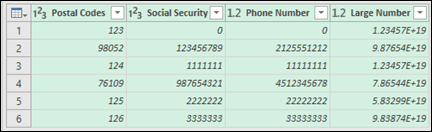
Tip: You can select multiple columns with Ctrl+Left-Click.
-
Next, click Replace Current in the Change Column Type dialog, and Excel will convert the selected columns to text.
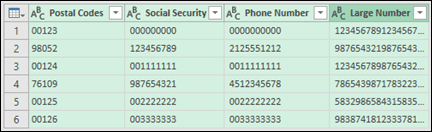
-
When you're done, Click Close & Load, and Excel will return the query data to your worksheet.
If your data changes in the future, you can go to Data > Refresh, and Excel will automatically update your data, and apply your transformations for you.
Use a custom format to keep the leading zeros
If you want to resolve the issue just within the workbook because it's not used by other programs as a data source, you can use a custom or a special format to keep the leading zeros. This works for number codes that contain fewer than 16 digits. In addition, you can format your number codes with dashes or other punctuation marks. For example, to make a phone number more readable, you can add a dash between the international code, the country/region code, the area code, the prefix, and the last few numbers.
|
Number code |
Example |
Custom number format |
|---|---|---|
|
Social |
012345678 |
000-00-0000 |
|
Phone |
0012345556789 |
00-0-000-000-0000 |
|
Postal |
00123 |
00000 |
Steps
-
Select the cell or range of cells that you want to format.
-
Press Ctrl+1 to load the Format Cells dialog.
-
Select the Number tab, then in the Category list, click Custom and then, in the Type box, type the number format, such as 000-00-0000 for a social security number code, or 00000 for a five-digit postal code.
Tip: You can also click Special, and then select Zip Code, Zip Code + 4, Phone number, or Social Security Number.
Find more information about custom codes, see Create or delete a custom number format.
Note: This will not restore leading zeros that were removed prior to formatting. It will only affect numbers that are entered after the format is applied.
Use the TEXT function to apply a format
You can use an empty column next to your data and use the TEXT function to convert it to the format you want.
|
Number code |
Example (In cell A1) |
TEXT function and new format |
|---|---|---|
|
Social |
012345678 |
=TEXT(A1,"000-00-0000") |
|
Phone |
0012345556789 |
=TEXT(A1,"00-0-000-000-0000") |
|
Postal |
00123 |
=TEXT(A1,"00000") |
Credit card numbers are rounded down
Excel has a maximum precision of 15 significant digits, which means that for any number containing 16 or more digits, such as a credit card number, any numbers past the 15th digit are rounded down to zero. In the case of number codes that are 16 digits or larger, you must use a text format. To do this, you can do one of two things:
-
Format the column as Text
Select your data range and press Ctrl+1 to launch the Format > Cells dialog. On the Number tab, click Text.
Note: This will not change numbers that have already been entered. It will only affect numbers that are entered after the format is applied.
-
Use the apostrophe character
You can type an apostrophe (') in front of the number, and Excel will treat it as text.
Need more help?
You can always ask an expert in the Excel Tech Community or get support in Communities.








