
To learn about digital signatures (also known as digital ID), what they can be used for, and how to them in Word, Excel, and PowerPoint, see All about digital signatures.
Create a signature line in Word or Excel
-
In the document or worksheet, place your pointer where you want to create a signature line.
-
On the Insert tab, select Signature Line in the Text group.
-
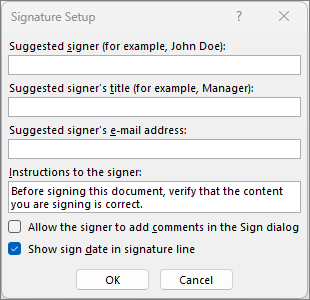
In the Signature Setup dialog box, type information to appear beneath the signature line:
-
Suggested signer: The signer's full name.
-
Suggested signer's title: The signer's title, if any.
-
Suggested signer's e-mail address: The signer's e-mail address, if needed.
-
Instructions to the signer: Add instructions for the signer, such as "Before signing the document, verify that the content is correct."
-
-
Select one or both of the following check boxes:
• Allow the signer to add comments in the Sign dialog box Allow the signer to type a purpose for signing.
• Show sign date in signature line The date the document was signed will appear with the signature.
To add additional signature lines, repeat these steps.
Note: If the document remains unsigned, the Signatures Message Bar appears. Select View Signatures to complete the signature process.
Sign the signature line in Word or Excel
When you sign a signature line, you add a visible representation of your signature and a digital signature.
-
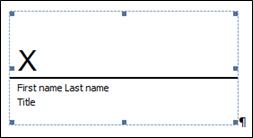
In the file, right-click the signature line and choose Sign.
If the file opens in Protected View, select Edit Anyway, if the file is from a reliable source. -
Do one or more of the following:
-
To add a printed version of your signature, type your name in the box next to the X.
-
To add a handwritten signature, sign your name in the box next to the X by using the inking feature.
-
To use an image of your written signature, choose Select Image. From the Insert Pictures dialog box, pick a location of your signature image file, select the file, and then choose Select.
Note: For customers using Chinese- (Traditional or Simplified), Korean-, or Japanese-language versions, the Stamp Signature Line option appears.
-
-
Select Sign.
The Signatures button appears at the bottom of the document or worksheet.
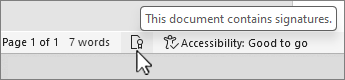
Note: You can sign a signature line by double-clicking the signature line. Type your name next to the X. Or, in the Signature Pane, in the Requested Signatures section, select the arrow next to the signature. From the menu, select Sign.
Remove digital signatures from Word or Excel
-
Open the document or worksheet that contains the visible signature you want to remove.
-
Right-click the signature line, and select Remove Signature.
-
Select Yes.
Note: In addition, you can remove a signature by selecting the arrow next to the signature in the Signature Pane. Select Remove Signature.
All about digital signatures
What is a digital signature?
A digital signature is an electronic, encrypted, stamp of authentication on digital information such as e-mail messages, macros, or electronic documents. A signature confirms that the information originated from the signer and has not been altered.
Signing certificate and certificate authority
Signing certificate To create a digital signature, you have to have a signing certificate, which proves identity. When you send a digitally-signed macro or document, you also send your certificate and public key. Certificates are issued by a certification authority, and like a driver’s license, can be revoked. A certificate is usually valid for a year, after which, the signer must renew, or get a new, a signing certificate to establish identity.
Note: You can learn more about public and private keys in this article.
Certificate authority (CA) A certificate authority is an entity similar to a notary public. It issues digital certificates, signs certificates to verify their validity and tracks which certificates have been revoked or have expired.
Tip: For more information on obtaining a digital certificate see Obtain a digital certificate and create a digital signature.
What does a digital signature guarantee?
-
Authenticity The signer is confirmed as the signer.
-
Integrity The content has not been changed or tampered with since it was digitally signed.
-
Non-repudiation Proves to all parties the origin of the signed content. Repudiation refers to the act of a signer denying any association with the signed content.
-
Notarization Signatures in Word, Excel, or PowerPoint files, which are time stamped by a secure time-stamp server, under certain circumstances, have the validity of a notarization.
To make these assurances, the content creator must digitally sign the content by using a signature that satisfies the following criteria:
-
The digital signature is valid.
-
The certificate associated with the digital signature is current (not expired).
-
The signing person or organization, known as the publisher, is trusted.
Important: Signed documents, which have a valid time stamp, are considered to have valid signatures, regardless of the age, or revocation status, of the signing certificate.
-
The certificate associated with the digital signature is issued to the signing publisher by a reputable certificate authority (CA).
Signature lines in Word and Excel
A signature line resembles a typical signature placeholder that might appear in a printed document. However, it works differently. When a signature line is inserted into a Microsoft 365 file, the author can specify information about the intended signer, and instructions for the signer. When an electronic copy of the file is sent to the intended signer, this person sees the signature line and a notification that their signature is requested. The signer can:
-
Type a signature
-
Select a picture of an inked signature
-
Write a signature by using the inking feature of a touch-screen PC
When the signer adds a visible representation of a signature to the document, a digital signature is added at the same time to authenticate the signer's identity.
Important: A digitally-signed document becomes read-only to prevent modifications.
Invisible digital signatures in Word, Excel, or PowerPoint
An invisible digital signature, like a visible digital signature line, assures the authenticity, integrity, and origin of a document. You can add invisible digital signatures to Word documents, Excel workbooks, and PowerPoint presentations.
Signed documents will have the Signatures button at the bottom of the document. In addition, for signed documents, signature information appears in the Info section that you see after you click the File tab.
Add invisible digital signatures in Word, Excel, or PowerPoint
To protect the authenticity of a document's content, you can add an invisible digital signature. Signed documents have the Signatures button at the bottom of the document.
-
On the File tab, select Info.
-
Select

-
Select Add a Digital Signature.
-
Read the Word, Excel, or PowerPoint message, and then select OK.
-
In the Sign dialog box, type the purpose into the Purpose for signing this document box.
-
Select Sign.
After a file is digitally signed, the Signatures button appears, and the file becomes read-only to prevent modifications.
Remove invisible digital signatures from Word, Excel, or PowerPoint
-
Open the document, worksheet, or presentation that contains the invisible signature you want to remove.
-
On the File tab, select Info.
-
Select

-
The document, worksheet, or presentation view returns, and the Signatures pane appears.
-
Next to the signature name, select the arrow.
-
Choose Remove Signature and then select Yes.








