
|
Guided support in your browser can provide digital solutions for Office problems |
A macro is a series of commands used to automate a repeated task and can be run when you have to perform the task. However, some macros can pose a security risk by introducing viruses or malicious software to your computer.
Warning: Never enable macros in a Microsoft 365 file unless you're sure you know what those macros do and you want the functionality they provide. You don't need to enable macros to view or edit the file. For more info see Protect yourself from macro viruses.
Make a document trusted to enable macros
If you see a security warning when you open a document or try to run a macro, you can choose to make it a trusted document and enable macros. This example is on an Excel workbook.

-
Select Enable Content.
-
In the Security Warning dialog, select Yes to make the document trusted.
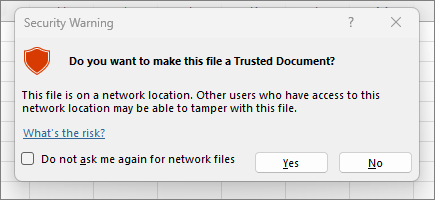
Macros are now enabled on this document. To revoke a trusted document, you need to clear all trusted documents. For more info, see Trusted documents.
Tip: Rather than enabling macros for each document, you can create a trusted location to store trusted documents. Microsoft 365 will then not check them with the Trust Center. For more info, see Add, remove, or change a trusted location in Microsoft Office.
Change macro settings in the Trust Center
Macro settings are located in the Trust Center. However, if your device is managed by your work or school the system administrator might prevent anyone from changing settings.
Important: When you change your macro settings in the Trust Center, they are changed only for the Microsoft 365 app that you are currently using. The macro settings are not changed for all your Microsoft 365 apps.
-
Select the File tab and choose Options.
-
Select Trust Center, and then choose Trust Center Settings.
-
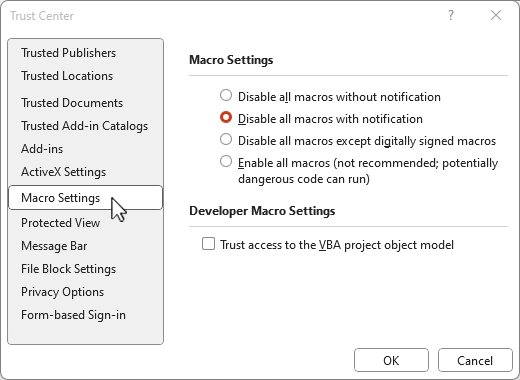
In the Trust Center, select Macro Settings.
Tip: If you have the developer tab on your ribbon, select the Developer tab and then choose

-
Make the selections that you want, then select OK.
The following are Macro setting options. Not all apps have the same choices.
Note: The options are slightly different in Excel, we'll call those out as we go.
-
Disable all macros without notification Macros and security alerts about macros are disabled.
In Excel this option is Disable VBA macros without notification and it only applies to VBA macros. -
Disable all macros with notification Macros are disabled, but security alerts appear if there are macros present.
Use this setting to enable macros on a case-by-case basis.
In Excel this option is Disable VBA macros with notification and it only applies to VBA macros. -
Disable all macros except digitally signed macros Macros are disabled, and security alerts appear if there are unsigned macros present. However, if the macro is digitally signed by a trusted publisher, the macro just runs. If the macro is signed by a publisher you haven't trusted yet, you are given the opportunity to enable the signed macro and trust the publisher.
In Excel this option is Disable VBA macros except digitally signed macros and it only applies to VBA macros. -
Enable all macros (not recommended, potentially dangerous code can run) All macros run without confirmation. This setting makes your computer vulnerable to malicious code.
In Excel this option is Enable VBA macros (not recommended, potentially dangerous code can run) and it only applies to VBA macros. -
Excel also has a checkbox for Enable Excel 4.0 macros when VBA macros are enabled. If you select this checkbox all of the above settings for VBA macros will also apply to Excel 4.0 (XLM) macros. If this checkbox is not selected XLM macros are disabled without notification.
-
Trust access to the VBA project object model Block or allow programmatic access to the Visual Basic for Applications (VBA) object model from an automation client. This security option is for code written to automate a Microsoft 365 program and manipulate the VBA environment and object model. It is a per-user and per-application setting, and denies access by default, hindering unauthorized programs from building harmful self-replicating code. For automation clients to access the VBA object model, the user running the code must grant access. To turn on access, select the check box.
Note: Microsoft Access has no Trust access to the VBA project model object option.
See Also
Change macro security settings in Excel
Quick start: Create a macro in Excel.








