
Important
Spreadsheet Compare is only available with Microsoft 365 Apps for enterprise.
When you compare files with Microsoft Spreadsheet Compare, you might see differences between cells but need more detail than the results grid provides. To see detailed changes line by line, select a row twice to open it in a new window. This can be useful when comparing macros or Visual Basic for Applications (VBA) code.
For example, suppose you want to see how the VBA code has changed for a function named "GPA." The following image shows the changes in the Spreadsheet Compare results grid:
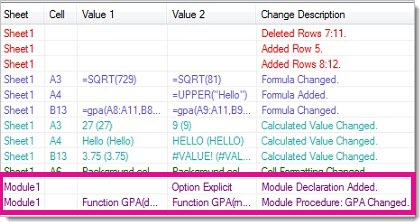
To see more details for the second "Module1" line, select the line twice to open the detailed comparison. The following image shows the results:
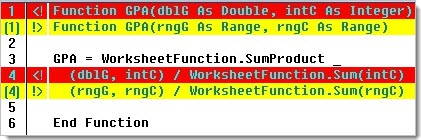
Changed lines are highlighted in red and yellow. Red lines are from the first workbook, and yellow lines are from the second workbook. For example, line 1 shows different variables inside the parentheses. On line 4, the arguments in the two sets of parentheses are also different because the variable names changed.