

Select the cell contents in Excel that you want to format.
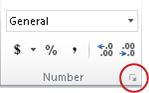
On the Home tab, select the Dialog Box Launcher next to Number.
On the Number tab, in the Category list, select Number.
To display or hide the thousands separator, select or clear the Use 1000 Separator (,) check box.
Tip
To quickly display the thousands separator, select Comma Style.  in the Number group on the Home tab.
Note
By default, Excel uses the comma as the system separator for thousands. However, in Excel, you can specify a different system separator. For more information, see Change the character used to separate thousands or decimals.