
Last Updated: February 19, 2026
ISSUE
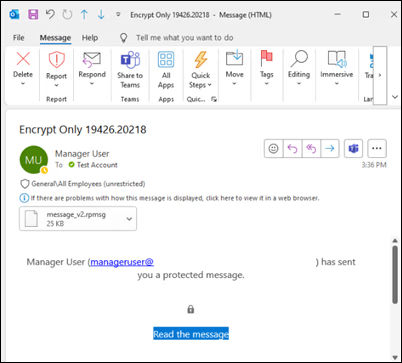
After updating to Current Channel Version 2511 (Build 19426.20218) recipients may not be able to open “Encrypt Only” emails.
In the Reading Pane you may get a message "This message with restricted permission cannot be viewed in the reading pane until you verify your credentials. Open the item to read its contents and verify your credentials."
After you open the email, you find an attachment message_v2.rpmsg and the recipient is not able to read the email.
STATUS: FIXED
This issue is fixed in the following builds:
-
Beta Channel Version 2602 (Build 19720.15160) – Available in the Beta Channel, Update History for Office Beta Channel.
-
Current Channel Preview Version 2602 (Build 19725.20000) – Early February 2026, Update History for Office Current Channel (Preview).
-
Current Channel Version 2602 (Build 19725.20000) – February 24, 2026, Update history for Microsoft 365 Apps.
-
Version 2601 (Build 19628.20184), Update history for Microsoft 365 Apps.
-
Version 2512 (Build 19530.20226), Update history for Microsoft 365 Apps.
-
Version 2511 (Build 19426.20294), Update history for Microsoft 365 Apps.
-
Version 2510 (Build 19328.20306), Update history for Microsoft 365 Apps.
WORKAROUND
This issue happens if you encrypt the email using the settings under the email File dialog (File > Encrypt). To prevent the issue, select the Options ribbon, then select Encrypt, and choose Encrypt or Do Not Forward as noted in this article, Send encrypted messages with a Microsoft 365 personal or family subscription.
Alternately, you can revert to a build before the issue started and then send the email. The issue started with build 19426.20218. The next prior build that works is 19426.20186. To revert Office, do the following:
-
Save your work and close all Office applications.
-
Open an elevated Command Prompt.
-
Run the following command: "%programfiles%\Common Files\Microsoft Shared\ClickToRun\officec2rclient.exe" /update user updatetoversion=16.0.19426.20186
Additional Resources
More Resources

Ask the experts
Connect with experts, discuss the latest Outlook news and best practices, and read our blog.

Get help in the community
Ask a question and find solutions from Support Agents, MVPs, Engineers, and Outlook users.

Suggest a new feature
We love reading your suggestions and feedback! Share your thoughts. We're listening.
See Also
Fixes or workarounds for recent issues in classic Outlook for Windows








