

Before you begin:
- You're on the right page if you're troubleshooting sync issues while setting up your mobile email for the first time.
- If your email, calendar, and contacts were syncing before and now they don't, see Fix Outlook.com email sync issues. If you don't use an Outlook.com or Microsoft 365 for business account, contact your email provider.
Things to remember:
- IMAP and POP are sync protocols that are unable to sync calendar, contacts, etc. They can only sync email. What are IMAP and POP?
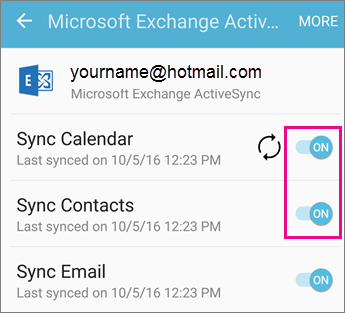
- You must have an email provider that uses Microsoft Exchange ActiveSync. Most common providers like Gmail do.
Note
Starting March 1, 2026, devices running ActiveSync versions lower than 16.1 will no longer be able to connect to our services. For more information, please go to Exchange Online ActiveSync Device Support update.
Which email app are you using?
Common questions for the Outlook app:
- Can I edit contacts in Outlook and have it sync across all my devices? Yes! See this article on how to manage your contacts in Outlook for iOS and Android.
- Are my phone's calendar events also in the Outlook app's calendar? In order to have your device's calendar events display in your Outlook calendar, they must be added through an account that has been synced to Outlook. For example, if you're adding events to the iPhone calendar, you'll have to sync them to your iCloud account and then add your iCloud account to the Outlook app. Outlook for iOS and Android also support calendar widgets, which allow you to access your Outlook calendars on your home screen.
Check your sync settings
Check that Calendar is enabled for your account:
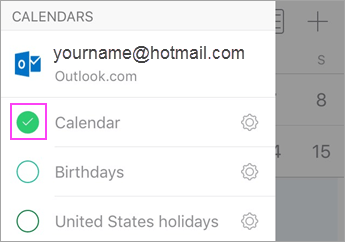
- Go to the Calendar icon in the Outlook app and tap the calendar icon (or your avatar) in the upper left-hand corner.
- Under your email accounts, make sure each Calendar you'd like to sync to Outlook is checkmarked.
If your email address is not displayed in the list, then the account does not support calendar sync. POP and IMAP accounts do not support calendar sync. To sync your calendar across your devices, sign up for a free Microsoft account.
Check that access to Contacts is allowed for Outlook:
Steps may vary between devices and between operating systems. If you don't own an iOS or Samsung Android device, use these directions as a guideline:
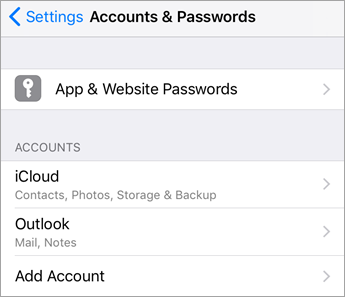
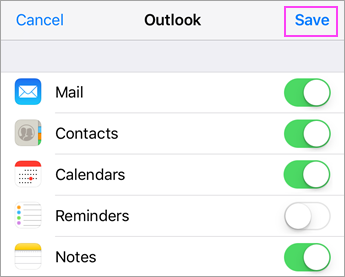
- For iOS: Open the Settings app > scroll down and tap Apps > Outlook > Contacts. Contacts should be set to Full Access and Background App Refresh should be on.
- For Android: Open phone Settings > Apps > Outlook > Permissions > Make sure access to Contacts and accounts is allowed.
Then open the Outlook app and go to Settings > Contacts > Sync Contacts. Toggle on any accounts you'd like to sync contacts from.
Troubleshoot calendar and contacts in the Outlook mobile app
In the Outlook app, go to Settings
 > Tap Accounts > the account that is not syncing > Ensure the account is not an IMAP or POP account. The account type is listed at the top of the screen.
If the account is not IMAP or POP, you can try to reset your account to resolve the issue. Tap Reset Account. Check to see if your account is syncing.
If that doesn't work, delete and re-add your email account:
From Settings
, tap the account that is not syncing > tap Delete Account > Delete From This Device.
Then re-add your email account in Outlook for Android or Outlook for iOS.Note
If you're prompted to set up your email as an IMAP or POP account, your email provider cannot sync calendar and contacts. Contact them or your administrator for help, or consider signing up for a free Microsoft account. If you're asked to enter server settings, you need to get server settings from your provider.
Still not working?
- On your other device, verify that the calendar you are trying to access is not connected to a POP or IMAP account.
- Ensure you have selected the correct calendar by going to Calendar in the Outlook app > tap the calendar icon or your avatar in the upper-left corner. The calendar should be listed with a checkmark next to it's name.
Having trouble? We can help.
- If you have a work or school account that uses Microsoft 365 for business or Exchange-based accounts, talk to your Microsoft 365 admin or technical support.
- Contact Microsoft support for questions related to the Outlook app or Outlook.com accounts, or use the Contact Support option in the Outlook Mobile client.
If you still need help syncing your calendar or contacts to your mobile device, tell us about your question in detail using the comment box below so we can address it in the future. For the easiest way to manage email, calendar, contacts, we recommend the Outlook for Android or Outlook for iOS mobile app.