
Microsoft is modernizing the activation experience for perpetual licenses. Beginning December 3, 2025, the traditional telephone-based product activation automation process has been moved from telephone to online. Customers will instead use the Product Activation Portal:
The new digital workflow provides a more secure, reliable, and user‑friendly activation experience and helps prevent fraud. While the process has been updated, offline activation capabilities remain supported. Customers who rely on traditional offline activation can continue using it without changes to their environment.
The Product Activation Portal enables activation for a wide range of perpetual Microsoft products and supports both connected and non‑connected devices. This evolution ensures activation remains simple, flexible, and dependable while offering a modern, streamlined interface for all users.
This article describes the Product Activation portal and explains how it supports activation for perpetual Microsoft products.
Sign-in to Product Activation portal
To access the Product Activation Portal, a human operator must complete a CAPTCHA and authenticate with a supported account type. The following account types are supported:
-
Personal Microsoft accounts
-
Work or school accounts
-
Microsoft Entra ID accounts
-
Azure Government tenant accounts
The account used to sign in is not tied to your product license. It is used only to validate secure portal access.
Sign-in steps for personal, work, and school accounts
-
Open Product Activation portal, or go to: https://visualsupport.microsoft.com
-
Complete the Captcha.
-
Select Proceed to Sign In.
-
Enter your personal, work, or school account, and then select Next.
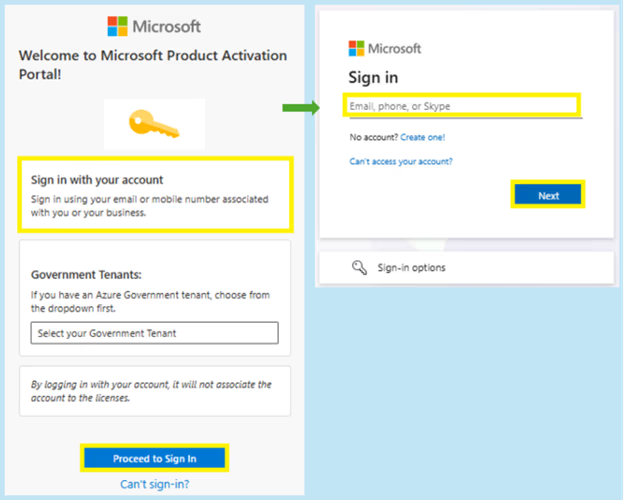
If your account is already registered: You will be guided through the standard verification process associated with your account.
If your account is not registered: You may receive an error if:
-
The account is not yet a Microsoft account, or
-
The account is configured as an Azure Government tenant (in this case, follow the steps in the Azure Government tenants below)
To register the account:
-
Select Get a new Microsoft account.
-
Complete the Captcha.
-
You will be redirected to the Create your Microsoft account experience.
-
Confirm the displayed email address, select Next, and complete the setup.

Note: To create a new personal Microsoft account (for example, @outlook.com), select Create one.
Sign-in steps for Azure Government tenants
Follow the below steps to sign in:
-
Open Product Activation portal, or go to: https://visualsupport.microsoft.com
-
In the Government tenants section, select the appropriate environment.
-
Select Proceed to sign in.
-
Enter your Azure Government account and select Next.

If the account is already registered, you will complete the standard verification flow.
Product activation options
After signing in, you can choose from several activation options.
Activate a Microsoft product
Use this option If you need help activating a Microsoft perpetual product of the following:
-
Retail.
-
Original Equipment Manufacturer (OEM).
-
Volume License
Volume License key management
Use this option If you need help managing your volume license keys:
-
Locating, assigning your active Volume Licensing Agreements’ Volume License Key(s).
-
Locating license details
-
Help navigating your Volume License Portal to locate your volume license keys and volume license software.
-
Key limit increases, or MAK or KMS activation exceptions.
Contact Support
If additional assistance is required and your scenario qualifies, the portal will connect you with the appropriate support option. Depending on availability, these may include:
-
Live chat
-
Requesting a call (Microsoft will call you—no need to wait on hold)








