Create a table
Select a cell in your data, and then press Ctrl+T or select Insert > Table.
In the Create Table dialog box, confirm the cell range for the table. If your data has headers, make sure the My table has headers check box is selected, and then select OK.
Use format as table
Select a cell in your data, and then select Home > Format as Table. Select a table style.
In the Create Table dialog box, confirm the cell range for the table. If your data has headers, make sure the My table has headers check box is selected, and then select OK.
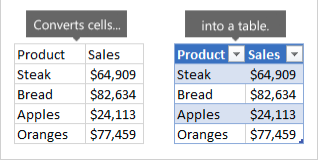
The following image shows data before and after it's converted to a table.