

You can square a number in Excel by using the exponent operator or the power function. Use the formula =N^2, in which N is either a number or the value of the cell you want to square. You can use this formula multiple times throughout a worksheet.
Square a number in its own cell
Follow these steps:
Select a cell on your worksheet.
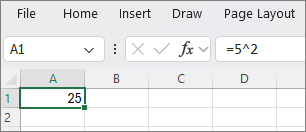
Type =N^2 into the cell, where N is the number you want to square. For example, to insert the square of 5 into cell A1, type =5^2 into the cell.
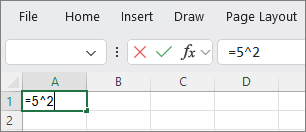
Press Enter to see the result.
Tip
You can also select another cell to see the squared result.
Square a number in a different cell
Follow these steps:
- Select a cell and type the number that you want to square.
- Select another empty cell in the worksheet.
- Type =N^2 into the empty cell, where N is a cell reference that contains the numeric value you want to square. For example, to display the square of the value in cell A1 into cell B1, type =A1^2 into cell B1.
- Press Enter to see the result.
Need more help?
You can always ask an expert in the Excel Tech Community or get support in Communities.