
The latest Windows 11 2026 Update builds on the Windows 11 2025 Update, bringing together the features and improvements delivered through monthly Windows updates over the past year. If you’ve been keeping your device up to date, many of these experiences might already be familiar.
Get this update and enable early access to the latest features
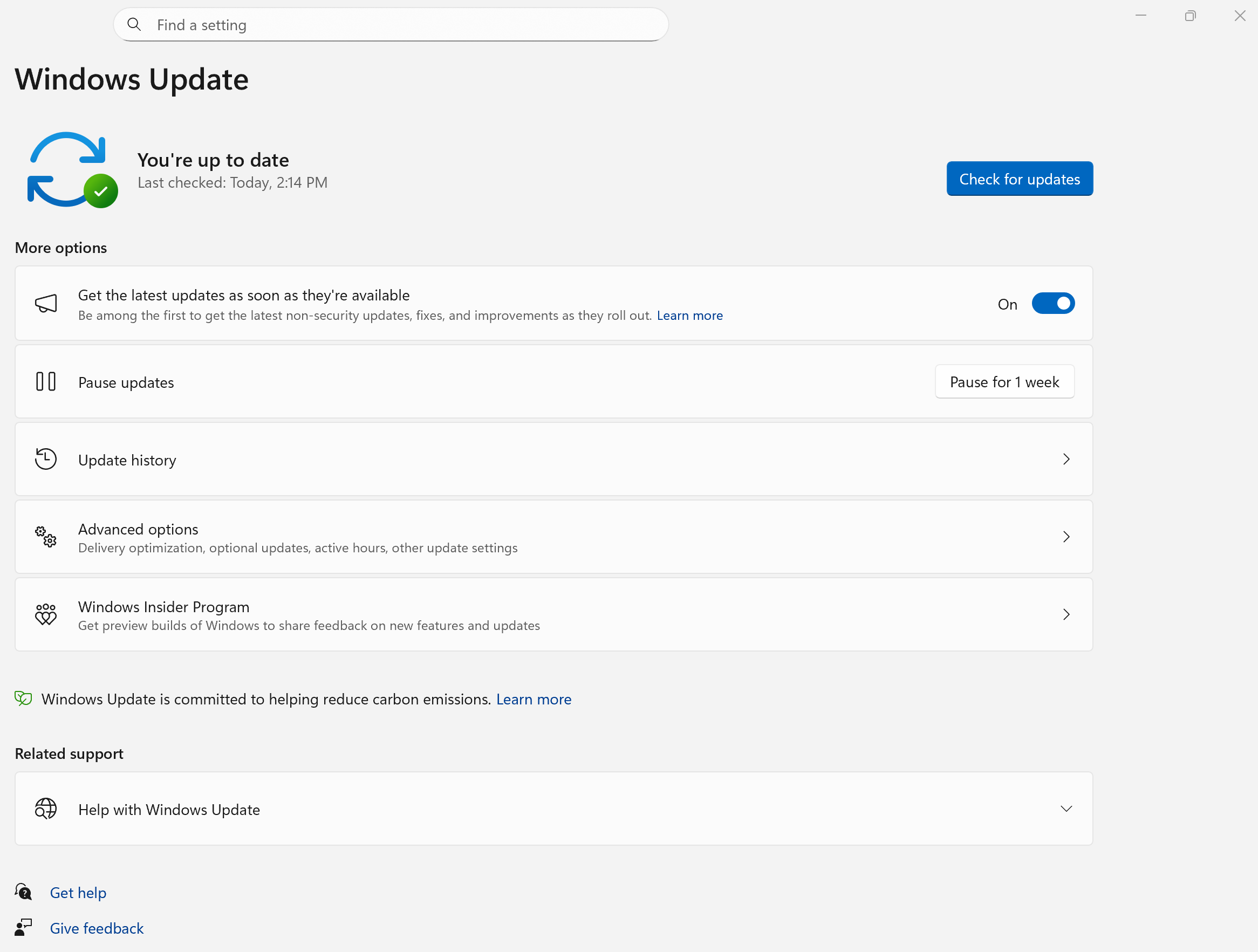
To download and install this Windows Update click the Windows Start button, then select Settings > Windows Update, and select Check for updates.
Or, use the below shortcut and select Check for updates.
If you want to be among the first to get the latest non-security updates, go to the Get the latest updates as soon as they're available option, and set the toggle next to it to "On".
Learn more about Get Windows updates as soon as they're available for your device.
Are you a Windows Insider? Check out the Windows Insider blog to see what's new in the latest preview builds.
Explore what's new in recent updates
Discover the features and improvements that have arrived in Windows 11 over the past year. They include new ways to work, create, personalize your PC, and stay protected. Select each tab to learn more:
Note
For more information about this release, visit How to get the Windows 11 2026 Update. We will continue to provide updates on the phased rollout of this update on the Windows release health site.
Important
Features vary by device and market and may require updates continuing to roll out; timing varies.
AI-Powered experiences
Settings: Agent in Settings helps you find and manage settings using natural language.
Narrator: Enhanced image descriptions provide more detailed information about visual content.
Task Manager: New AI monitoring capabilities provide greater visibility into AI workloads and NPU activity.
Taskbar: New taskbar experiences make it easier to access AI-powered tools and track progress across tasks.
Start and Taskbar personalization
Start: New customization options let you personalize the Start menu. Choose from different menu sizes, hide your profile picture and account name, and control the visibility of individual sections.
Taskbar: Customize the taskbar to suit your preferences by choosing its position on the screen and selecting a more compact layout.
Search and discovery
Windows Search: Find content more quickly with a simplified search experience, improved results from automatically indexed frequently used folders, and new controls for managing web and Microsoft Store suggestions.
File Explorer: Enhancements make it easier to view and manage files, including more intuitive file size displays and improved usability throughout File Explorer.
Accessibility
Voice access: Expanded language support provides more ways to interact with your PC using your voice.
Voice Isolation: Improved voice recognition helps voice access better understand your commands in noisy environments.
Magnifier: Enhanced zoom controls make it easier to customize your viewing experience.
Narrator: Richer image descriptions provide more detailed information about visual content.
Sharing and collaboration
Windows Share: Discover and install relevant apps directly from the share window when signed in with a work or school account.
Cross-device experiences: Enhanced integration between your Android phone and Windows PC helps you stay productive across devices, including the ability to resume tasks seamlessly as you move between them.
Security and protection
Windows Hello: Expanded support for compatible fingerprint readers provides more secure and flexible sign-in options.
Smart App Control: Enhanced management capabilities provide greater flexibility for helping protect your device from untrusted apps.
Windows Security: New security enhancements help safeguard your identity, apps, and device.
Devices and drivers
Shared Audio: Share audio across multiple devices simultaneously using supported Bluetooth audio technology.
Multi-App Camera: Allow multiple applications to access your camera at the same time.
Basic Camera: A simplified camera mode helps improve compatibility and provides a more streamlined camera experience.
Other improvements
Widgets: Improvements help create a more focused experience with better notification controls and fewer interruptions.
Gaming: New gaming enhancements and deeper Xbox integration provide a more streamlined gaming experience on supported Windows devices.
Networking: Reliability improvements help provide more consistent access to shared network resources and services.
Note
For more information about this release, visit How to get the Windows 11 2025 Update. We will continue to provide updates on the phased rollout of this update on the Windows release health site.
Important
Features vary by device and market and may require updates continuing to roll out; timing varies.
Copilot+ PCs unique features
Recall (preview) introduces a smarter way to search your past activity using AI-powered snapshots of apps, websites, and documents. Users opt in and authenticate with Windows Hello, with full control to pause or reset snapshot collection. A personalized homepage highlights recent snapshots and frequently used apps, while new export options allow secure sharing with third-party apps using a one-time code. Filters and navigation improvements make Recall easier to manage and use.
Click to Do brings a fast, intuitive way to take action on text and images directly from your screen using AI-powered tools. Users can summarize, rewrite, or create lists from selected text, and perform image edits like background removal or object erasing. New integrations allow sending content to Copilot or Microsoft Copilot, launching Reading Coach for fluency practice, or opening Immersive Reader for distraction-free reading. The experience includes a tutorial, supports multiple languages, and works across apps like Teams and Word. Enhanced personalization options are available for pen shortcuts and regional support.
Windows Search has been significantly enhanced for Copilot+ PCs, making it easier to find documents, photos, and settings using natural language. Powered by semantic indexing and on-device AI, users no longer need to remember exact file names or setting labels, searching phrases like “change my theme” works seamlessly. Cloud-stored photos and files now appear alongside local results, with keyword matches shown from within file content. A new unified settings page simplifies managing search permissions and indexing. These improvements are now available on Snapdragon, AMD, and Intel-powered Copilot+ PCs.
Windows Settings introduces a Copilot-powered agent that helps users find and change settings using natural language. It currently works only when your primary display language is set to English.
Voice Access supports natural language commands and new languages like Simplified and Traditional Chinese. Users can add custom words, explore new features via an in-product guide, and navigate Windows entirely by voice.
AI-Powered experiences
Copilot enhancements include customizable keyboard shortcuts, voice interaction via press-to-talk, and integration with Click to Do and Microsoft Copilot. Users can personalize how the Copilot key behaves and use natural language to interact with Copilot for quick assistance while multitasking.
Accessibility and input
Narrator received major accessibility upgrades, including new scan mode shortcuts to jump to the start or end of items, skip links, and access lists. Users can now copy spoken content, get AI-powered image descriptions, and use Screen Curtain to hide the screen while reading aloud. Narrator also guides users through new features and supports live transcription and speech recap for better accessibility.
Voice Typing now includes a profanity filter toggle for more control.
Input enhancements include a Gamepad keyboard layout for touch devices, improved controller navigation, and support for PIN sign-in on the lock screen. These updates improve accessibility and gaming experiences.
User interface and experience
Taskbar improvements include better icon resizing, enhanced previews, and new options for clock display with seconds. Admins can configure pin policies, and users benefit from clearer indicators, improved accessibility grouping, and status updates during file indexing.
Widgets now support multiple dashboards, lock screen customization, and a redesigned Discover feed with Copilot-curated stories. Users can personalize widgets and access summaries, videos, and images from trusted sources.
File Explorer adds curated views for Microsoft 365 content, context menu dividers, and new sharing options with Android devices. Users can snooze backup reminders, restore previous tabs, and access Live Persona Cards when signed in with Entra ID. Sharing and editing images is now easier via the Windows Share window.
Snap in Windows gets usability improvements with inline tips and keyboard shortcut guidance when users interact with the Snap Bar or Snap menu.
Settings & system management
Windows Settings redesigned homepage includes top cards for system info, FAQs, and enterprise-specific views. Users can now manage AI model usage by third-party apps and access improved activation and printer rename dialogs.
PC Migration begins rolling out with a new pairing page in the Windows Backup app, allowing users to transfer files and settings between PCs. Full support during setup will arrive in future updates.
Windows Resiliency Initiative adds quick machine recovery via WinRE, enabling automatic fixes for boot issues. A redesigned restart screen improves readability.
Security and privacy
Windows Hello introduces a modernized interface for passkey authentication across sign-in flows, Recall, and the Microsoft Store. Users can easily switch between authentication methods and enjoy a cleaner, more intuitive experience.
Critical security fixes are included to help keep your system protected against emerging threats.
Sharing and collaboration
Windows Share allows image editing before sharing, previews for web content, and compression level selection. Users can drag and drop files into suggested apps and customize the right-click menu for faster sharing.
Note
For more information on the Windows 11 2024 update, visit the Windows Experience Blog: How to get new experiences for Windows 11. We will continue to provide updates on the phased rollout of this update on the Windows release health site.
Copilot+ PCs unique features
Welcome to the future of personal computing with Windows 11's Copilot+ PCs! These devices are not just an upgrade; they're a leap into a new era of AI-powered technology. With a neural processing unit (NPU) capable of performing over 40 trillion operations per second, Copilot+ PCs are designed to handle the most demanding tasks with ease.
Experience the world in new ways with Live Captions, translating audio and video content into English subtitles from 44 languages, ensuring you never miss a beat!
Dive into creativity with Cocreator in Paint, where AI assists you in bringing your artistic visions to life.
Enhance your video calls with Windows Studio Effects, offering AI-powered lighting and noise cancellation for crystal-clear communication.
Auto Super Resolution is the first AI-powered super resolution solution built into an operating system, making games automatically play smoother with higher resolution details.
And with Image Creator and Restyle Image in the Microsoft Photos app, reimagine your photos or create new images with AI's help.
These exclusive features for Copilot+ PCs in the Windows 11 2024 update are just the beginning of a transformative journey into the future of technology.
Wi-Fi 7 support: elevate your connectivity experience

|
Embrace the wireless revolution with the introduction of Wi-Fi 7 for consumer access points, now accessible to all. Wi-Fi 7 is not just an incremental update; it's a transformative leap forward in wireless technology, delivering unparalleled speed, reliability, and efficiency. Building upon the foundations of Wi-Fi 6 and Wi-Fi 6E, Wi-Fi 7 elevates your connectivity experience with significant improvements in throughput, latency, and overall wireless performance. With Wi-Fi 7, your Windows PC can achieve multi-gigabit speeds, offering up to 4x the speed of Wi-Fi 6 and Wi-Fi 6E, and nearly 6x that of Wi-Fi 5. This means smoother, more responsive real-time activities like gaming and video conferencing, with significantly reduced latency. To harness the full potential of Wi-Fi 7, ensure your PC and consumer access point are Wi-Fi 7 capable, as many of our ecosystem partners have already introduced compatible products to the market. |
|---|
Bluetooth® LE Audio enhancements for assistive hearing devices support
Windows has advanced accessibility by enabling direct pairing and audio streaming for Bluetooth® Low Energy Audio (LE Audio) supported assistive hearing devices on compatible PCs. This update introduces new capabilities for audio presets and ambient sound control, accessible directly from Settings or Quick Settings in Windows. Users can adjust their assistive hearing device settings to suit their environment, although options will vary based on the device model and configuration.
Users can also manage the volume of ambient sound their assistive hearing device capture, allowing them to focus on streamed audio or their surroundings as needed. This feature's availability also depends on the device model.
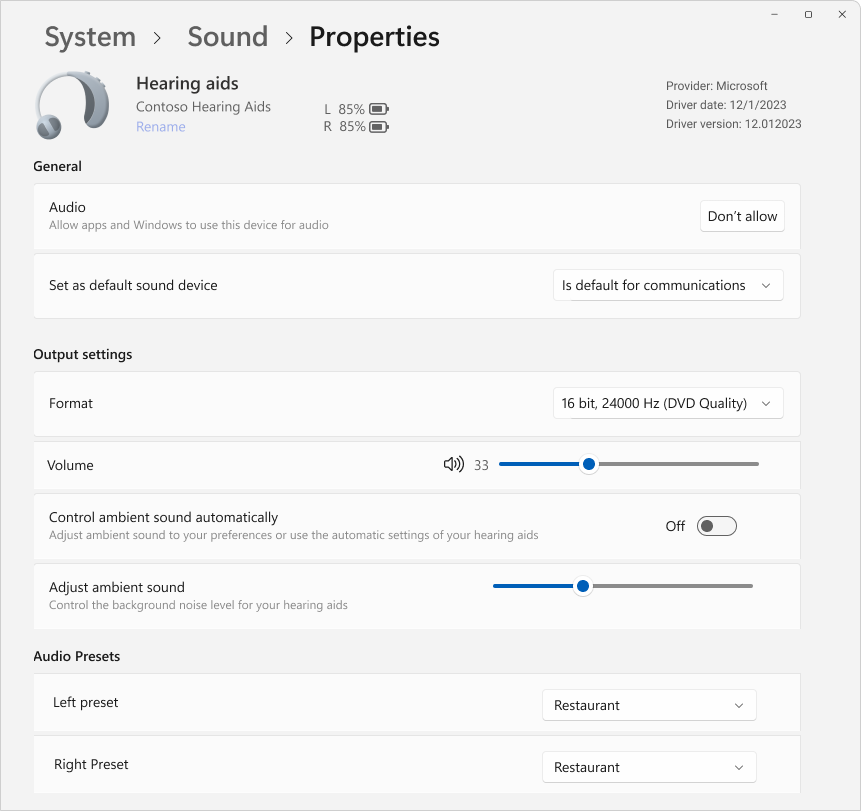
To utilize these features, both the Windows device and the assistive hearing device must support Bluetooth LE Audio. It's important to note that not all Windows 11 PCs or hearing devices with Bluetooth LE support are compatible with LE Audio. For more information on LE Audio compatibility with Windows, refer to the Windows support page. For assistive hearing device compatibility, consult the manufacturer or your audiologist.
To learn more, see Using hearing devices with your Windows PC.
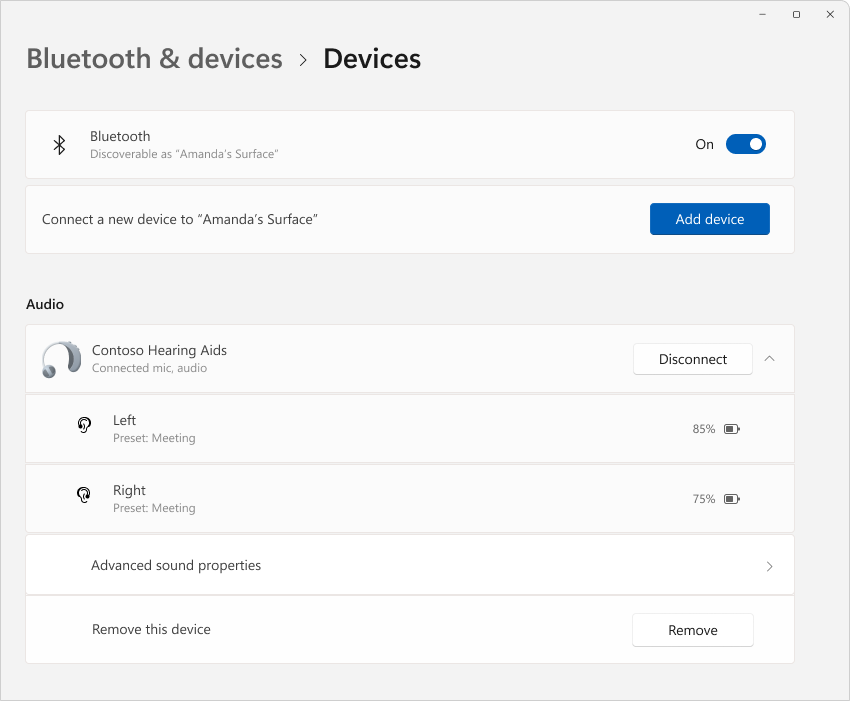
The Bluetooth & devices settings page has also been enhanced to offer more functionality. Users can now view essential details for connected Bluetooth devices, such as battery life and connection status, and access audio settings for audio devices with ease. These improvements apply to hearing aids and all other devices listed on this page.
To explore these features, go to Settings > Bluetooth & devices > Devices, or use the following shortcut:
System tray & taskbar enhancements
A new scrollable view of quick settings means that you no longer have to edit the list to add new actions; simply scroll through and rearrange as you see fit.
Live captions are more accessible with a new quick setting, making it easier to turn on from the system tray.
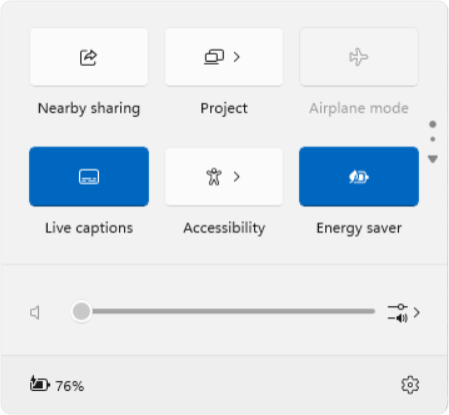
Network connectivity is more intuitive with the following improvements:
- animated icons that indicate when a connection is in progress, replacing the disconnected globe icon
- a refresh button for Wi-Fi networks along with a scan progress indicator to help you find the networks you need
- VPN management is simpler, with a new split toggle for single VPNs and an improved list for multiple VPNs, reducing the time it takes to start a connection
In the taskbar, File Explorer windows now show preview thumbnails with multiple tabs, ALT+TAB, and Task View.
Lastly, the progress bar design under app icons is updated for better visibility on both the taskbar and the Start menu.
These updates are designed to make your Windows experience more user-friendly.
A more streamlined File Explorer
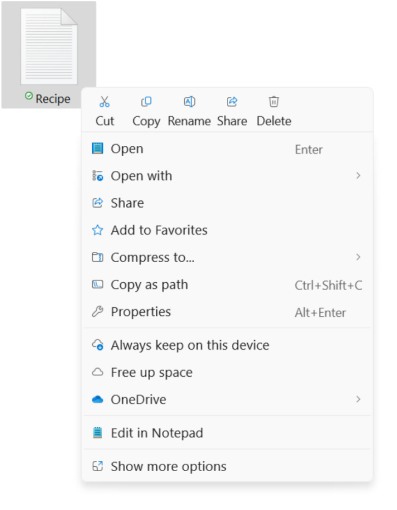
This Windows update brings a fresh breath of efficiency to File Explorer, making your file management smoother and more intuitive. Clear labels in the context menu indicate actions such as cut, copy, paste, rename, share, and delete, simplifying your daily tasks.
You can now easily drag files between breadcrumbs in the File Explorer address bar. Breadcrumbs show the path to your current file location, making navigation a breeze. For example, in the path This PC > Windows (C:) > Program Files, there are three breadcrumbs.
Embrace the new support for creating 7-zip and TAR archives, expanding your options beyond the traditional ZIP format. The new compression wizard offers a variety of formats and detailed customization for your archiving needs, while the enhanced extraction feature resolves file name conflicts with ease.
Additionally, PNG files now support metadata editing, allowing you to add information to your images.
These improvements are designed to enhance your File Explorer experience, ensuring that every interaction is as intuitive as it is effective.
Smart power management for your PC
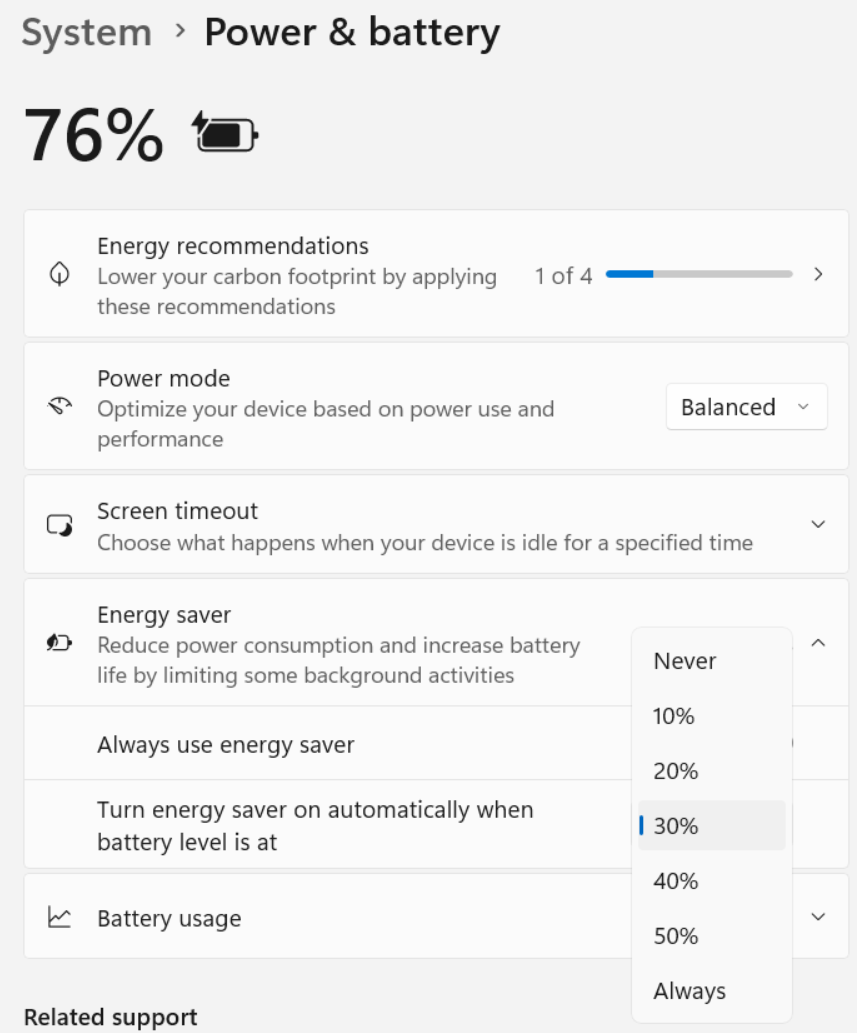
Introducing energy saver, the smart solution to extend your PC's battery life and reduce energy consumption without sacrificing performance. Easily accessible via Quick Settings, energy saver can be toggled on or off to suit your needs or set to activate automatically at a certain battery percentage.
Ideal for both battery-powered and plugged-in PCs, this feature is not only optimized for laptops but also available for desktops to conserve energy continuously.
When active, a new energy saver icon appears in the system tray for desktop PCs, while battery-powered devices maintain the familiar leaf icon.
To configure energy saver, go to Settings > System > Power & Battery, or use the following shortcut:
Energy-saving brightness control for plugged-in devices
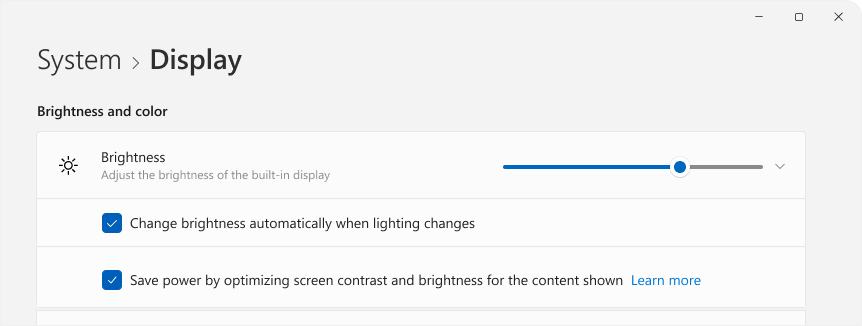
Content Adaptive Brightness Control (CABC) dims or brightens areas of a display or monitor based on the content being displayed. The goal is to strike a balance between reduced power consumption and maintaining a good visual experience, ultimately saving battery life. This feature operates on devices such as laptops and 2-in-1s that are plugged into a charger. For most users, this change will be unnoticeable and should help reduce energy consumption
You can configure CABC from Settings > System > Display, or by using the following shortcut:
Under Brightness & color use the drop-down menu with 3 options: Off, Always, and On Battery Only. For battery powered devices such as laptops and 2-in-1's, the default is On Battery Only.
Note
CABC must be enabled by the manufacturer of your device. As a result, this feature is not available on all laptop or 2-in-1 devices.
Join and share Wi-Fi networks with QR codes
Windows now supports QR code sharing for Wi-Fi networks, making it easy to share your Wi-Fi network with friends and family. You can connect to new Wi-Fi networks without manually entering network details and passwords, greatly streamlining the experience. With the new QR code sharing feature, you can:
- Scan a QR code to instantly connect to a Wi-Fi network. Windows devices with a camera can scan and connect to a QR code posted on the wall of a coffee shop or shared by another device. To use, open the Camera app on your device and point it at a Wi-Fi network QR code
- Share your Wi-Fi password to another device via QR code. To use, find your network in Quick Settings > Wi-Fi and select the properties
 , then Show Wi-Fi network password at the top of the settings page. You can also find the password for networks you have previously used in Settings > Network & internet > Wi-Fi > Manage known networks and select a network to show the password. On another device that supports QR code connections, use the camera app to scan the QR code to connect
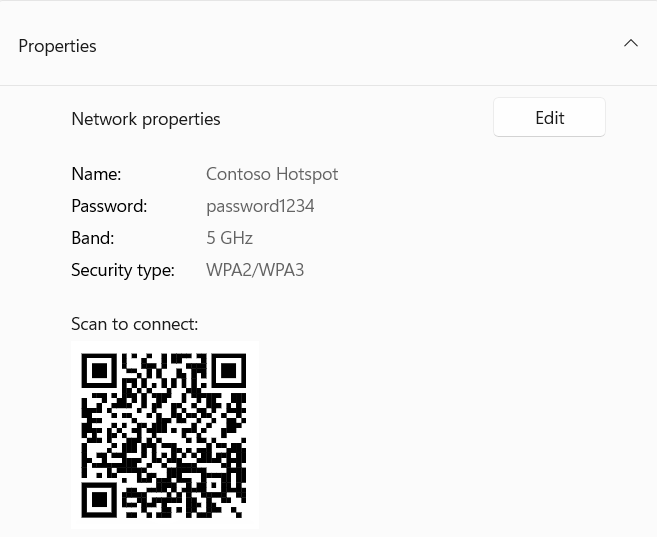
 - Share your mobile hotspot via QR code. You can quickly share your device's mobile hotspot on the Settings > Network & internet > Mobile hotspot page where the properties section now includes a QR code. Use another device that supports QR code connections to scan with the camera and connect
Enhanced privacy controls for Wi-Fi network access

|
There are new privacy settings to give you greater control over which applications can access the list of Wi-Fi networks in your vicinity, which could potentially be used to pinpoint your location. You can review and adjust app permissions by going to Settings > Privacy & security > Location. To simplify the process of sharing your location with trusted applications, we've implemented a new prompt. This prompt appears the first time an application attempts to access your location or Wi-Fi details, enabling location services and granting the app permission to use your location data. This facilitates tasks like finding directions or checking the weather without the need to delve into Settings. 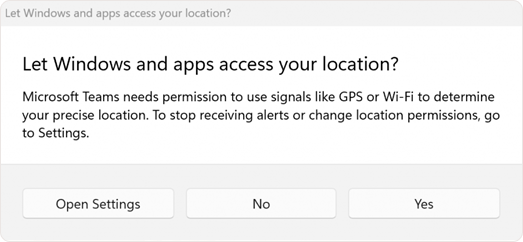
Moreover, the prompt alerts you when an application unexpectedly requests access to location services, allowing you to deny permission, if needed. If you prefer to keep your location private, you can disable Notify when apps request location in the location settings to prevent these prompts from appearing when location services are turned off. Once permission is granted, applications utilizing location or Wi-Fi data are listed under Recent activity on the Location page. Additionally, a location icon will be displayed in the taskbar while the app is active, helping you monitor when and how apps are accessing this information. |
|---|
Effortless account management and notifications in Microsoft Teams
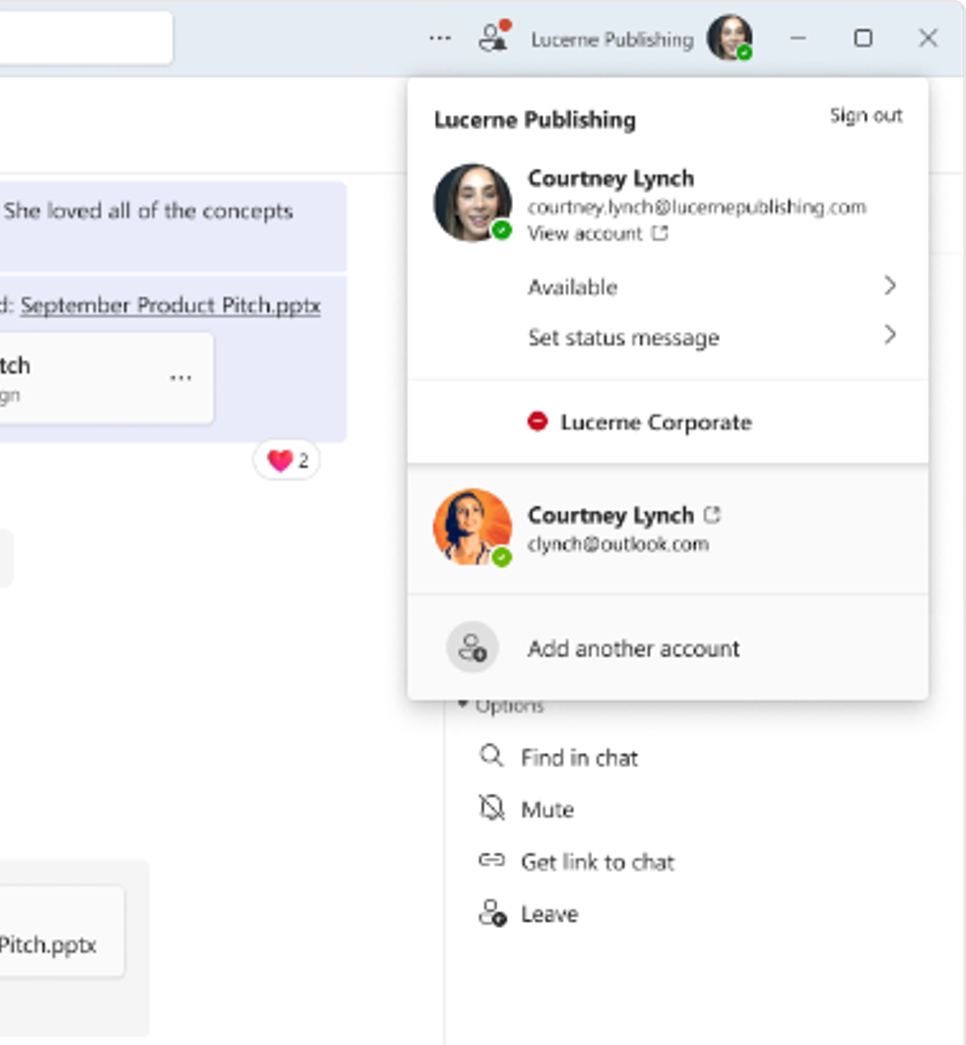
Microsoft Teams now enables seamless switching between personal and work or school accounts, offering a unified experience within a single app. This update simplifies your workflow by allowing you to use one application for all your Teams accounts.
To add or switch accounts, simply click on your profile picture at the top right corner after signing into Teams. You'll find options to launch both personal and work accounts simultaneously, each with distinct icons on the taskbar for easy access.
Notifications have been enhanced to clearly indicate which Teams account they pertain to. Personal account notifications now provide more detailed information, allowing for quick and straightforward actions directly from the notification banner.
Expanding Voice Clarity across devices
Voice Clarity, initially exclusive to Surface devices, is now available to more devices.
Voice Clarity is an innovative feature that elevates your audio experience on Windows through cutting-edge AI technology. Utilizing low complexity AI models, it effectively cancels echo, suppresses background noise, and minimizes reverberation in real-time.
This feature is conveniently enabled by default and is accessible to applications operating in Communications Signal Processing Mode, such as Phone Link and WhatsApp. Remarkably, no additional hardware is necessary to benefit from Voice Clarity, as it is compatible with both x64 and Arm64 CPUs.
Applications leveraging Communications Signal Processing Mode will automatically integrate Voice Clarity without requiring any modifications, ensuring seamless operation when OEM devices lack Communications Mode processing. This extends to PC games utilizing Communications Signal Processing Mode for online interactions, enhancing the gaming experience with clearer communication.

Sudo for Windows: elevate the Windows command-line efficiency

|
Windows now offers the sudo command, an addition that brings a familiar elevation method to the command-line interface. Configuring the sudo command is simple: open Settings > System > For developers and switch on the sudo command. You can then select your preferred mode of operation, whether it's in a new window, with input disabled, or inline, tailoring it to your specific needs for an efficient command-line experience. To learn more, see the Sudo for Windows documentation. |
|---|
Remote Desktop: enhanced connectivity and accessibility

|
The Remote Desktop feature offers a more integrated connection bar for your remote sessions, with a refreshed light/dark mode design that aligns with the Windows 11 design principles. Remote Desktop Connection (mstsc.exe) now adapts to your text scaling preferences set under Settings > Accessibility > Text Size, ensuring readability across a range of visual needs. For instances where text scaling is substantially increased, a scrollbar will appear to accommodate the larger text. Additionally, Remote Desktop Connection now supports zoom options of 350, 400, 450, and 500%, providing greater flexibility and clarity for your remote work requirements. These updates enhance the overall remote desktop experience, making it more accessible and user-friendly. |
|---|
Additional changes and improvements
Updated Windows setup experience
The Windows setup experience is refreshed with a clean and modern design. During setup (OOBE), when you need to connect to a network and there's no Wi-Fi drivers, you'll be given an option to press an Install Drivers button to install drivers you have previously downloaded.
Lock screen
Now, along with weather updates, Windows spotlight can display sports scores, traffic conditions, and finance news right on your lock screen! Stay informed at a glance. To turn on this feature, go to Settings > Personalization > Lock screen.
Start menu
- The Start menu has a new account manager. When you use a Microsoft account to sign in to Windows, you'll get a glance at your account benefits. This feature also makes it easy to manage your account settings
- You can drag apps from the pinned section of the menu and pin them to the taskbar
System tray
- Consistent clock display: hovering over the date and time in the system tray will now consistently display a clock, even with a single clock setup
- Charging notification update: the notification text for detecting a slow charger has been refined for clarity
Settings
- Easily manage all your PCs and Xbox consoles from a new page in Settings > Accounts > Linked devices. This feature is available on Home and Pro editions when you sign in with your Microsoft account
- A convenient Add now button in available Settings > Accounts. Use it to quickly add a recovery email address to your Microsoft account, ensuring you never lose access. This option appears when you sign in with your Microsoft account
- Discover new games with the Game Pass recommendation card, now on the Settings home page. This feature is available on Home and Pro editions for users who actively play games on their PC
- Wi-Fi password accessibility: the Wi-Fi password is now more accessible at the top of its properties page under Settings > Network & Internet > Wi-Fi
- Configure a Default Location which is used when precise signals like GPS aren't available. Find the new experience in Settings > Privacy & security > Location > Default location> Set default
- Print job management: pause and resume print jobs directly from the print queue, allowing for convenient printer maintenance
- Printer renaming: easily rename your printer in the Bluetooth & devices > Printers & scanners settings
- The Storage Spaces interface has been revamped for intuitive management, including clearer status indicators and links under Settings > System > Storage > Storage Spaces
- Hearing aids support: manage Bluetooth LE audio capable hearing aids with ease under Settings > Accessibility > Hearing devices
Audio mic test utility
Windows now offers a new audio mic test utility that allows users to test and compare audio quality in Default and Communication modes. Located in the microphone properties under Settings > System > Sound, this utility enables you to record and listen to audio in both modes, providing a clear comparison of the audio processing modes available for Windows applications. This feature is particularly useful for evaluating the special audio effects included in some audio drivers for communication purposes. By toggling between modes, you can experience firsthand how your microphone's audio is captured and processed differently by communication and non-communication applications. It's a great tool for testing, but it's worth noting that it won't change your audio settings - it's just for comparison. This utility also offers the opportunity to test the Voice Clarity feature, enhancing the audio experience on Windows.
Graphics
- Dynamic Refresh Rate can now be enabled via a toggle. After enablement, Windows dynamically adjusts the refresh rate up to the selected rate to help saving power
- Improved refresh rate logic, allowing different refresh rates on different monitors, depending on the refresh rate for each monitor and content shown on the screen
- While a Dynamic Refresh Rate (DRR) is selected and Battery saver is also enabled, Windows remains at the lower refresh rate and doesn't switch to the higher rate until after Battery saver is disabled
- New options are available for tuning intensity and color boost to the color filters. To do so, open Settings > Accessibility > Color Filters
- A new Color management settings page located under Settings > System > Display > Color management. From this page, you can add or remove color profiles, set default color profiles for the connected displays and configure auto-color management
Bluetooth
Improved Bluetooth device discovery: by default, the system will now scan for all types of devices but only display common device types. When an uncommon device is detected during scanning, users will be presented with a Show all devices option, allowing them to view and connect to less common Bluetooth devices if needed. In environments with many nearby Bluetooth devices, this makes it easier for users to find the device they are trying to connect to.
Windows Backup
Windows can now back up your sound settings, including your sound scheme! Just turn on Remember my preferences and check the boxes for Personalization and Other Windows settings. You can find these options in Settings > Accounts > Windows backup. Use the Windows Backup app to restore these settings on a new device effortlessly.
Security
New and enhanced protection features have been integrated for work and school environments to bolster security, including:
- BitLocker: the prerequisites of DMA and HSTI/Modern Standby are removed. As a result, more devices are eligible for automatic and manual device encryption
- Rust in the Windows kernel: a robust programming language designed to enhance system security and performance
- Windows protected print mode: a safeguard for your print jobs, ensuring confidentiality and integrity
- Personal Data Encryption (PDE) for folders: encrypt your sensitive data at the folder level for an added layer of security
- SHA-3 support: the latest in cryptographic hash functions, providing stronger security for data integrity
- Local Security Authority (LSA) protection enablement on upgrade: automatic reinforcement of security during system upgrades
- Server Message Block (SMB) protocol changes: updates to the SMB protocol to enhance security and performance
- Windows Local Administrator Password Solution (LAPS) changes: improved management and security of local administrator passwords
- Disablement of remote Mailslot protocol: phased out outdated protocols to reduce vulnerabilities
For a deep dive into these updates, the documentation for IT professionals offers a comprehensive overview.
Task Manager
- DDR speed units: the units for DDR speed have been updated from MHz to MT/s for more accurate readings
- Faster process handling: Task Manager now releases process handles more quickly when stopping a process
- Improved reliability and performance
- Accessibility improvements that include keyboard focus for easier navigation, tab key navigation, text scaling, screen reader support, high contrast heatmaps, and easier resizing
Registry Editor
The Registry Editor now supports limiting a search to the currently selected key and its descendants.
Narrator
Scan mode now responds quicker, making it easier to navigate and read large documents, especially in Microsoft Edge. To use scan mode, first turn on Narrator (Windows logo key + Ctrl + Enter). Then, activate scan mode by pressing Caps lock + Spacebar during your Narrator session.
Get Help
Get Help now offers enhanced network diagnostics to assist you in getting back online. You can select the specific network interface you want to troubleshoot, and the app provides advanced diagnostics for driver and other hardware issues.
Windows share
- No more worries about accidentally closing the Windows share window by clicking outside of it. Now, you can only close it by selecting the close button at the upper-right corner
- Easily generate QR codes for webpage URLs and cloud files directly from the Windows share window. Just select the share button in the Microsoft Edge toolbar and choose Windows share options to share across your devices
- You can now send emails to yourself from the Windows share window. The emails will be sent to the address associated with your Microsoft account
- Directly share content to specific Microsoft Teams channels and group chats from the Windows share window. Just sign in using your work or school account
- A new Copy button in the Windows share window lets you quickly copy files
- Share content to your Android device from the Windows share window. Pair your Android device with your Windows PC using the Link to Windows app on your Android device and Phone Link on your PC
Input
- New German Keyboard layouts: introducing two new keyboard layouts, German Extended (E1) and (E2), compliant with the latest standards, enabling typing for a wide range of characters and languages, including all Latin-based EU languages, Greek, IPA, and more
- Colemak Keyboard layout addition: the Colemak keyboard layout is now available, offering an alternative for users of Latin-script alphabet-based languages
- New Hebrew keyboard layout: a new standard Hebrew keyboard layout (Standard, 2018) has been added to accommodate modern typing needs
To enable one of these layouts, go to Settings > Time & language > Language & region.
Emoji
This update adds support for Emoji 15.1.
The Windows 10 2022 Update (Windows 10, version 22H2) delivers a scoped set of improvements in the areas of productivity and management.