

Click your cursor in the table so that the table move handle appears outside the upper left corner, click the table move handle and press the Backspace key.
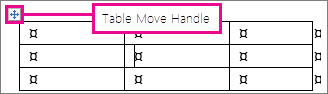
If the table move handle doesn’t appear, the document might not be in Print Layout view. To switch to Print Layout view, select the Print Layout button at the bottom right of the Word window next to the Zoom slider.

For information on deleting only part of the table, see Delete a cell, column, or row in a table.
Delete the contents of the table
To delete the information that’s inside a table, select that part of the table, and then press the Delete key. The rows and columns remain along with any formatting, but all the content disappears.