

Lorsque vous supprimez un élément d’une bibliothèque de documents ou d’une liste SharePoint, il n’est pas immédiatement supprimé de SharePoint. Les éléments supprimés sont placés dans la Corbeille du site pendant un certain temps. Pendant ce temps, vous pouvez restaurer les éléments que vous avez supprimés à leur emplacement d’origine, ou les supprimer pour libérer de l’espace de stockage.
Important
La Corbeille SharePoint est différente de la Corbeille de Windows. Pour récupérer des fichiers locaux supprimés de votre bureau ou de vos applications, utilisez d’abord la Corbeille Windows. Pour placer la Corbeille Windows sur votre bureau, voir Afficher ou masquer la Corbeille.
Remarque
Si vous recherchez la corbeille pour OneDrive, accédez à votre site OneDrive et sélectionnez Corbeille dans le volet gauche.
Pour plus d’informations sur la restauration des éléments dans la Corbeille du site, voir Restaurer des éléments dans la Corbeille d’un site SharePoint.
Supprimer un élément de la corbeille du site
Pour supprimer des éléments de la corbeille du site SharePoint
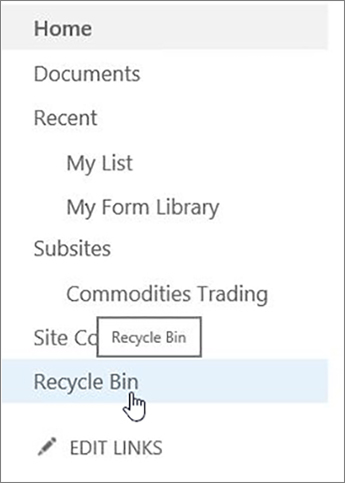
Cliquez sur Corbeille dans la barre de lancement rapide à gauche de l’écran.
Si vous ne voyez pas la Corbeille dans la barre de lancement rapide, procédez comme suit :Cliquez sur le bouton Paramètres d’Office
 puis sur Contenu du site.
L’option Corbeille se trouve dans la partie supérieure droite de la page Contenu du site .

Dans la page Corbeille , cliquez sur la zone à gauche des éléments ou fichiers à supprimer ou à restaurer.
Cliquez sur Supprimer pour supprimer les fichiers sélectionnés.

Remarque
Si vous ne voyez pas l’élément que vous recherchez, il est possible qu’il ait déjà été supprimé et déplacé vers la Corbeille de la collection de sites. Ou il peut avoir dépassé la limite de temps de conservation (93 jours) et déjà été supprimé définitivement.
Pour supprimer tous les éléments de la corbeille du site SharePoint
Cliquez sur Corbeille dans la barre de lancement rapide à gauche de l’écran.
Si vous ne voyez pas la Corbeille dans la barre de lancement rapide, procédez comme suit :Cliquez sur le bouton Paramètres d’Office
puis sur Contenu du site.L’option Corbeille se trouve dans la partie supérieure droite de la page Contenu du site .
Sur la page Corbeille, cliquez sur Vider la corbeille
 pour supprimer tous les éléments.
Si la Corbeille vide n’est pas visible, veillez à désélectionner tous les éléments de la corbeille.


Puis-je récupérer les éléments que j’ai supprimés de la corbeille du site SharePoint ?
Lorsque vous supprimez un élément d’une corbeille de site, il va automatiquement dans la Corbeille Second-Stage ou Collection de sites, où il reste pendant une période définie jusqu’à ce qu’il soit définitivement supprimé de SharePoint. Si vous êtes administrateur de collection de sites, vous pouvez restaurer des éléments à partir de la Corbeille de collections de sites. Pour plus d’informations, voir Restaurer des éléments supprimés de la corbeille de collections de sites.
N’hésitez pas à nous laisser un commentaire
Cet article vous a-t-il été utile ? Si c’est le cas, faites-le nous savoir en bas de cette page. Dans le cas contraire, indiquez-nous quels éléments étaient imprécis ou absents. Pensez à indiquer votre version de SharePoint, votre système d’exploitation et votre navigateur. Nous utiliserons vos commentaires pour vérifier les étapes, corriger les erreurs et mettre à jour cet article.