The Indicators field shows symbols that give you a heads-up about different aspects of each task or resource.
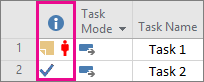
Misc
| Icon |
Description |

|
Indicators column header. |

|
The task, resource, engagement, or assignment has a note attached to it. |

|
The task, resource, or assignment has a hyperlink associated with it. |
Tasks
| Icon |
Description |

|
The task is a recurring task. |

|
The task is complete. |

|
The task is an inserted project. |

|
The task is an inserted project that is read-only. |

|
The task has a calendar applied to it. |

|
The task has non-intersecting task and resource calendars. |

|
The task finishes on a date that is later than its deadline date. |
Constraints
| Icon |
Description |

|
The task has an inflexible constraint, such as the following:
- Must Finish On
- Must Start On
|

|
The task has a moderately flexible constraint, such as the following:
- Finish No Earlier Than
- Finish No Later Than
- Start No Earlier Than
- Start No Later Than
|

|
The task has not been scheduled or completed within the constraint's time frame. |
Deliverables and dependencies
| Icon |
Description |

|
The task has a deliverable associated with it that another project depends on for its completion. |

|
The task has an external dependency on a task in another project. |
Resources
| Icon |
Description |

|
Resource is overallocated and needs leveling. |

|
Resource is local to the project, and requires approval for assignments. |

|
Resource is generic. |

|
There is no engagement covering the resource assignment. |

|
An engagement is created, but not yet submitted, or not yet accepted. |

|
A new resource has been added to your project because of an engagement. |

|
The engagement has been edited and needs to be resubmitted for approval. |
Contour
| Icon |
Description |

|
The work of the assignment is distributed using a back-loaded contour. |

|
The work of the assignment is distributed using a bell contour. |

|
The work of the assignment is distributed using a double-peak contour. |

|
The work of the assignment is distributed using an early-peak contour. |

|
The work of the assignment is distributed using an edited contour. |

|
The work of the assignment is distributed using a front-loaded contour. |

|
The work of the assignment is distributed using a late-peak contour. |

|
The work of the assignment is distributed using a turtle contour. |
