
Lists in Teams offers a special formatting option for choice columns: You can format the "pills" that surround each choice so that the choice names provide additional info, are easier to read, or just look better.
Note
This feature is not currently available on mobile.
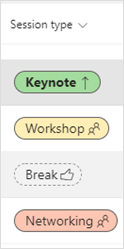
For example, here is a choice column with pill formatting for session types at a conference:
Go to the list containing the column you want to format.
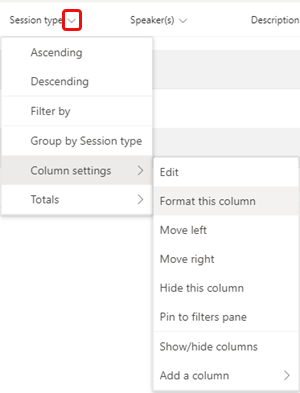
In a list view (as opposed to a gallery view) select the down arrow next to the column name > Column settings > Format this column.
Under Choice pills select Edit styles, and then select the edit icon
 to the right of a choice name.
Make your choices on the color screen and in More styles.
Select Save when you're done.
Want to know more?
Format a column to change how it looks
For IT admins
Manage the Lists app for your organization in Microsoft Teams