
- Select the folder you want to add to Favorites.
- Press Ctrl + Click.
- Select Add to Favorites.

The Favorites folder now appears at the top of your folder list in the sidebar.
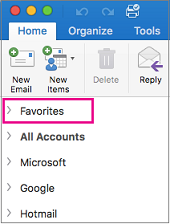
The Favorites folder now appears at the top of your folder list in the sidebar.
