Ähnlich, wie Sie Ordner zum Organisieren Ihrer Dateien verwenden, können Sie Ihre Folien mithilfe von Abschnitten in sinnvollen Gruppen organisieren.
Hinzufügen eines Abschnitts
- Klicken Sie mit der rechten Maustaste zwischen die Folien, und wählen Sie Abschnitt hinzufügen aus.
Im Miniaturansichtenbereich wird ein Abschnitt ohne Titel hinzugefügt, und das Dialogfeld Abschnitt umbenennen wird geöffnet.
- Geben Sie im Feld Abschnittname einen Namen ein.
- Wählen Sie Umbenennen aus.
- Um einen Abschnitt zu reduzieren, klicken Sie auf das Dreieck neben dem Abschnittsnamen. Die Zahl hinter dem Abschnittsnamen zeigt die Anzahl der Folien in diesem Abschnitt.
Verschieben oder Löschen eines Abschnitts
Wählen SieFoliensortierer anzeigen> aus.
- Um einen Abschnitt zu verschieben, ziehen Sie den Abschnittstitel an die gewünschte Position, z. B. verschieben Sie den dritten Abschnitt vor den ersten Abschnitt.
- Um einen Abschnitt zu löschen, klicken Sie mit der rechten Maustaste, und wählen Sie Löschen aus.
Ähnlich, wie Sie Ordner zum Organisieren Ihrer Dateien verwenden, können Sie Ihre Folien mithilfe von Abschnitten in sinnvollen Gruppen organisieren.
Sie können jedem Kollegen einen Abschnitt zuweisen, damit der Folienbesitz während der Zusammenarbeit ganz klar ist. Und wenn Sie mit einem leeren Blatt beginnen, können Sie Abschnitte verwenden, um Ihre Präsentation zu umreißen.
Hinzufügen eines Abschnitts
- Klicken Sie in der Normalansicht im Miniaturbereich auf die Folie, die zur ersten Folie des Abschnitts werden soll.
- Klicken Sie auf der Registerkarte Start auf die Schaltfläche Abschnitt
 und klicken Sie dann auf Abschnitt hinzufügen.
- Geben Sie im Feld Abschnittsname einen Namen für den Abschnitt ein.
- Um weitere Abschnitte hinzuzufügen, wählen Sie eine neue Anfangsfolie für den neuen Abschnitt aus, und wiederholen Sie die Schritte 2 und 3.
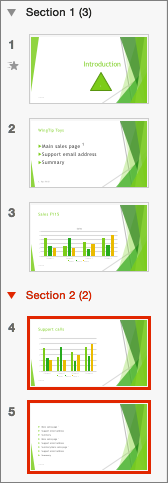
Die Namen, die Sie eingeben, werden als Überschriften über jedem Abschnitt angezeigt, gefolgt von der Anzahl der Folien in jedem Abschnitt in Klammern.
Tipp
Klicken Sie auf die Pfeile neben den Abschnittsnamen, um Abschnitte zu reduzieren oder zu erweitern.
Ändern der Reihenfolge von Abschnitten
- Ziehen Sie den Abschnittstitel in der Normal- oder Foliensortierungsansicht an die gewünschte Position – verschieben Sie z. B. den dritten Abschnitt vor den ersten Abschnitt.
Ändern des Namens eines Abschnitts
- Doppelklicken Sie in der Normal- oder Foliensortierungsansicht auf den Namen des Abschnitts, und geben Sie einen neuen Namen in das Feld Abschnittsname ein.
Um Abschnitte in PowerPoint für das Web wechseln Sie zur Foliensortieransicht, indem Sie auf die Schaltfläche Foliensortierer klicken  auf der status leiste am unteren Rand des Fensters. Wählen Sie in der Foliensortierungsansicht die erste Folie im neuen Abschnitt aus, klicken Sie mit der rechten Maustaste darauf, und wählen Sie Abschnitt hinzufügen aus. Weisen Sie Ihrem Abschnitt einen Namen zu, und drücken Sie dann die EINGABETASTE.
Wenn Sie einen Abschnitt umbenennen oder entfernen möchten, markieren Sie ihn, klicken Sie mit der rechten Maustaste darauf, und wählen Sie das gewünschte Element aus dem Kontextmenü aus.
