
Monthly VAT or GST invoices can be downloaded from the Skype Manager admin dashboard for specific allocations made. You can download your VAT or GST invoice for a given month on the 5th of the next month; invoices will be available for six months.
You can learn more about how Skype charges VAT or GST here .
VAT or GST invoices are available to download for admins in the following countries:
- Bulgaria
- Cyprus
- Denmark
- Estonia
- Hungary
- Italy
- Latvia
- Lithuania
- Malta
- Portugal
- Romania
- Slovenia
- Spain
- Switzerland
We do not charge VAT or GST when you buy or allocate Skype Credit, so these transactions are not reflected on monthly VAT/GST invoices. Allocations of subscriptions or Skype Numbers are charged VAT or GST, so you will see these transactions recorded on monthly VAT/GST invoices.
Your members’ transactions (Skype Credit usage for calls, SMS or Wi-Fi as well as purchases made with allocated Skype Credit) will incur VAT or GST if the registered billing address of the personal linked account is in a country where VAT or GST is applicable. Monthly VAT invoices for members’ transactions are available in certain countries. Learn more .
Other Skype Manager reports are available on the admin dashboard.
To download a monthly VAT/GST invoice:
- Sign in to Skype Manager admin .
- Click Reports from your Skype Manager Dashboard.

- Click Invoices .
- Select the month for which you require a VAT/GST invoice and click Download to save the invoice for the allocation in PDF format.
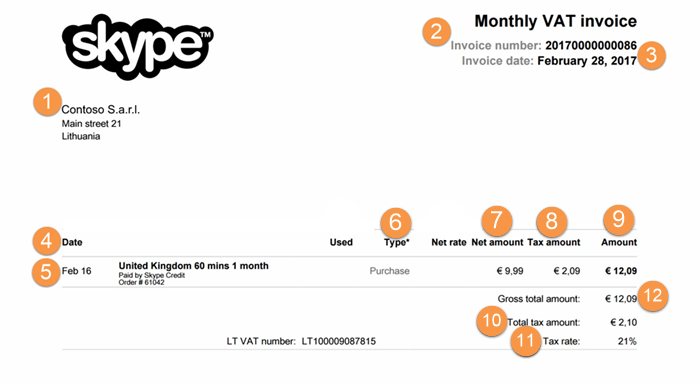
The following is an example of a VAT/GST invoice with each column explained in detail.
<
- Customer Details : your name and address
- Invoice Number: unique invoice identifier
- Invoice Date: usually the last day of the month
- Date : Date of the transaction
- Description : Calls you made or purchases you made
- Type : The type field lets you know if the item is a purchase, a call, or an SMS
- Net Amount: The amount paid for the item
- Tax Amount: The amount of VAT/GST paid for the item
- Amount : Total amount paid including VAT/GST for the item
- Total Tax Amount : total amount of VAT/GST paid for the month
- Tax Rate : the applicable tax rate used to calculate VAT/GST
- Gross Total Amount : total amount and VAT/GST paid
Skype Manager
VAT
VAT invoice
invoice