
When you use an array constant in an array formula, you can give it a name, and then you can reuse it easily.
Select Formulas > Define Name.
In the Name box, enter a name for your constant.
In the Refers to box, enter your constant. For example, you can use ={"January","February","March"} .
The dialog box should look something like this: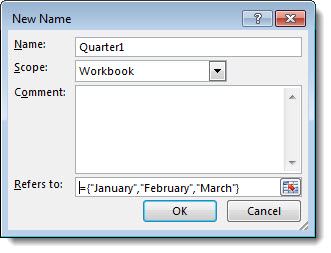
Select OK.
In your worksheet, select the cell where you want to enter the named constant.
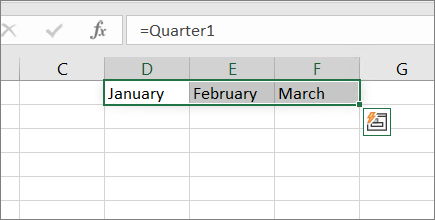
In the formula bar, enter an equal sign and the name of the constant, such as =Quarter1 .
Press Enter. The results spill into neighboring cells as a dynamic array.
Note
If your version of Excel doesn't support dynamic arrays, select the output range, enter the formula, and then press Ctrl+Shift+Enter. For more information, see Naming array constants in Guidelines and examples of array formulas.
Here's what a dynamic array looks like in Excel for Microsoft 365:
Note
- When you use a named constant as an array formula, remember to enter the equal sign. If you don't, Excel interprets the array as a string of text and you see an error message.
- You can use numbers, text, logical values (such as TRUE and FALSE), and error values (such as #N/A) in your constants. You can also use numbers in the integer, decimal, and scientific formats. If you include text, you surround it with double quotes ("").
- Array constants can't contain other arrays, formulas, or functions. In other words, they can contain only text, numbers, or characters separated by commas or semicolons. Excel displays a warning message when you enter a constant such as {1,2,A1:D4} or {1,2,SUM(Q2:Z8)}. Also, numbers can't contain percent signs, dollar signs, commas, or parentheses.
Need more help?
You can always ask an expert in the Excel Tech Community or get support in Communities.
See also
Create an array formula in Excel
Guidelines and examples of array formulas