
By using Amplify from SharePoint, a SharePoint news author can promote their news post through email, Engage posts, Teams channel messages, and additional SharePoint sites as news.
When you amplify your news post, you gain visibility for your communication without needing to copy, paste, or reformat your content for different channels. You also get advanced analytics directly in SharePoint on the existing news analytics page. You can see how audiences engage with, view, and react to the news post in all channels, directly within SharePoint.
Any SharePoint news author with an Amplify license assigned can use this capability.
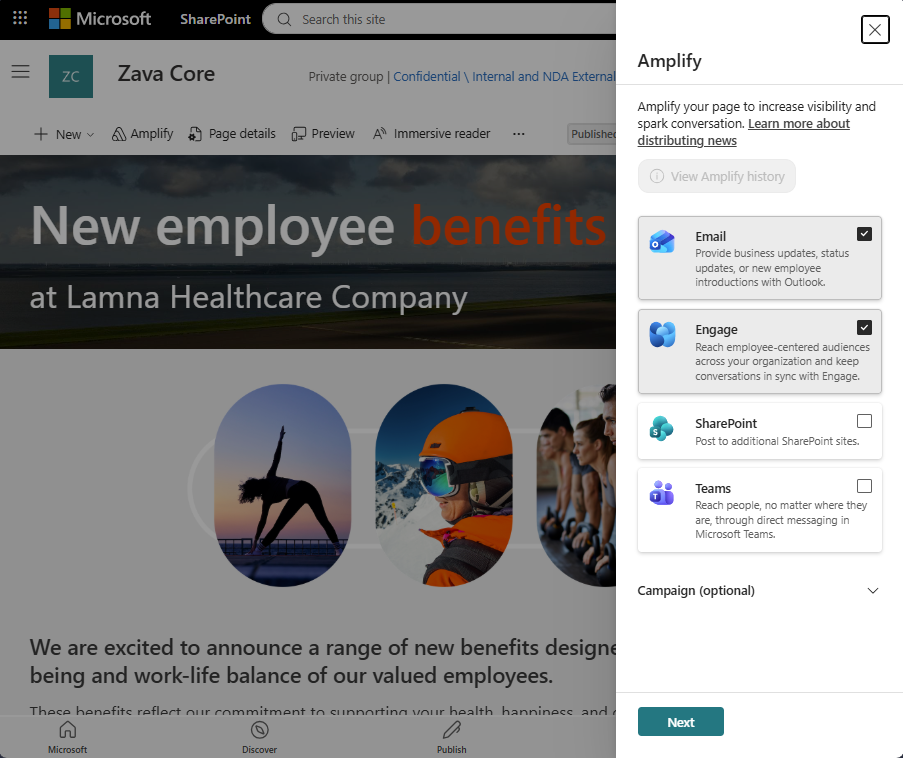
Amplify a news post
- Author and publish a SharePoint news post.
- Select the Amplify button on the toolbar.
- In the Amplify pane, select the distribution channels where you want to share news. Choose from Outlook, Engage, Teams, and other SharePoint sites.
- Select Next to see how your news post will appear in each distribution channel.
- Choose your audiences and message options for each channel where you're amplifying your news post.
- Select Amplify to send your news post to all your chosen distribution channels.
View the analytics
- As someone who can edit a news post, open a news post that was already amplified.
- Select the Analytics button on the toolbar.
- You will see new advanced analytics for your news post, including views by channel, average time spent, promotions, people who clicked a link, and reactions.
Amplify again
You can amplify your news post as many times as you need. It creates a new email or post in your desired distribution channels. If you want to make changes to the content you previously amplified, make your edits directly on the distribution channel endpoints.
Note
You can amplify a news post to Engage only once. To change a news post after you amplify it to Engage, edit and republish it in SharePoint. Your changes sync to the Engage post automatically.
You can also see a history of your amplifications:
- Select the Amplify button on the toolbar.
- Select View Amplify history.
- Change the date dropdown to see different amplification actions and which distribution channels were used.
Who can use Amplify from SharePoint?
Amplify from SharePoint follows the same rules and configurations that organizations set up for sending emails, Engage posts, Teams channel posts, and SharePoint news. Amplify doesn't give a user any extra abilities to send to these locations or to audiences beyond what they can already do manually in each of these applications.
To use Amplify, a user must be allowed to author or edit news in a SharePoint site and have the Amplify license assigned to them. Amplify from SharePoint is a super powered version of the existing Promote capability on SharePoint news, that allows all authors and editors to promote their news into other locations one by one. Amplify gives the extra capability to allow authors to promote to multiple channels all at once and get back the analytics from those channels.