
Nota
Data di pubblicazione originale: 16 marzo 2026
Ultima data di aggiornamento: 12 maggio 2026
ID KB : 5084567
Contenuto dell'articolo
- Panoramica
- Caratteristiche principali
- Informazioni di riferimento sulle impostazioni degli aggiornamenti dei certificati
- Architettura
- Fase 1: rilevamento e monitoraggio dello stato a livello aziendale
- Fase 2: script di orchestrazione dell'aggiornamento del certificato di avvio protetto
- Passaggi della distribuzione E2E (guida di riferimento rapida)
- Risoluzione dei problemi
- Registro delle modifiche
Panoramica
Questa guida descrive il sistema di distribuzione automatizzato per gli aggiornamenti del certificato database di avvio protetto di Windows usando i criteri di gruppo e le ondate di implementazione progressive.
L'automazione dell'implementazione del certificato di avvio protetto è un sistema basato su PowerShell che distribuisce gli aggiornamenti del certificato del database di avvio protetto di Windows ai computer aggiunti a un dominio in modo controllato e graduale.
Caratteristiche principali
| Funzionalità | Descrizione |
|---|---|
| Implementazione graduale | > 1 2 > 4 8>... Dispositivi per bucket |
| Blocco automatico | Sono esclusi i bucket con dispositivi non raggiungibili |
| Distribuzione automatica di oggetti Criteri di gruppo | Il singolo script dell'agente di orchestrazione gestisce tutti gli elementi |
| Esecuzione di attività pianificate | Non sono necessarie richieste interattive |
| Monitoraggio in tempo reale | Visualizzatore di stato con indicatore di stato |
Informazioni di riferimento sulle impostazioni degli aggiornamenti dei certificati
Contenuto della sezione
Criteri di gruppo AvailableUpdatesPolicy
| Posizione del Registro di sistema | HKEY_LOCAL_MACHINE\SYSTEM\CurrentControlSet\Control\SecureBoot |
|---|---|
| Nome | Criterio aggiornamenti disponibili |
| valore | 0x5944 (DWORD) |
Si tratta della chiave controllata dall'oggetto Criteri di gruppo/ADMX che:
- Persiste tra i riavvii
- È impostato da Criteri di gruppo/MDM
- Non causa cicli di tentativi (cancellato tramite ClearRolloutFlags)
- È la chiave corretta per la distribuzione basata su criteri
torna a "Riferimento alle impostazioni degli aggiornamenti dei certificati"
WinCSFlags - Flag di sistema di configurazione di Windows
Gli amministratori di dominio possono in alternativa usare il sistema di configurazione Windows (WinCS) rilasciato con gli aggiornamenti del sistema operativo Windows per distribuire gli aggiornamenti dell'avvio protetto tra client e server Windows aggiunti al dominio. È costituito da un'utilità di interfaccia della riga di comando (CLI) per eseguire query e applicare configurazioni di avvio protetto localmente a un computer.
| Nome funzionalità | Tasto WinCS | Descrizione |
|---|---|---|
| Feature_AllKeysAndBootMgrByWinCS | F33E0C8E002 | L'abilitazione di questa chiave consente l'installazione dei seguenti nuovi certificati di avvio protetto forniti da Microsoft nel dispositivo.
|
Riferimento: API del sistema di configurazione Windows (WinCS) per l'avvio protetto
torna a "Riferimento alle impostazioni degli aggiornamenti dei certificati"
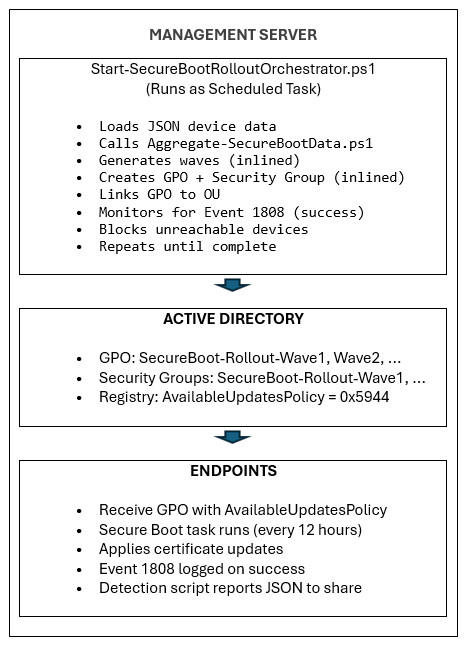
Architettura
Fase 1: rilevamento e monitoraggio dello stato a livello aziendale
Contenuto della sezione
- Script necessari per la Fase 1
- Test locali
- Configurazione della condivisione di rete
- Distribuzione di oggetti Criteri di gruppo
- Riepilogo delle impostazioni dell'oggetto Criteri di gruppo
- Verifica
Script necessari per la Fase 1
Script di esempio per la raccolta dei dati di inventario di avvio protetto
Nota
CONSIGLI I seguenti articoli contenenti gli script di esempio sono stati ritirati. Se è stato installato un aggiornamento di Windows rilasciato a partire dal 12 maggio 2026, gli script di esempio sono disponibili nella cartella %systemroot%\SecureBoot\ExampleRolloutScripts nel dispositivo.
| Nome script di esempio | Scopo | Funziona su |
|---|---|---|
| Script di Detect-SecureBootCertUpdateStatus.ps1 di esempio | Raccoglie i dati sullo stato del dispositivo | Ogni endpoint (tramite oggetto Criteri di gruppo) |
| Script di Aggregate-SecureBootData.ps1 di esempio | Genera report e dashboard | Postazione di amministrazione |
| Script di Deploy-GPO-SecureBootCollection.ps1 di esempio | Automatizza la creazione di oggetti Criteri di gruppo per la raccolta dei dati | Controller di dominio |
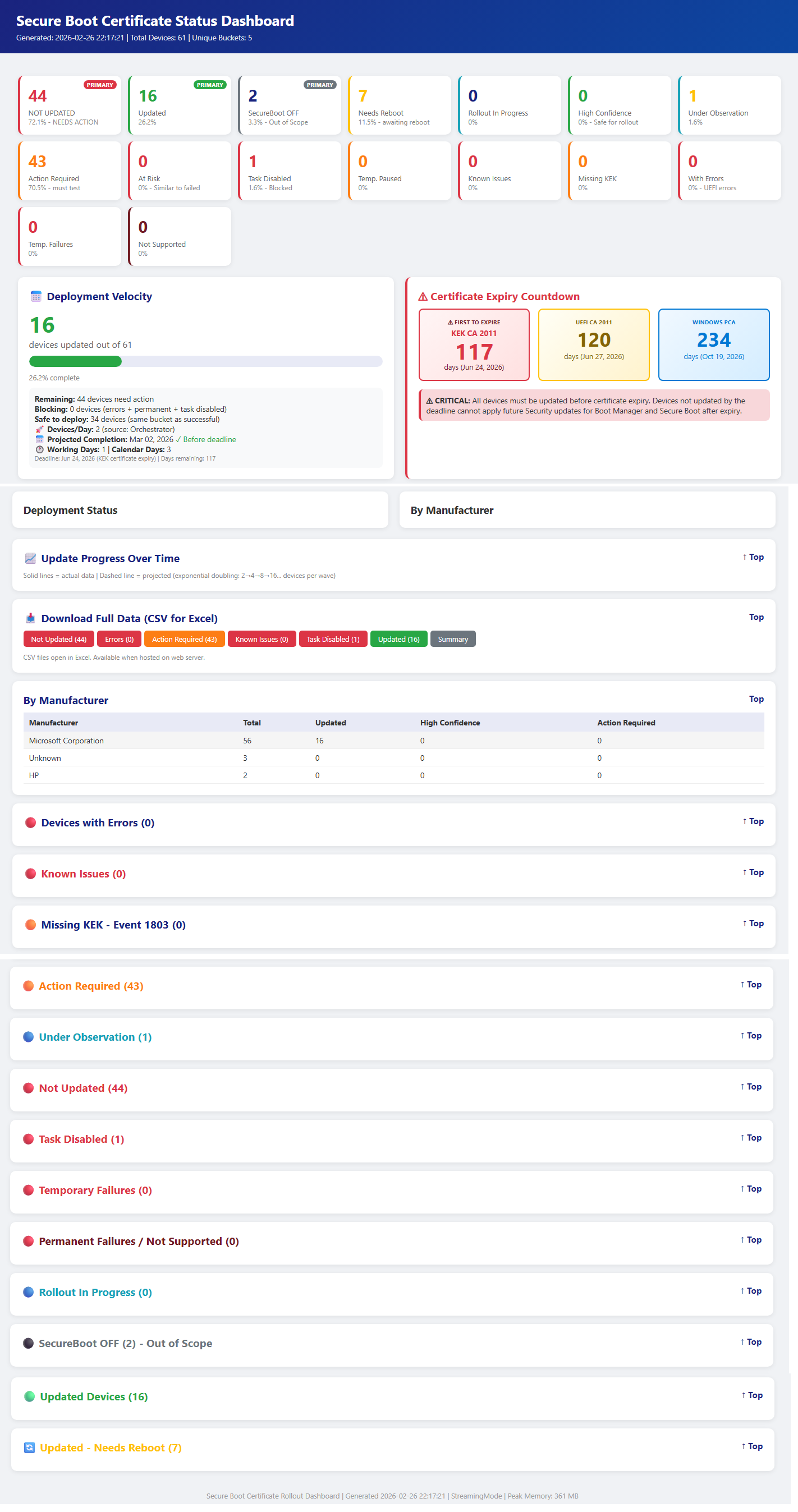
Output di esempio dagli script della fase 1 precedenti
torna a "Fase 1: rilevamento e monitoraggio dello stato a livello aziendale"
Test locali
Prima di eseguire la distribuzione tramite oggetto Criteri di gruppo, testare lo script di raccolta in un singolo computer per verificarne la funzionalità.
Eseguire lo script della raccolta localmente
Aprire un prompt di PowerShell elevato ed eseguire:
Nota
& .\Detect-SecureBootCertUpdateStatus.ps1 -OutputPath "C:\Temp\SecureBootTest"Verifica output JSON
Nota
# View the collected data
Get-Content "C:\Temp\SecureBootTest\*_latest.json" | ConvertFrom-Json | Format-ListCampi chiave da verificare
• SecureBootEnabled : deve essere True o False
• OverallStatus : Complete, ReadyForUpdate, NeedsData o Error
• BucketHash : bucket del dispositivo per la corrispondenza dei dati di affidabilità
• SecureBootTaskEnabled : mostra lo stato dell'attività di aggiornamento dell'avvio protetto.Script di aggregazione test
Nota
# Generate reports from collected data
& ".\Aggregate-SecureBootData.ps1" '
-InputPath "C:\Temp\SecureBootTest" '
-OutputPath "C:\Temp\SecureBootReports"
Aprire il dashboard HTML
Start-Process "C:\Temp\SecureBootReports\SecureBoot_Dashboard_*.html"
torna a "Fase 1: rilevamento e monitoraggio dello stato a livello aziendale"
Configurazione della condivisione di rete
Creare la condivisione di rete
Sul file server, crea una condivisione dedicata per i dati di raccolta:
Nota
# Run on file server as Administrator
$SharePath = "D:\SecureBootCollection"
$ShareName = "SecureBootData$"
Crea cartella
New-Item -ItemType Directory -Percorso $SharePath -Force
Crea condivisione nascosta (il suffisso $ nasconde dall'elenco di navigazione)
New-SmbShare -name $ShareName -path $SharePath '
- Descrizione "Raccolta stato certificato di avvio protetto" '
-FullAccess "Amministratori di dominio" '
-ChangeAccess "Computer di dominio"Configurare le autorizzazioni NTFS
Nota
# Get current ACL
$Acl = Get-Acl $SharePath
Consente agli utenti autenticati di scrivere file
$WriteRule = New-Object System.Security.AccessControl.FileSystemAccessRule(
"Computer di dominio" e
"Modifica",
"ContainerInherit,ObjectInherit",
"Nessuno",
"Consenti"
)
$Acl.AddAccessRule($WriteRule)
Consenti agli amministratori di dominio il controllo completo (per l'aggregazione)
$AdminRule = New-Object System.Security.AccessControl.FileSystemAccessRule(
"Domain Admins",
"FullControl",
"ContainerInherit,ObjectInherit",
"Nessuno",
"Consenti"
)
$Acl.AddAccessRule($AdminRule)
Applicare le autorizzazioni
Set-Acl -Path $SharePath -AclObject $Acl
Verifica l'accesso condiviso.
Nota
# Test from a domain-joined workstation
Test-Path "\\fileserver\SecureBootData$"Deve restituire: true
torna a "Fase 1: rilevamento e monitoraggio dello stato a livello aziendale"
Distribuzione di oggetti Criteri di gruppo
Utilizzare lo script di automazione fornito da un controller di dominio:
Nota
Eseguire nel controller di dominio come amministratore di dominio per l'unità organizzativa interattiva Sezione - Scelta consigliata
Sostituire "Contoso.com", "Contoso" con il nome del dominio
Sostituire FILESERVER con il nome del file server. Lo script mostra l'elenco delle unità organizzative in cui distribuire l'oggetto Criteri di gruppo
.\Deploy-GPO-SecureBootCollection.ps1 '
-NomeDominio: "contoso.com" '
-AutoDetectOU '
-CollectionSharePath "\\FILESERVER\SecureBootData$"
-ScriptSourcePath ".\Detect-SecureBootCertUpdateStatus.ps1" '
-Programma "Giornaliero" '
-ScheduleTime "14:00" '
-RandomDelayHours 4
Questo script eseguirà le seguenti operazioni:
- Crea un nuovo oggetto Criteri di gruppo con il nome specificato
- Copia lo script della raccolta in SYSVOL per la disponibilità elevata
- Configura lo script di avvio del computer
- Collega l'oggetto Criteri di gruppo all'unità organizzativa di destinazione
- Crea facoltativamente un'attività pianificata per la raccolta periodica
La tabella seguente fornisce indicazioni sulla durata del ritardo in base alle dimensioni della flotta.
| Dimensioni della flotta | Intervallo di ritardo |
|---|---|
| 1-10.000 dispositivi | 4 ore |
| Dispositivi 10K-50K | 8 ore |
| 50K+ dispositivi | 12-24 ore |
torna a "Fase 1: rilevamento e monitoraggio dello stato a livello aziendale"
Riepilogo delle impostazioni dell'oggetto Criteri di gruppo
| Impostazione | Percorso | valore |
|---|---|---|
| Script di avvio | Script di configurazione del computer → | Detect-SecureBootCertUpdateStatus.ps1 |
| Parametri degli script | (stesso) | -OutputPath "\\server\share$" |
| Criteri di esecuzione | Modelli di → Amministrazione di configurazione del computer → PowerShell | Consenti firma locale e remota |
| attività pianificata | Preferenze → Configurazione computer → Attività pianificate | Raccolta giornaliera/settimanale |
torna a "Fase 1: rilevamento e monitoraggio dello stato a livello aziendale"
Verifica
Forza l'aggiornamento dell'oggetto Criteri di gruppo nella macchina di provae
Nota
## On a test workstation
gpupdate /force
Riavviare i computer client per eseguire lo script di avvio o verrà attivato nella pianificazione successiva.
Restart-Computer -Force
Verificare la raccolta dei dati
Nota
Controlla se i dati sono stati raccolti (su file server o da qualsiasi computer)
Get-ChildItem "\\fileserver\SecureBootData$" |
Sort-Object LastWriteTime -Descending |
Select-Object -Primi 10
Verifica il contenuto JSON
Get-Content "\\fileserver\SecureBootData$\TESTPC_latest.json" | ConvertFrom-Json
Controllare l'applicazione GPO
Nota
Verificare che l'oggetto Criteri di gruppo sia applicato al computer
Select-String "SecureBoot"
Lo script salva anche una copia locale per la ridondanza:
Get-ChildItem "C:\ProgramData\SecureBootCollection\"
torna a "Fase 1: rilevamento e monitoraggio dello stato a livello aziendale"
Fase 2: Script di orchestrazione dell'aggiornamento del certificato di avvio protetto
Importante
Assicurarsi che la Fase 1 sia completata, inclusa la raccolta dei dati su ciascun endpoint per le condivisioni server remote.
Contenuto della sezione
- Script necessari per la Fase 2
- Start-SecureBootRolloutOrchestrator.ps1
- Deploy-OrchestratorTask.ps1
- Get-SecureBootRolloutStatus.ps1
Script necessari per la Fase 2
Script di esempio per la raccolta dei dati di inventario di avvio protetto
Nota
CONSIGLI I seguenti articoli contenenti gli script di esempio sono stati ritirati. Se è stato installato un aggiornamento di Windows rilasciato a partire dal 12 maggio 2026, gli script di esempio sono disponibili nella cartella %systemroot%\SecureBoot\ExampleRolloutScripts nel dispositivo.
| Nome script di esempio | Scopo | Eseguito in: |
|---|---|---|
| Script di Detect-SecureBootCertUpdateStatus.ps1 di esempio | Raccoglie i dati sullo stato del dispositivo | Ogni endpoint (tramite oggetto Criteri di gruppo) |
| Script di Aggregate-SecureBootData.ps1 di esempio | Genera report e dashboard | Postazione di amministrazione |
| Script di Deploy-GPO-SecureBootCollection.ps1 di esempio | Automatizza la creazione di oggetti Criteri di gruppo per la raccolta dei dati | Controller di dominio |
| Script di Start-SecureBootRolloutOrchestrator.ps1 di esempio | Orchestrazione continua completamente automatizzata con distribuzione automatica di oggetti Criteri di gruppo per l'installazione dei certificati | Postazione di amministrazione |
| Script di Deploy-OrchestratorTask.ps1 di esempio | Distribuisce lo script di Orchestrator come attività pianificata per l'implementazione automatica | Controller di dominio |
| Script di Get-SecureBootRolloutStatus.ps1 di esempio | Visualizzare il certificato di avvio protetto Stato di implementazione da qualsiasi workstation | Amministrazione Workstation |
| Script di Enable-SecureBootUpdateTask.ps1 di esempio | Abilita l'attività di aggiornamento dell'avvio protetto | Nei punti finali in cui l'attività è disabilitata (Esegui una sola volta per abilitare l'attività, se disabilitata) |
torna a "Fase 2: script di orchestrazione dell'aggiornamento del certificato di avvio protetto"
Start-SecureBootRolloutOrchestrator.ps1
Scopo: Orchestrazione continua completamente automatizzata con distribuzione automatica di oggetti Criteri di gruppo.
Effetto
Chiamate Aggregate-SecureBootData.ps1 per lo stato del dispositivo
Genera onde di rollout utilizzando il raddoppio progressivo
Crea un oggetto Criteri di gruppo per la distribuzione dei certificati usando uno dei metodi seguenti
- Avvio protetto Criteri di gruppo AvailableUpdatesPolicy = 0x5944 (impostazione predefinita)
- Metodo WinCS (Parameter –UseWinCS)
Crea gruppi di sicurezza di Active Directory per il targeting
Aggiunge account computer ai gruppi di sicurezza
Configura il filtro di sicurezza dell'oggetto Criteri di gruppo
Collega l'oggetto Criteri di gruppo all'unità organizzativa di destinazione
Monitora i bucket bloccati (dispositivi non raggiungibili)
Si sblocca automaticamente al ripristino dei dispositivi
Utilizzo
Nota
# Interactive (testing)
.\Start-SecureBootRolloutOrchestrator.ps1 '
-AggregationInputPath "\\fileserver\SecureBootData$" '
-ReportBasePath "C:\SecureBootReports" '
-PollIntervalMinutes 30Nota
# Interactive (testing), leveraging WinCS method
.\Start-SecureBootRolloutOrchestrator.ps1 '
-AggregationInputPath "\\fileserver\SecureBootData$" '
-ReportBasePath "C:\SecureBootReports" '
-PollIntervalMinutes 30 '
-UseWinCSComandi di Amministrazione
Nota
# List blocked buckets
.\Start-SecureBootRolloutOrchestrator.ps1 -ReportBasePath "C:\SecureBootReports" -ListBlockedBucketsNota
# Unblock specific bucket
.\Start-SecureBootRolloutOrchestrator.ps1 -ReportBasePath "C:\SecureBootReports" -UnblockBucket "Dell|Latitudine5520|BIOS1.2"Nota
# Unblock all
.\Start-SecureBootRolloutOrchestrator.ps1 -ReportBasePath "C:\SecureBootReports" -UnblockAllParametri
Parametro Impostazione predefinita Descrizione AggregationInputPath Obbligatorio Percorso UNC ai file JSON dell'endpoint ReportBasePath Obbligatorio Percorso locale per report e stato TargetOU Radice del dominio UO per collegare gli oggetti Criteri di gruppo WavePrefix SecureBoot-Rollout Prefisso denominazione gruppo/oggetto Criteri di gruppo/ MaxWaitHours 72 Ore prima di verificare la raggiungibilità del dispositivo PollIntervalMinutes 1440 Minuti tra i controlli dello stato DryRun FALSE Mostra cosa succederebbe senza modifiche Nota
Nota su PollIntervalMinutes: Quando si esegue direttamente l'agente di orchestrazione, il valore predefinito è 1440 minuti (24 ore). Durante la distribuzione tramite Deploy-OrchestratorTask.ps1, il tempo predefinito è 30 minuti. Lo script di distribuzione passa il proprio valore predefinito all'agente di orchestrazione. Usare 30 minuti per l'implementazione attiva, 1440 per il monitoraggio di manutenzione.
Parametri facoltativi
Parametro Impostazione predefinita Descrizione UseWinCS FALSE Usare il metodo WinCS anziché l'oggetto Criteri di gruppo AvailableUpdatesPolicy WinCSKey F33E0C8E002 Chiave WinCS per la configurazione di avvio protetto AllowListPath (nessuno) Percorso del file con nomi host da CONSENTIRE per l'implementazione mirata/pilota. Supporta .txt o .csv. AllowADGroup (nessuno) Gruppo di sicurezza AD di account computer da CONSENTI. Esempio: "SecureBoot-pilot-computers" ExclusionListPath (nessuno) Percorso del file con nomi host da escludere dall'implementazione (dispositivi VIP/esecutivi) ExcludeADGroup (nessuno) Gruppo di sicurezza di Active Directory di account computer da escludere. Esempio: "Computer VIP" ListBlockedBuckets FALSE Visualizzare i bucket di dispositivi attualmente bloccati UnblockBucket (nessuno) Sbloccare un contenitore specifico. Formato: "Produttore|Modello|BIOS" UnblockAll FALSE Sbloccare tutti i bucket di dispositivi bloccati
torna a "Fase 2: script di orchestrazione dell'aggiornamento del certificato di avvio protetto"
Deploy-OrchestratorTask.ps1
Scopo: Distribuisce l'agente di orchestrazione come attività pianificata di Windows.
Vantaggi
- Nessun prompt di sicurezza di PowerShell (ExecutionPolicy Bypass)
- Esecuzione in background continuo
- Non è necessaria alcuna interazione con l'utente
- Sopravvive ai riavvii
Utilizzo
Distribuire con un account del servizio di dominio (scelta consigliata)
Usare i criteri di gruppo AvailableUpdates (metodo predefinito)
Nota
.\Deploy-OrchestratorTask.ps1 '
-AggregationInputPath "\\server\SecureBootData$" '
-ReportBasePath "C:\SecureBootReports" '
-ServiceAccount "DOMAIN\svc_secureboot"Usa il metodo WinCS
Nota
.\Deploy-OrchestratorTask.ps1 '
-AggregationInputPath "\\server\SecureBootData$" '
-ReportBasePath "C:\SecureBootReports" '
-ServiceAccount "DOMAIN\svc_secureboot" - UseWinCS
Distribuire con account SYSTEM
Usare i criteri di gruppo AvailableUpdates (metodo predefinito)
Nota
.\Deploy-OrchestratorTask.ps1 '
-AggregationInputPath "\\server\SecureBootData$" '
-ReportBasePath "C:\SecureBootReports"Usare WinCS method.\Deploy-OrchestratorTask.ps1
Nota
-AggregationInputPath "\\server\SecureBootData$" '
-ReportBasePath "C:\SecureBootReports" -UseWinCSRequisiti dell'account di servizio
- Amministrazione di dominio (per New-GPO, New-ADGroup, Add-ADGroupMember)
- Accesso in lettura alla condivisione di file JSON
- Accesso in scrittura a ReportBasePath
torna a "Fase 2: script di orchestrazione dell'aggiornamento del certificato di avvio protetto"
Get-SecureBootRolloutStatus.ps1
Scopo: Visualizzare l'avanzamento dell'implementazione da qualsiasi workstation.
Cosa include
- Stato attività pianificata (In esecuzione/Pronta/Arrestata)
- Numero d'onda corrente
- Dispositivi di destinazione vs aggiornati
- Indicatore di stato visivo
- Riepilogo dei bucket bloccati
- Link alla dashboard HTML più recente
Utilizzo
Nota
# Quick status check
.\Get-SecureBootRolloutStatus.ps1 -ReportBasePath "C:\SecureBootReports"Nota
# Continuous monitoring (refreshes every 30 seconds)
.\Get-SecureBootRolloutStatus.ps1 -ReportBasePath "C:\SecureBootReports" - Watch 30Nota
# View blocked buckets
.\Get-SecureBootRolloutStatus.ps1 -ReportBasePath "C:\SecureBootReports" -ShowBlockedNota
# View wave history
.\Get-SecureBootRolloutStatus.ps1 -ReportBasePath "C:\SecureBootReports" -ShowWavesNota
# View recent log
.\Get-SecureBootRolloutStatus.ps1 -ReportBasePath "C:\SecureBootReports" -ShowLogNota
# Open dashboard in browser
.\Get-SecureBootRolloutStatus.ps1 -ReportBasePath "C:\SecureBootReports" -OpenDashboardParametri
Parametro Obbligatorio? Impostazione predefinita Descrizione ReportBasePath Obbligatorio — Percorso locale dei report e dei file di stato ShowLog Dati facoltativi FALSE Visualizzare le voci del log di Orchestrator recenti ShowBlocked Dati facoltativi FALSE Visualizzare i dettagli dei bucket bloccati ShowWaves Dati facoltativi FALSE Visualizza la cronologia delle onde Guardare Dati facoltativi 0 (disabilitato) Intervallo di aggiornamento automatico in secondi. Esempio: - Guarda 30 aggiornamenti ogni 30 secondi. OpenDashboard Dati facoltativi FALSE Aprire il dashboard HTML più recente nel browser predefinito Output di esempio
Nota
==============================================================
STATO DI IMPLEMENTAZIONE DI AVVIO PROTETTO
2026-02-17 19:30:00
======================================================Scheduled Task: RunningROLLOUT PROGRESS
Stato: In corso
Onda corrente: 5
Obiettivo totale: 1250
Totale aggiornato: 847Progress: [█████████████████████░░░░░░░░░░░░░░░░░░░] 67.8%BLOCKED BUCKETS: 2 buckets need attention
Esegui con -ShowBlocked per informazioni dettagliateLATEST DASHBOARD
C:\SecureBootReports\Aggregation_20260217_193000\SecureBoot_Dashboard.html
__________________________________________________________________________________________
torna a "Fase 2: script di orchestrazione dell'aggiornamento del certificato di avvio protetto"
Passaggi della distribuzione E2E (guida di riferimento rapida)
Contenuto della sezione
Fase 1: infrastruttura di rilevamento
Passaggio 1: Creare una condivisione raccolta
Nota
# On file server
$sharePath = "D:\SecureBootData"
New-Item -ItemType Directory -Percorso $sharePath -Force
New-SmbShare -name "SecureBootData$" -percorso $sharePath -FullAccess "Domain Admins" -ChangeAccess "Domain Computers"Nota
# Set NTFS permissions
$acl = Get-Acl $sharePath
$rule = New-Object System.Security.AccessControl.FileSystemAccessRule("Computer di dominio","Modify","Allow")
$acl. AddAccessRule($rule)
Set-Acl $sharePath $aclPassaggio 2: distribuire l'oggetto Criteri di gruppo di rilevamento
Nota
.\Deploy-GPO-SecureBootCollection.ps1 `
-NomeDominio: "contoso.com" '
-OUPath "OU=Workstations,DC=contoso,DC=com" '
-CollectionSharePath "\\server\SecureBootData$"Passaggio 3: Attendere il report degli endpoint (24-48 ore)
Nota
Controllare lo stato della raccolta
(Get-ChildItem "\\server\SecureBootData$" -Filter "*.json"). Conteggio
torna a "Procedura di distribuzione E2E (Guida di riferimento rapida)"
Fase 2: implementazione orchestrata
Passaggio 4: Verifica dei prerequisiti
- Rilevamento GPO distribuito (passaggio 2)
- Almeno 50+ endpoint che segnalano JSON
- Account di servizio con diritti di Amministratore di dominio
- Server di gestione con PowerShell 5.1+
Passaggio 5: Distribuire Orchestrator come attività pianificata
Nota
.\Deploy-OrchestratorTask.ps1 `
-AggregationInputPath "\\server\SecureBootData$" '
-ReportBasePath "C:\SecureBootReports" '
-ServiceAccount "DOMAIN\svc_secureboot"Passaggio 6: monitorare lo stato di avanzamento
Nota
.\Get-SecureBootRolloutStatus.ps1 -ReportBasePath "C:\SecureBootReports"Passaggio 7: Visualizzare il dashboard
Nota
.\Get-SecureBootRolloutStatus.ps1 -ReportBasePath "C:\SecureBootReports" -OpenDashboardFase 8: gestione dei bucket bloccati
Nota
# List blocked
.\Start-SecureBootRolloutOrchestrator.ps1 -ReportBasePath "C:\SecureBootReports" -ListBlockedBucketsNota
# Investigate and unblock
.\Start-SecureBootRolloutOrchestrator.ps1 -ReportBasePath "C:\SecureBootReports" -UnblockBucket "Manufacturer|Modello|BIOS"Passaggio 9: Verificare il completamento
Nota
.\Get-SecureBootRolloutStatus.ps1 -ReportBasePath "C:\SecureBootReports"Lo stato dovrebbe mostrare "Completato"
torna a "Procedura di distribuzione E2E (Guida di riferimento rapida)"
State Files
L'agente di orchestrazione mantiene lo stato in ReportBasePath\RolloutState\:
| File | Descrizione |
|---|---|
| RolloutState.json | Cronologia onde, dispositivi mirati, stato |
| BlockedBuckets.json | Contenitori che richiedono indagini |
| DeviceHistory.json | Rilevamento dispositivi in base al nome host |
| Orchestrator_YYYYMMDD.log | Registri attività giornalieri |
torna a "Procedura di distribuzione E2E (Guida di riferimento rapida)"
Risoluzione dei problemi
Contenuto della sezione
Orchestrator non avanza
Controllare l'attività pianificata
Nota
Get-ScheduledTask -TaskName "SecureBoot-Rollout-Orchestrator"Controllare i log
Nota
Get-Content "C:\SecureBootReports\RolloutState\Orchestrator_*.log" -Tail 50Verifica l'aggiornamento dei dati JSON
Nota
(Get-ChildItem "\\server\SecureBootData$" -Filter "*.json" | Where-Object { $_.LastWriteTime -gt (Get-Date).AddDays(-1) }).Count
torna a "Risoluzione dei problemi"
Contenitori bloccati
Elenco bloccato.
Nota
.\Start-SecureBootRolloutOrchestrator.ps1 -ReportBasePath "C:\SecureBootReports" -ListBlockedBucketsAnalizza la raggiungibilità del dispositivo.
Verifica la presenza di problemi con il firmware.
Sblocca dopo un'indagine.
torna a "Risoluzione dei problemi"
Oggetto Criteri di gruppo non applicabile
Verificare l'esistenza dell'oggetto Criteri di gruppo.
Nota
Get-GPO -Name "SecureBoot-Rollout-Wave*"Verificare il filtro di sicurezza.
Nota
Get-GPPermission -Name "GPO-Name" -AllVerificare che il computer si trovi nel gruppo di sicurezza.
Applicare l'oggetto Criteri di gruppo alla destinazione.
Nota
gpupdate /force
torna a "Risoluzione dei problemi"
Registro delle modifiche
| Modifica data | Descrizione della modifica |
|---|---|
| 12 maggio 2026 | In precedenza, ogni file di script di esempio veniva pubblicato come singoli articoli da cui copiare e incollare lo script. A partire dagli aggiornamenti di Windows rilasciati a partire dal 12 maggio 2026, gli script di esempio si trovano nella cartella %systemroot%\SecureBoot\ExampleRolloutScripts nel dispositivo. |