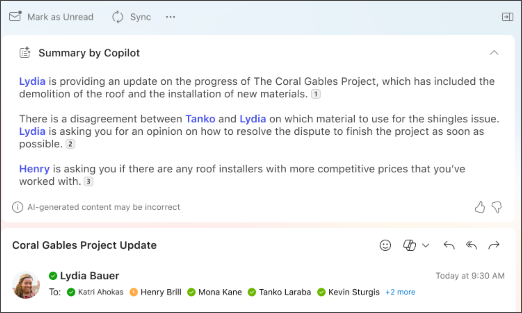
- Klasiskajā Outlook vai jaunajā Outlook izvēlieties sarunu.
- E-pasta pavediena augšdaļā atlasiet Kopsavilkums pēc Copilot (vai var būt Kopsavilkums). Copilot meklēs pavedienā galvenos punktus un izveidos jums kopsavilkumu.
- Kopsavilkums tiks parādīts e-pasta ziņojuma augšdaļā, un tajā var būt numurētas atsauces, kuras atlasot, tiek atvērts atbilstošais e-pasta ziņojums pavedienā.
- Ja izmantojat jauno Outlook un e-pasta ziņojumam ir pielikumi (PDF, PowerPoint vai Word), varat atlasīt Izveidot faila kopsavilkumu. Uzgaidiet, līdz tiks ģenerēti kopsavilkumi, pēc tam pārskatiet tos, lai ātri skatītu nosūtītos ziņojumus.
- Programmā Outlook tīmeklī izvēlieties vēlamo sarunu.
- E-pasta pavediena augšdaļā atlasiet Kopsavilkums pēc Copilot (vai var būt Kopsavilkums). Copilot meklēs pavedienā galvenos punktus un izveidos jums kopsavilkumu.
- Kopsavilkums tiks parādīts e-pasta ziņojuma augšdaļā, un tajā var būt numurētas atsauces, kuras atlasot, tiek atvērts atbilstošais e-pasta ziņojums pavedienā.
- Ja e-pasta ziņojumam ir pielikumi (PDF, PowerPoint vai Word), varat atlasīt Izveidot faila kopsavilkumu. Uzgaidiet, līdz tiks ģenerēti kopsavilkumi, pēc tam pārskatiet tos, lai ātri skatītu nosūtītos ziņojumus.
Piezīme
Microsoft Copilot programmā Outlook ir pieejams tikai jaunākajā Outlook darbam ar Mac versijā. Mantotā Outlook versija netiek atbalstīta. Skatiet Outlook darbam ar Mac.
- Programmā Outlook darbam ar Mac izvēlieties vēlamo sarunu.
-
Atlasiet Izveidot kopsavilkumu lodziņā Kopsavilkums pēc Copilot e-pasta pavediena augšdaļā. Copilot meklēs pavedienā galvenos punktus un izveidos jums kopsavilkumu.
- Kopsavilkums tiks parādīts e-pasta ziņojuma augšdaļā, un tajā var būt numurētas atsauces, kuras atlasot, tiek atvērts atbilstošais e-pasta ziņojums pavedienā.
Piezīme
Mac datorā kopsavilkuma izveides līdzeklis pēc noklusējuma izmantos tā e-pasta ziņojuma valodu, kura kopsavilkums tiek izveidots. Jūs varat mainīt kopsavilkuma valodu atbilstoši Outlook izvēļņu un pogu valodai, taču šīs izmaiņas netiek saglabātas. Pēc Outlook restartēšanas kopsavilkuma izveide atpakaļ būs e-pasta ziņojuma valodā.
Piezīme
Sniegtie attēli ir piemēri darbam ar iOS, bet norādījumi attiecas gan uz iOS, gan Android ierīcēm.
- Lietojumprogrammā Outlook darbam ar iOS vai Outlook darbam ar Android izvēlieties vēlamo sarunu. Rīkjoslā atlasiet Copilot ikonu
 .
.
- Copilot meklēs pavedienā galvenos punktus un izveidos jums kopsavilkumu.
- Kad tas ir paveikts, varat skatīt kopsavilkumu zem e-pasta ziņojuma.
Piezīme
iOS un Android ierīcēs kopsavilkuma izveides līdzeklis pēc noklusējuma izmantos tā e-pasta ziņojuma valodu, kura kopsavilkums tiek izveidots. Jūs varat mainīt kopsavilkuma valodu atbilstoši Outlook izvēļņu un pogu valodai, taču šīs izmaiņas netiek saglabātas. Pēc Outlook restartēšanas kopsavilkuma izveide atpakaļ būs e-pasta ziņojuma valodā.
Papildinformācija
E-pasta ziņojuma melnraksts, izmantojot Copilot programmā Outlook
E-pasta apmācība, izmantojot Copilot programmā Outlook
Kur var iegūt līdzekli Microsoft Copilot?
Microsoft Copilot palīdzība & mācīšanās