
Denne artikkelen beskriver oppdatering KB3114517 for Microsoft Office 2016, som ble utgitt 7. juni 2016. Denne oppdateringen har en forutsetning.
Vær oppmerksom på at oppdateringen i Microsoft Download Center gjelder for den Microsoft Installer (.msi)-baserte versjonen av Office 2016. Den gjelder ikke for Office 2016 Klikk og bruk-versjoner, for eksempel Microsoft Office 365 Home. (Hvordan fastslår man?)
Forbedringer og rettelser.
Denne oppdateringen inneholder følgende løsninger og forbedringer for Power Pivot-tillegget:
- Sletter KPI-ikonsett som ikke støttes, fra Power Pivot.
- Hvis du gir nytt navn til et mål i feltlisten for pivottabellen, gjelder denne endringen for navnet i Power Pivot.
- Løser problemer som oppstår når du bruker alternativet for å lagre passord for tilkoblinger til SQL Server fra Power Pivot.
- Løser problemer som oppstår når du importerer data til Power Pivot fra Analysis Services.
- Aktiverer endringer i datatypen for en kolonne etter at du gir kolonnen nytt navn i Power Pivot.
- Løser problemer som oppstår når du bruker kolonnesortering eller filterkontroll i Power Pivot etter at du har lagt til en tabell i datamodellen.
- Forbedrer støtten for autofullfør DAX-formel for høyre-mot-venstre-språk.
- Løser noen Power Pivot hjelp-koblinger som peker til hjelpeemner på feil språk.
- Løser problemer som kan oppstå når du bruker Power Pivot KPI-ikonsett som ikke støttes.
- Løser problemer som kan oppstå når du bruker kopierings- eller innlimingsoperasjonen i Power Pivot på et mål som inneholder en KPI.
- Løser problemet med visning av feltnavn på høyre-mot-venstre-språk i Power Pivot-diagramvisning etter at du har brukt dra-og-slipp-operasjonen.
- Støtter riktig visualisering basert på datatypen til Power Pivot-kolonnen som er opprettet av Få & transformere-spørringer.
- Løser noen manglende lokalisering av strenger i Power Pivot.
Slik laster du ned og installerer oppdateringen
Microsoft Update
Bruk Microsoft Update til å laste ned og installere oppdateringen automatisk.
Download Center
Denne oppdateringen er også tilgjengelig for manuell nedlasting og installasjon fra Microsoft Download Center.
-
 , laste ned oppdatering KB3114517 for 32-biters versjon av Office 2016
 -
, laste ned, oppdatere KB3114517 for 64-bitersversjonen av Office 2016
Hvis du ikke er sikker på hvilken plattform (32-biters eller 64-biters) du kjører, kan du se Kjører jeg 32-biters eller 64-biters Office? I tillegg kan du se mer informasjon om hvordan du laster ned Microsoft-kundestøttefiler.
Krav om virusskanning
Microsoft skannet denne filen for virus ved hjelp av den nyeste programvaren for virusregistrering som var tilgjengelig på datoen da filen ble lagt inn. Filen lagres på sikkerhetsforbedrede servere som bidrar til å forhindre uautoriserte endringer i den.
Oppdateringsinformasjon
ForutsetningerDu må ha Microsoft Office 2016 installert for å bruke denne oppdateringen.
Informasjon om omstartDu må kanskje starte datamaskinen på nytt når du har installert denne oppdateringen.
Mer informasjon
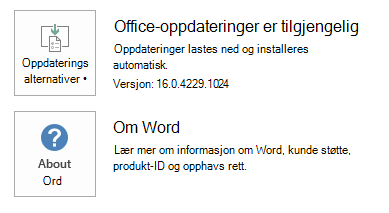
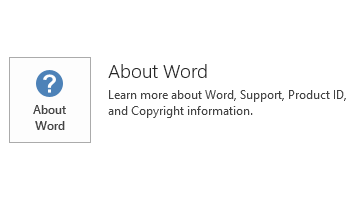
Hvis du vil finne ut om Office-installasjonen er Klikk og bruk- eller MSI-basert, følger du disse trinnene:
- Start et Office 2016-program.
- I Fil-menyen velger du Konto.
- Det vises et element for oppdateringsalternativer for Office 2016 Klikk og bruk-installasjoner. For MSI-baserte installasjoner vises ikke elementet Oppdateringsalternativer .
| Office 2016 Klikk og bruk-installasjon | MSI-basert Office 2016 |
|---|---|
|
|
Slik avinstallerer du denne oppdateringen
Windows 10:
- Gå til Start, skriv inn Vis installerte Oppdateringer i boksen Søk i Windows, og trykk deretter Enter.
- Finn og velg KB3114517 i listen over oppdateringer, og velg deretter Avinstaller.
Windows 8 og Windows 8.1
- Sveip inn fra høyre kant av skjermen, og velg deretter Søk. Hvis du bruker mus, peker du på nedre høyre hjørne av skjermen, og velger deretter Søk.
- Skriv inn Windows Update, velg Windows Update, og velg deretter Installerte Oppdateringer.
- Finn og velg KB3114517 i listen over oppdateringer, og velg deretter Avinstaller.
Windows 7
- Gå til Start, skriv inn Kjør, og velg deretter Kjør.
- Skriv inn Appwiz.cpl, og velg deretter OK.
- Velg Vis installerte oppdateringer.
- Finn og velg KB3114517 i listen over oppdateringer, og velg deretter Avinstaller.
Kilder
Finn ut mer om standardterminologien som brukes til å beskrive Microsoft-programvareoppdateringer. Office System TechCenter inneholder de nyeste administrative oppdateringene og strategiske distribusjonsressursene for alle versjoner av Office.
Filinformasjon
Den globale versjonen av denne oppdateringen har filattributtene (eller nyere filattributter) som er oppført i tabellen nedenfor. Datoene og klokkeslettene for disse filene er oppført i Coordinated Universal Time (UTC). Når du viser filinformasjonen, konverteres den til lokal tid. Hvis du vil finne forskjellen mellom UTC og lokal tid, bruker du Tidssone-fanen i dato- og klokkeslettelementet i Kontrollpanel.
x64
Excelpp-X-None.MSP filinformasjon
| Filidentifikator | Filnavn | Filversjon | Filstørrelse | Dato | Klokkeslett |
|---|---|---|---|---|---|
| Common.dll | Microsoft.analysisservices.common.dll | 11.0.9166.158 | 1,564,864 | 16. mai 2016 | 23:06 |
| Backend.dll | Microsoft.analysisservices.excel.backend.dll | 11.0.9166.158 | 1,775,816 | 16. mai 2016 | 23:06 |
| Connuidlg.dll | Microsoft.data.connectionui.dialog.dll | 8.0.50727.3053 | 409,280 | 16. mai 2016 | 23:06 |
| Connui.dll | Microsoft.data.connectionui.dll | 8.0.50727.3053 | 22,208 | 16. mai 2016 | 23:06 |
| Xladomdc.dll | Microsoft.excel.adomdclient.dll | 11.0.9166.158 | 697,544 | 16. mai 2016 | 23:06 |
| Xlamo.dll | Microsoft.excel.amo.dll | 11.0.9166.158 | 1,582,280 | 16. mai 2016 | 23:06 |
| Exceldm.dll | Microsoft.office.excel.datamodel.dll | 16.0.4387.1000 | 310,984 | 17. mai 2016 | 06:33 |
| Sstring.dll | Microsoft.sqlserver.configuration.sstring.dll | 11.0.9166.158 | 33,472 | 16. mai 2016 | 23:06 |
| Msmdloc.dll | Msmdlocal_xl.dll | 2011.110.9166.158 | 60,132,544 | 17. mai 2016 | 06:33 |
| Xlmsmdsr.rll_1033 | Msmdsrvi_xl.rll | 2011.110.9166.158 | 1,133,248 | 17. mai 2016 | 06:33 |
| Msmgdsrv.dll | Msmgdsrv_xl.dll | 2011.110.9166.158 | 7,867,576 | 17. mai 2016 | 06:33 |
| Msolap10.dll | Msolap110_xl.dll | 2011.110.9166.158 | 9,117,888 | 17. mai 2016 | 06:33 |
| Xmlrw_xl.dll | Xmlrw_xl.dll | 2011.110.9166.158 | 286,912 | 17. mai 2016 | 06:33 |
| Xmlrwbin.dll | Xmlrwbin_xl.dll | 2011.110.9166.158 | 198,328 | 17. mai 2016 | 06:33 |
| Xmsrv_xl.dll | Xmsrv_xl.dll | 2011.110.9166.158 | 25,180,856 | 17. mai 2016 | 06:33 |
x86
Excelpp-X-None.MSP filinformasjon
| Filidentifikator | Filnavn | Filversjon | Filstørrelse | Dato | Klokkeslett |
|---|---|---|---|---|---|
| Common.dll | Microsoft.analysisservices.common.dll | 11.0.9166.158 | 1,564,864 | 16. mai 2016 | 23:05 |
| Backend.dll | Microsoft.analysisservices.excel.backend.dll | 11.0.9166.158 | 1,775,808 | 16. mai 2016 | 23:05 |
| Connuidlg.dll | Microsoft.data.connectionui.dialog.dll | 8.0.50727.3053 | 409,280 | 16. mai 2016 | 23:05 |
| Connui.dll | Microsoft.data.connectionui.dll | 8.0.50727.3053 | 22,208 | 16. mai 2016 | 23:05 |
| Xladomdc.dll | Microsoft.excel.adomdclient.dll | 11.0.9166.158 | 697,536 | 16. mai 2016 | 23:05 |
| Xlamo.dll | Microsoft.excel.amo.dll | 11.0.9166.158 | 1,582,272 | 16. mai 2016 | 23:05 |
| Exceldm.dll | Microsoft.office.excel.datamodel.dll | 16.0.4387.1000 | 310,976 | 17. mai 2016 | 06:27 |
| Sstring.dll | Microsoft.sqlserver.configuration.sstring.dll | 11.0.9166.158 | 33,472 | 16. mai 2016 | 23:05 |
| Msmdloc.dll | Msmdlocal_xl.dll | 2011.110.9166.158 | 41,348,800 | 17. mai 2016 | 06:27 |
| Xlmsmdsr.rll_1033 | Msmdsrvi_xl.rll | 2011.110.9166.158 | 1,133,248 | 17. mai 2016 | 06:26 |
| Msmgdsrv.dll | Msmgdsrv_xl.dll | 2011.110.9166.158 | 7,146,688 | 17. mai 2016 | 06:27 |
| Msolap10.dll | Msolap110_xl.dll | 2011.110.9166.158 | 7,561,400 | 17. mai 2016 | 06:27 |
| Xmlrw_xl.dll | Xmlrw_xl.dll | 2011.110.9166.158 | 244,416 | 17. mai 2016 | 06:27 |
| Xmlrwbin.dll | Xmlrwbin_xl.dll | 2011.110.9166.158 | 170,176 | 17. mai 2016 | 06:27 |
| Xmsrv_xl.dll | Xmsrv_xl.dll | 2011.110.9166.158 | 31,534,272 | 17. mai 2016 | 06:27 |