Instead of typing a text email message to reply with your support for or satisfaction about an email you received, express yourself by clicking the Like button. You can also see who else likes an email message by hovering over the Like button.
Like an email message
In the upper-right corner of an open email message, choose the Thumbs-up icon
 .
.
How to tell when someone likes an email message
When someone likes your (or someone else's) email message, the Thumbs-up icon
appears in the email messages listed in your Inbox. When you open the email message, you'll see the Thumbs-up icon with a number next to it
 , indicating the number of people who like it.
Tip
If you hover over the Thumbs-up icon, you'll see the names of the people who like the message.
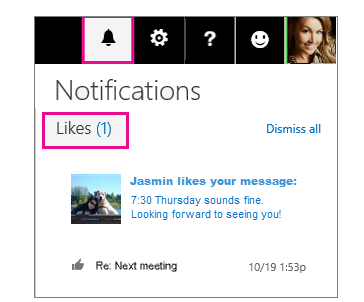
See all email likes in one pane
To see all email likes in one pane, on the navigation bar, in the top right corner of the screen, click the Notification bell
 icon.
icon.