
Safe web search in Dragon Copilot
Safe web search provides timely, evidence‑linked answers when your trusted clinical sources don’t contain the information you need. Results are delivered directly inside Dragon Copilot, so you can stay focused without leaving your workflow. All web‑derived responses are clearly labeled, always making the source of the information transparent.
What makes safe web search "safe"?
Dragon Copilot uses safe web search after it checks your trusted and selected clinical sources. When those sources can't answer your question, you can choose to expand your search by using safe web search. This process ensures you use web content intentionally, transparently, and only when needed.
Clinical and security safeguards
- The system verifies evidence and validates clinical codes for every web source.
- It uses HTTPS only and blocks potentially unsafe HTTP websites.
- It performs SSL certificate checks to exclude websites with invalid or expired certificates.
- It provides provenance assurance by including direct links to verified, up‑to‑date sources in every response, so you can see where the information comes from and review the underlying evidence.
- Safe web search uses Microsoft Bing’s built‑in protection mechanisms to filter out harmful, non‑clinical, restricted, or unauthorized content sources.
PHI protection
- It uses query minimization by sending only a short keyword query - never full patient data or encounter text.
- It removes your user and organization identifiers before the query leaves the system boundary.
- It uses TLS encryption to secure all transmitted traffic.
How safe web search works
You don't need to enable anything. Safe web search is already built into Dragon Copilot AI Chat.
Dictate or type your clinical question in Dragon Copilot AI Chat as you normally would.
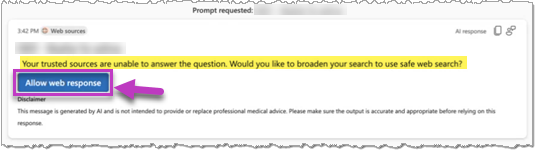
If your trusted or curated sources can't answer, a message appears in the Timeline tab asking if you want to perform a safe web search.
Tip
Verify your trusted source selections in Settings to ensure your Dragon Copilot AI Chat queries and requests use the sources you prefer.
Select Allow web response to perform a safe web search.
Review the response to your safe web search.
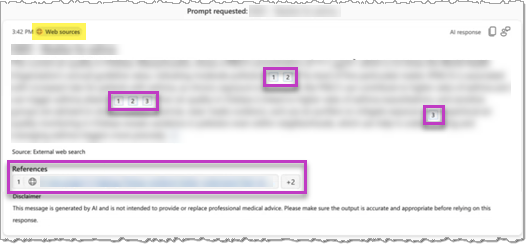
The response clearly indicates it came from Web sources, and it includes reference citations and links. Follow the reference links to validate the content if necessary.