下载免费的预建模板

应用对象
Microsoft 365 专属 Excel Microsoft 365 专属 Word Microsoft 365 专属 PowerPoint Microsoft 365 专属 Access Project Online 桌面客户端 Microsoft 365 专属 Publisher Excel 2024 Word 2024 PowerPoint 2024 Access 2024 Project Standard 2024 Excel 2021 Word 2021 PowerPoint 2021 Access 2021 Project 专业版 2021 Project Standard 2021 Publisher 2021 Excel 2019 Word 2019 PowerPoint 2019 Access 2019 Project Professional 2019 Project Standard 2019 Publisher 2019 Excel 2016 Word 2016 PowerPoint 2016 Access 2016 Project 专业版 2016 Project Standard 2016 Publisher 2016 Visio 专业版 2016 InfoPath 2013

在 Office 应用中,可以轻松访问具有有用且富有创意主题的免费预建模板。 单击“文件>新建”后,这些内容将立即可用 
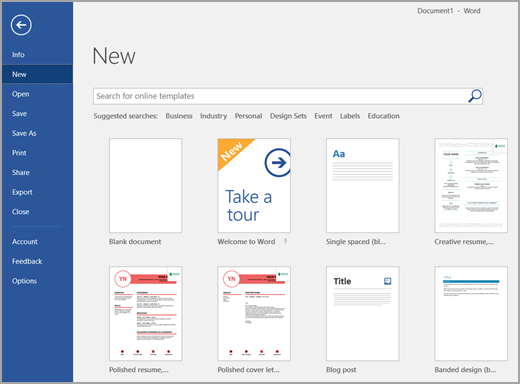
文件 > 新建

日历名片信件卡片小册子时事通讯简历求职信演示文稿社交媒体 等提供模板。 可以“按原样”使用这些模板,并对其进行自定义以满足你的需求。 

选择模板时,将显示一个对话框,其中包含该模板的较大视图。 单击 “创建 ”按钮以下载它。 此时将显示一个新文件,可根据需要进行自定义。 

“创建”按钮

如果打算在 Avery 标签上打印,请参阅使用 Microsoft Word 在 Avery 标签上打印。

提示

还可以在此处浏览大量模板: https://create.microsoft.com