跳转至主内容
Microsoft
支持
支持
支持
主页
Microsoft 365
Office
产品
Microsoft 365
Outlook
Microsoft Teams
OneDrive
Microsoft Copilot
OneNote
Windows
更多信息 ...
设备
Surface
电脑配件
Xbox
PC 游戏
HoloLens
Surface Hub
硬件保修
帐户和计费
资源
社区论坛
Microsoft 365 管理员
开发人员
教育
上报支持欺诈
产品安全
更多
购买 Microsoft 365
所有 Microsoft
Global
Microsoft 365
Azure
Windows
Surface
XBOX
双11专区
企业购
支持
软件
软件
Windows 应用
OneDrive
Outlook
从 Skype 转到 Teams
OneNote
Microsoft Teams
PC 和设备
PC 和设备
购买 XBOX
PC 和平板电脑
配件
娱乐
娱乐
XBOX 与游戏
PC 游戏
企业
企业
Microsoft AI
Microsoft 安全
Azure
Dynamics 365
Microsoft 365 商业版
Microsoft Power Platform
数字主权
开发人员与 IT
开发人员与 IT
Microsoft 开发人员
Microsoft Learn
支持 AI 商城应用
Microsoft 技术社区
Microsoft Marketplace
软件公司
Visual Studio
其他
其他
免费下载与安全性
教育
查看站点地图
搜索
搜索帮助
无结果
取消
登录
使用 Microsoft 登录
登录或创建帐户。
你好,
使用其他帐户。
你有多个帐户
选择要登录的帐户。
如何将 Outlook for Android 日历小组件添加到主屏幕?
应用对象
Outlook for Android
从设备的小组件列表选择“
Outlook for Android 日历
”小组件。
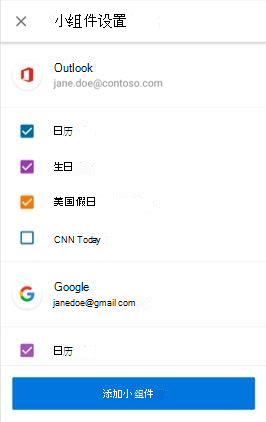
将小组件拖动到主屏幕上的偏好位置。 你将看到配置屏幕,可以用来配置日历小组件。
可以从账户中选择希望显示哪些日历。
此信息是否有用?
是
否
Thank you! Any more feedback for Microsoft?
Can you help us improve?
(Send feedback to Microsoft so we can help.)
How satisfied are you with the translation quality?
What affected your experience?
Resolved my issue
Clear instructions
Easy to follow
No jargon
Pictures helped
Translation quality
Didn't match my screen
Incorrect instructions
Too technical
Not enough information
Not enough pictures
Translation quality
Any additional feedback? (Optional)
Submit feedback
By pressing submit, your feedback will be used to improve Microsoft products and services.
Your IT admin will be able to collect this data.
Privacy Statement.
谢谢您的反馈!
×