

尺規提供視覺提示,協助您放置文字和投影片物件。 當您不再需要它時,您可以隱藏尺規。
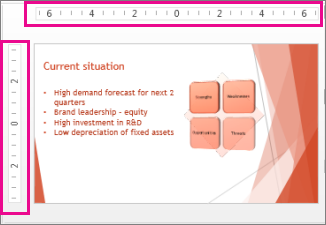
PowerPoint 中有兩個尺規:一個水平顯示在作用投影片的頂端,另一個則垂直顯示在投影片左邊緣 (如下所示) 。
若要顯示尺規,請按一下 [檢視],然後在 [顯示 ] 群組中勾選 尺規。
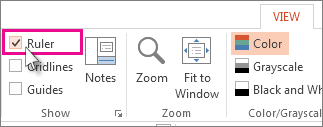
若要隱藏尺規,請按一下 [檢視],然後在 [ 顯示 ] 群組中清除 [ 尺規 ] 方塊。
![PowerPoint [檢視] 索引標籤上的尺規核取方塊](media/e0bebf11-b5e3-40d3-b925-27d2eb2aae4b.png)
若要永久隱藏垂直尺規,請按一下 [ 檔案>選項>] [進階],向下捲動至 [ 顯示 ] 區段,然後清除 [ 顯示垂直尺規 ] 方塊。
![[顯示垂直尺規] 核取方塊](media/powerpoint-2016-show-veritical-ruler-check-box.png)
秘訣
尺規並非在所有檢視中都可用,例如投影片瀏覽檢視。 如果 [尺規] 方塊呈現灰色,請嘗試切換到 [標準模式]。
![[檢視] 索引標籤上的 [尺規] 核取方塊](media/powerpoint-mac-2016-rulers-check-box.png)
![[顯示垂直尺規] 方塊](media/powerpoint-mac-2016-show-vertical-ruler.png)