跳到主要內容
Microsoft
支持
支持
支持
首頁
Microsoft 365
Office
產品
Microsoft 365
Outlook
Microsoft Teams
OneDrive
Microsoft Copilot
OneNote
Windows
其他...
裝置
Surface
電腦配件
Xbox
電腦遊戲
HoloLens
Surface Hub
硬體保固
帳戶與帳單
資源
社群論壇
Microsoft 365 系統管理員
開發人員
教育
回報支援詐騙
產品安全性
更多
購買 Microsoft 365
所有 Microsoft
Global
Microsoft 365
Azure
Windows
Surface
XBOX
支援
軟體
軟體
Windows 應用程式
OneDrive
Outlook
從 Skype 移至 Teams
OneNote
Microsoft Teams
個人電腦和設備
個人電腦和設備
電腦配件
娛樂
娛樂
XBOX Game Pass Ultimate
XBOX Game Pass Essential
XBOX 與遊戲
電腦遊戲
商務適用
商務適用
Microsoft AI
Microsoft 安全性
Azure
Dynamics 365
商務用 Microsoft 365
Microsoft Power Platform
Windows 365
數位主權
開發人員與 IT
開發人員與 IT
Microsoft 開發人員工具
Microsoft Learn
支援 AI 市場應用程式
Microsoft 技術社群
Microsoft Marketplace
軟體公司
Visual Studio
其他
其他
Microsoft Rewards
免費下載與安全性
教育
禮品卡
Licensing
檢視網站地圖
搜尋
搜尋說明
無結果
取消
登入
使用 Microsoft 登入
登入或建立帳戶。
您好:
選取其他帳戶。
您有多個帳戶
選擇您要用來登入的帳戶。
讓文字框的背景變得隱形
套用到
Microsoft 365 Excel
Microsoft 365 Word
Microsoft 365 Outlook
Microsoft 365 PowerPoint
Excel 2024
Excel 2021
Word 2021
Outlook 2021
PowerPoint 2021
Excel 2019
Word 2019
Outlook 2019
PowerPoint 2019
Excel 2016
Word 2016
Outlook 2016
PowerPoint 2016
如果你是在圖片、圖表或其他圖形上層疊加文字,你可能會想移除文字框的背景色和邊框,讓文字看起來像是漂浮在上方,而不是直接出現在文字框內。
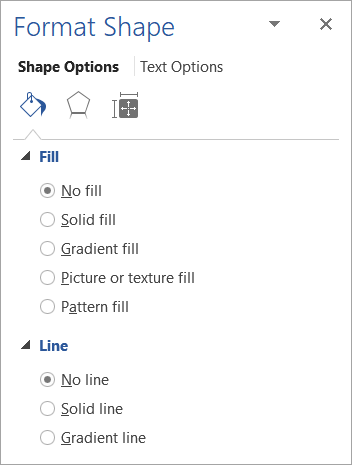
右鍵點擊你想讓它隱形的文字框。
如果你想更改多個文字框,請點選第一個文字框或圖形,然後按住 Shift 鍵同時點擊其他文字框。
在快捷鍵選單中,點選
「格式化形狀
」。
在
「填充」
下,選擇
「不填充
」。
在
「行」
中,選擇
「無行」。
另請參閱
移除圖片的背景
設定投影片的背景色彩格式
此資訊是否有幫助?
是
否
Thank you! Any more feedback for Microsoft?
Can you help us improve?
(Send feedback to Microsoft so we can help.)
How satisfied are you with the translation quality?
What affected your experience?
Resolved my issue
Clear instructions
Easy to follow
No jargon
Pictures helped
Translation quality
Didn't match my screen
Incorrect instructions
Too technical
Not enough information
Not enough pictures
Translation quality
Any additional feedback? (Optional)
Submit feedback
By pressing submit, your feedback will be used to improve Microsoft products and services.
Your IT admin will be able to collect this data.
Privacy Statement.
感謝您的意見反應!
×