
本文介紹了 2016 Microsoft Office 2016 的更新KB3141473,該版本於 2017 年 1 月 3 日發布。 這次更新有先 決條件。
請注意,Microsoft下載中心的更新適用於基於 Office 2016 的 Microsoft 安裝程式 (.msi) 版。 它不適用於 Office 2016 隨選即用版本,例如 Microsoft Office 365 家用版。 (如何判斷?)
改進與修正
修正 PowerPoint 2016 中泰文「Inches」一詞的翻譯。
解決了以下問題:
SharePoint 行事曆無法同步到 Outlook 2016。 同時,您會收到以下錯誤訊息:注意
你嘗試存取的伺服器使用的是這個版本 Office 不支援的認證協定。
如何下載及安裝更新
Microsoft Update
使用 Microsoft Update 自動下載並安裝更新。
下載中心
此更新也可從 Microsoft 下載中心手動下載和安裝。

如果你不確定自己 (32 位元還是 64 位元) ,請參考「 我是用 32 位元還是 64 位元的 Office?」 此外,請參閱 更多關於如何下載 Microsoft 支援檔案的資訊。
病毒掃描宣告
Microsoft 會利用發佈當日的最新病毒偵測軟體來掃描檔案,查看有無病毒感染。 檔案會儲存在已強化安全性的伺服器上,以避免任何未經授權的變更。
更新資訊
前提 要套用此更新,您必須安裝 Microsoft Office 2016。
重新啟動資訊安裝此更新後,可能需要重新啟動電腦。
更多資訊
要判斷您的 Office 安裝是點擊執行還是基於 MSI,請依照以下步驟操作:
- 啟動 Office 2016 應用程式。
- 在 [檔案] 功能表上,選取 [帳戶]。
- 對於 Office 2016 點擊執行安裝,會顯示 一個更新選項 項目。 對於基於 MSI 的安裝,更新 選項 項目不會顯示。
| Office 2016 點擊執行安裝 | 基於 MSI 的 Office 2016 |
|---|---|
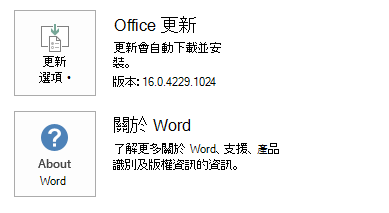
|
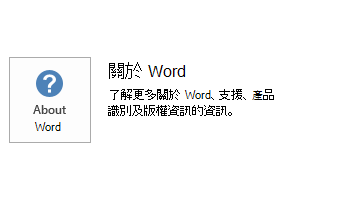
|
如何解除安裝此更新
Windows 10
- 移至「開始」,在「搜尋 Windows」方塊中輸入「View Installed Updates」,然後按下 Enter。
- 在更新清單中,找到並選擇KB3141473,然後選擇卸載。
Windows 8 和 Windows 8.1
- 從螢幕右邊邊緣向內撥動,然後選取 [搜尋]。 如果您使用滑鼠,請指向螢幕右下角,然後選取 [搜尋]。
- 輸入 Windows Update,選擇 Windows Update,然後選擇已安裝的匯報。
- 在更新清單中,找到並選擇KB3141473,然後選擇 卸載。
Windows 7
- 點到 開始,輸入 執行,然後選擇執行。
- 輸入 Appwiz.cpl,然後選取 [確定]。
- 選取 [檢視已安裝的更新]。
- 在更新清單中,找到並選擇KB3141473,然後選擇 卸載。
參考資料
了解用來 描述 Microsoft 軟體更新的標準術語。 Office 系統 TechCenter 包含所有版本 Office 的最新行政更新與策略部署資源。
檔案資訊
此更新的全域版本包含下表列出的檔案屬性 (或更新的檔案屬性) 。 這些檔案的日期與時間是以國際標準時間 (UTC) 表示。 當您檢視檔案資訊時,它會轉換成當地時間。 若要查看 UTC 與當地時間的差異,請使用 [控制台] 中 [日期和時間] 項目的 [時區] 索引標籤。
x86
MSO-X-NONE.MSP 檔案資訊
| 檔案識別碼 | 檔案名稱 | 檔案版本 | 檔案大小 | 日期 | 時間 |
|---|---|---|---|---|---|
| Firstrun.exe | Firstrun.exe | 16.0.4480.1000 | 770,248 | 2016年12月12日 | 22:48 |
| Mso.dll.x86 | Mso.dll | 16.0.4483.1000 | 14,365,952 | 2016年12月14日 | 01:55 |
| Msointl.dll.x86.1033 | Msointl.dll | 16.0.4465.1000 | 1,537,272 | 2016年12月12日 | 22:47 |
| msores.dll | msores.dll | 16.0.4435.1000 | 81,666,816 | 2016年12月12日 | 22:48 |
x64
MSO-X-NONE.MSP 檔案資訊
| 檔案識別碼 | 檔案名稱 | 檔案版本 | 檔案大小 | 日期 | 時間 |
|---|---|---|---|---|---|
| Firstrun.exe | Firstrun.exe | 16.0.4363.1000 | 815,808 | 2016年12月12日 | 22:51 |
| Mso.dll.x64 | Mso.dll | 16.0.4483.1000 | 19,802,880 | 2016年12月14日 | 01:56 |
| Mso.dll.x86 | Mso.dll | 16.0.4483.1000 | 14,365,952 | 2016年12月14日 | 00:02 |
| Msointl.dll.x64.1033 | Msointl.dll | 16.0.4465.1000 | 1,561,856 | 2016年12月12日 | 22:47 |
| Msointl.dll.x86.1033 | Msointl.dll | 16.0.4465.1000 | 1,537,272 | 2016年12月12日 | 22:50 |
| msores.dll | msores.dll | 16.0.4435.1000 | 81,666,816 | 2016年12月12日 | 2,246 |
| Msores.dll.x86 | msores.dll | 16.0.4435.1000 | 81,666,816 | 2016年12月12日 | 22:52 |