
摘要
此安全性更新可解決 Windows 中的弱點。 如果攻擊者說服使用者開啟蓄意製作的文件,或前往包含內嵌字型的不受信任網頁,則最嚴重的弱點可能會允許遠端執行程式碼。
若要深入了解弱點,請參閱 Microsoft 安全性公告 MS15-115。
更多資訊
重要
- Windows RT 8.1、Windows 8.1 和 Windows Server 2012 R2 日後所有的安全性與非安全性更新皆需要安裝更新 2919355。 我們建議您在 Windows RT 8.1、Windows 8.1 或 Windows Server 2012 R2 電腦上安裝更新 2919355,以便收到日後的更新。
- 如果您在安裝此更新之後安裝語言套件,您必須重新安裝此更新。 因此,我們建議您在安裝此更新前,先安裝任何需要的語言套件。 如需詳細資訊,請參閱將語言套件新增到 Windows (英文)。
此安全性更新已於 2015 年 11 月 11 日重新發行,適用於 Windows 7 和 Windows Server 2008 R2,以解決下列問題:
- 解決了使用者讀取特定電子郵件時所有受支援的 Microsoft Outlook 版本中發生的當機問題。
- 解決在支援的 Microsoft PowerPoint 版本中開啟 PowerPoint 簡報時發生當機的問題。
- 解決在 Internet Explorer 中瀏覽特定網頁時,在支援的 Internet Explorer 版本中發生當機的問題,例如群組軟體網頁。
- 解決使用者登入系統時發生的問題。 例如,使用者重新啟動電腦,然後在登入畫面按下 Ctrl+Alt+Delete 後,螢幕會閃爍,然後變黑。 然後使用者無法繼續。 可能還有其他類似的登入問題也與此問題相關。
對於無法登入其 Windows 7 電腦的客戶的解決方案:
如果您因為前面提到的已知問題而無法登入 Windows 7 電腦,我們建議您解除安裝安全性更新 3097877,然後安裝 Windows Update 中所有的最新更新。
下列章節提供解除安裝更新的方法:
選項 1:中斷任何數位板裝置的連線
如果您的數位板裝置已連線至 Windows 7 電腦 (,例如 Wacom 裝置) ,請拔除該裝置,然後繼續登入。 登入之後,請安裝 Windows Update 中所有的最新更新。
選項 2:使用系統還原復原最後一個還原點
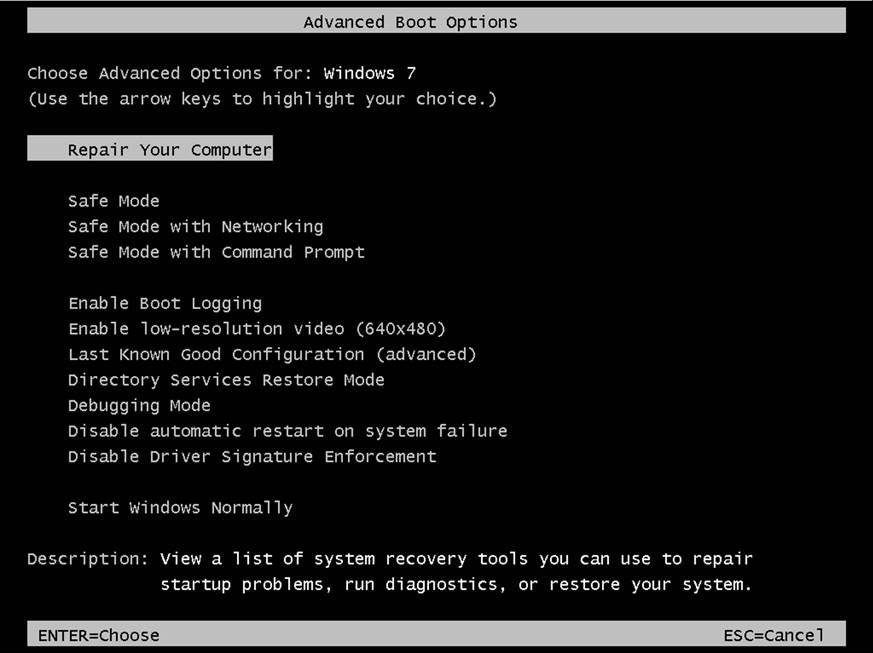
存取系統修復選項。 為此,請重新啟動電腦並在 Windows 標誌出現之前重複點選 F8 鍵。 如果看到 Windows 標誌出現,請再試一次。 請等到 Windows 登入提示出現,然後將電腦關機再重新啟動。 重新啟動前,必須先移除電腦中所有磁碟片、CD 和 DVD。
選取 [ 修復您的電腦]。
選取語言,然後登入電腦。用於在
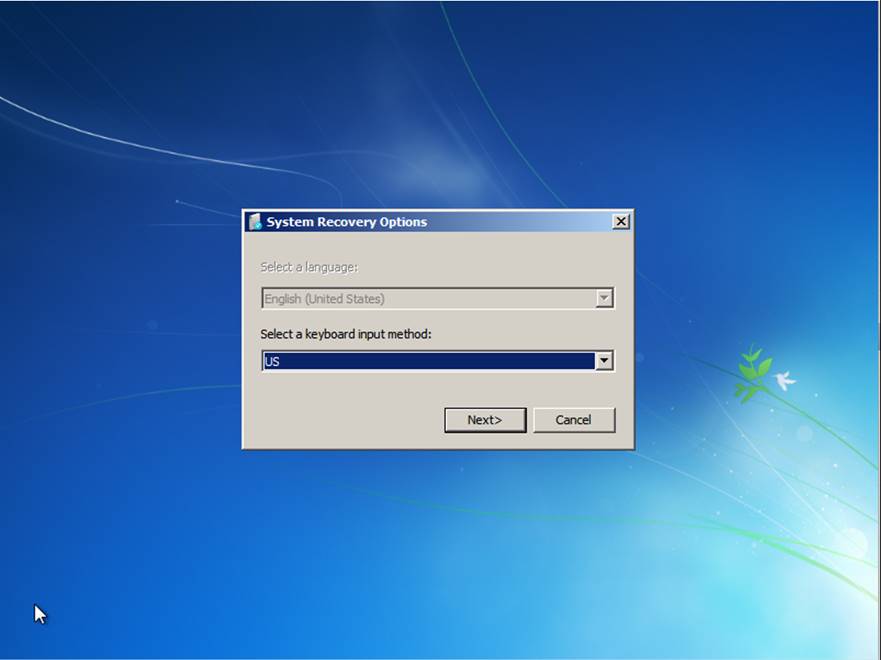
注意:如果不知道本機密碼,則必須使用 Windows 7 DVD 或 USB 可開機媒體開始。 然後,存取系統修復選項。 如需有關如何取得 Windows 7 DVD 或 USB 可開機媒體的詳細資訊,請造訪下列 Microsoft 網頁:
從功能表中選取 [系統還原]:
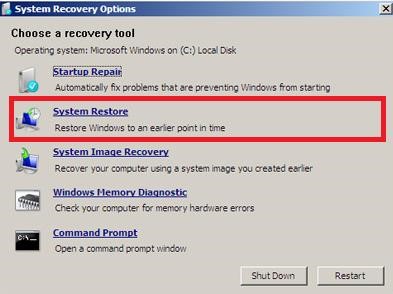
還原上一個還原點。 這會解除安裝安全性更新3097877。
將電腦重新啟動至正常模式。
選項 3:在命令提示字元後解除安裝安全性更新3097877
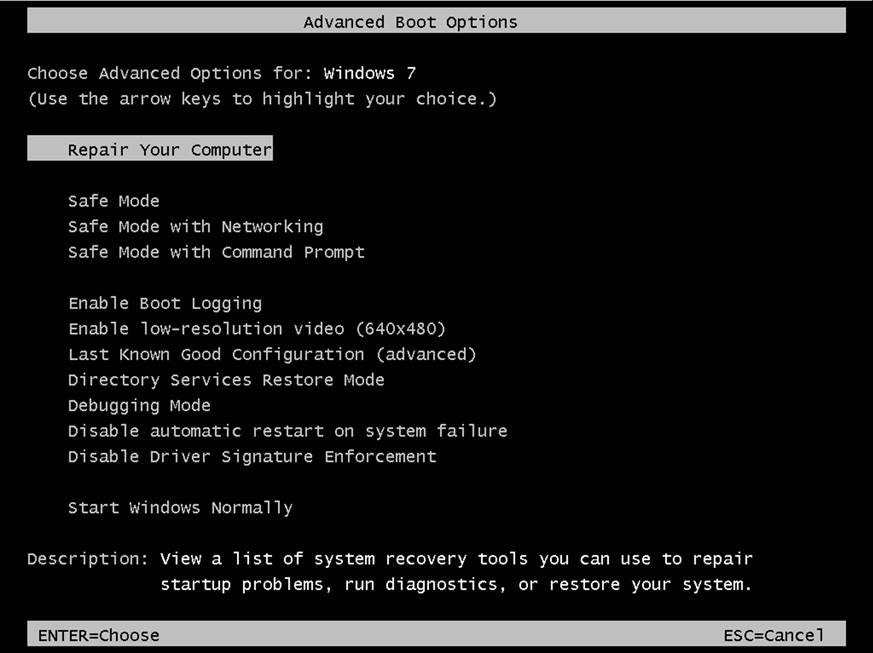
存取系統修復選項。 為此,請重新啟動電腦並在 Windows 標誌出現之前重複點選 F8 鍵。 如果看到 Windows 標誌出現,請再試一次。 請等到 Windows 登入提示出現,然後將電腦關機再重新啟動。 重新啟動前,必須先移除電腦中所有磁碟片、CD 和 DVD。
選取 [ 修復您的電腦]。
選取語言,然後登入電腦。
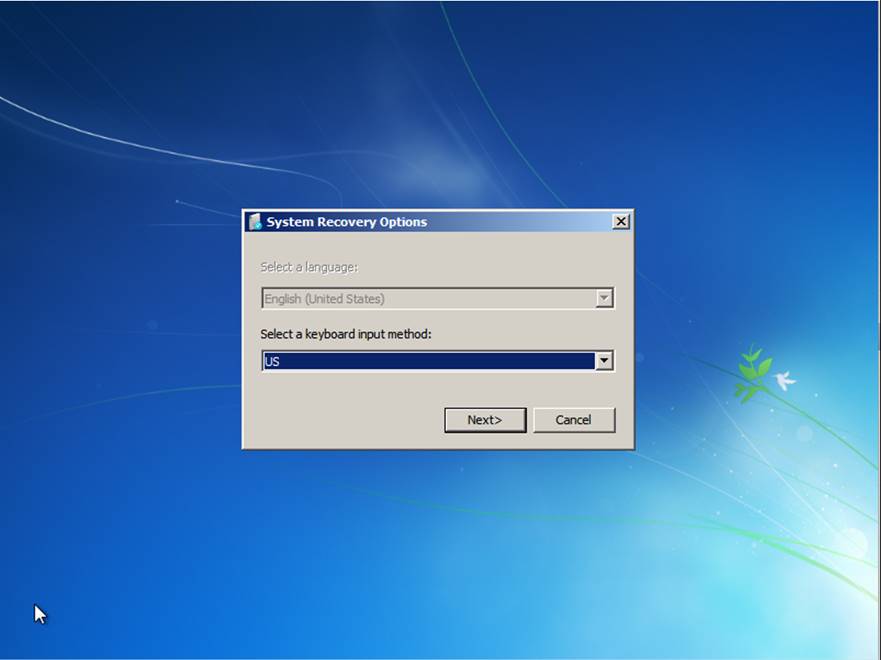
注意:如果不知道本機密碼,則必須使用 Windows 7 DVD 或 USB 可開機媒體開始。 然後,存取系統修復選項。 如需有關如何取得 Windows 7 DVD 或 USB 可開機媒體的詳細資訊,請造訪下列 Microsoft 網頁:
從功能表中選取 [ 命令提示字元 ]:
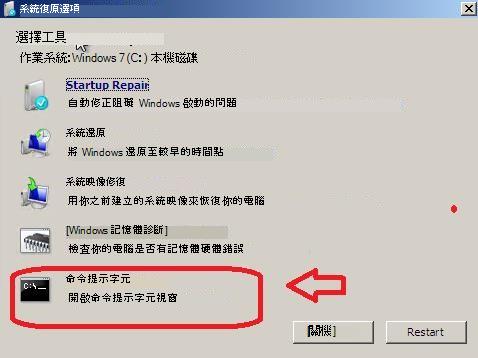
在命令提示字元中,執行下列命令:
dism /image:C:\ /get-packages
搜尋安全性更新3097877的結果。
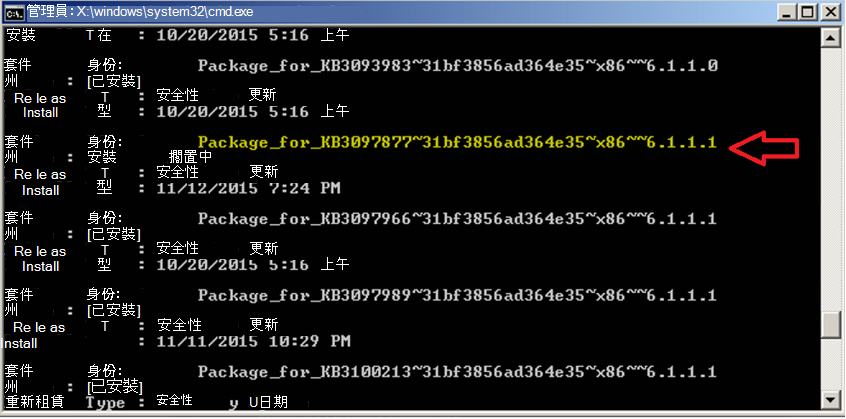
注意:您電腦中的套件名稱可能會與上述不同,因為這取決於您電腦的架構。 例如,您可能會看到 “amd64”,而非 “x86”。
如需如何判斷您執行的是 32 位元或 64 位元版本 Windows 的詳細資訊,請按一下下面的文件編號,檢視「Microsoft 知識庫」中的文件:
827218 如何判斷您的電腦執行的是 32 位元版本或 64 位元版本的 Windows 作業系統
複製套件名稱,並貼上,如下所示:
dism /image:C:\ /remove-package /PackageName:Package_for_KB3097877~31bf3856ad364e35~x86~~6.1.1.1
您會收到一則訊息,指出解除安裝成功。
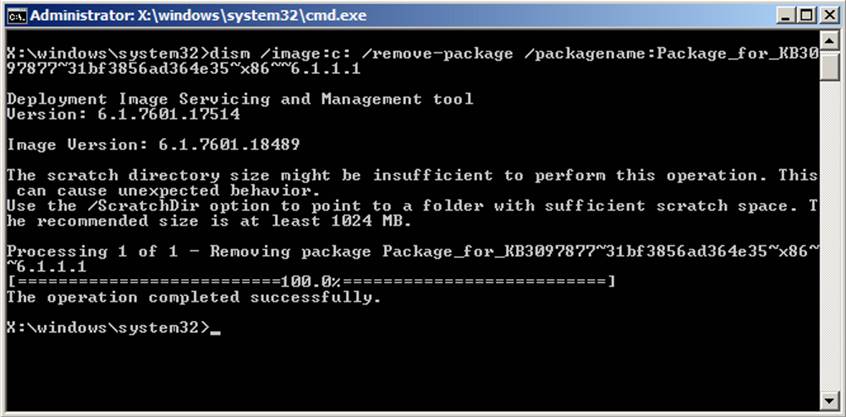
將電腦重新啟動至正常模式。
如何取得及安裝更新
方法 1:Windows Update
可透過 Windows Update 取得此更新。 開啟自動更新後,就會自動下載並安裝此更新。 如需有關如何開啟自動更新的詳細資訊,請參閱
自動取得安全性更新。
請注意:若為 Windows RT 和 Windows RT 8.1,只能透過 Windows Update 取得此更新。
方法 2: Microsoft 下載中心
您可以透過 Microsoft 下載中心取得獨立更新套件。 請依照下載頁面的安裝指示來安裝更新。
按一下 Microsoft 安全性公告 MS15-115 中對應至您執行的 Windows 版本的下載連結。
更多資訊
檔案資訊
此軟體更新的英文 (美國) 版會安裝具有下表中所列屬性的檔案。 這些檔案的日期與時間是以國際標準時間 (UTC) 表示。 本機電腦上這些檔案的日期與時間,是以您當地的時間和目前的日光節約時間 (DST) 偏差來顯示。 此外,當您對檔案執行特定作業時,其日期與時間可能會變更。
Windows Vista 和 Windows Server 2008 檔案資訊
套用至特定產品、里程碑 (SPn) 及服務分支 (LDR、GDR) 的檔案可透過檢視下列表格中所顯示的檔案版本號碼來識別:
版本 產品 里程碑 服務分支 6.0.6002.19xxx Windows Vista SP2 或 Windows Server 2008 SP2 SP2 GDR 6.0.6002.23xxx Windows Vista SP2 或 Windows Server 2008 SP2 SP2 LDR GDR 服務分支只包含針對普遍的嚴重問題所發行的通用修正程式。 LDR 服務分支除了通用修正程式之外,還包含 Hotfix。
附註 未列出已安裝的 MANIFEST 檔案 (.manifest) 及 MUM 檔案 (.mum)。
適用於所有支援的 x86 型版本 Windows Vista 和 Windows Server 2008
| 檔案名稱 | 檔案版本 | 檔案大小 | 日期 | 時間 | 平台 |
|---|---|---|---|---|---|
| Win32k.sys | 6.0.6002.19525 | 2,068,480 | 2015 年 10 月 17 日 | 14:24 | x86 |
| Win32k.sys | 6.0.6002.23835 | 2,076,160 | 2015 年 10 月 17 日 | 1,814 | x86 |
| Gdiplus.dll | 5.2.6002.19525 | 1,748,992 | 2015 年 10 月 17 日 | 16:00 | x86 |
| Gdiplus.dll | 5.2.6002.23835 | 1,748,992 | 2015 年 10 月 17 日 | 15:29 | x86 |
| Gdiplus.dll | 6.0.6002.19525 | 1,839,616 | 2015 年 10 月 17 日 | 16:00 | x86 |
| Gdiplus.dll | 6.0.6002.23835 | 1,839,616 | 2015 年 10 月 17 日 | 15:29 | x86 |
適用於所有支援的 x64 型版本 Windows Vista 和 Windows Server 2008
| 檔案名稱 | 檔案版本 | 檔案大小 | 日期 | 時間 | 平台 |
|---|---|---|---|---|---|
| Win32k.sys | 6.0.6002.19525 | 2,798,592 | 2015 年 10 月 17 日 | 14:35 | x64 |
| Win32k.sys | 6.0.6002.23835 | 2,801,152 | 2015 年 10 月 17 日 | 14:47 | x64 |
| Gdiplus.dll | 5.2.6002.19525 | 2,193,920 | 2015 年 10 月 17 日 | 15:41 | x64 |
| Gdiplus.dll | 5.2.6002.23835 | 2,194,432 | 2015 年 10 月 17 日 | 15:34 | x64 |
| Gdiplus.dll | 6.0.6002.19525 | 2,425,344 | 2015 年 10 月 17 日 | 15:41 | x64 |
| Gdiplus.dll | 6.0.6002.23835 | 2,425,856 | 2015 年 10 月 17 日 | 15:34 | x64 |
| Gdiplus.dll | 5.2.6002.19525 | 1,748,992 | 2015 年 10 月 17 日 | 16:00 | x86 |
| Gdiplus.dll | 5.2.6002.23835 | 1,748,992 | 2015 年 10 月 17 日 | 15:29 | x86 |
| Gdiplus.dll | 6.0.6002.19525 | 1,839,616 | 2015 年 10 月 17 日 | 16:00 | x86 |
| Gdiplus.dll | 6.0.6002.23835 | 1,839,616 | 2015 年 10 月 17 日 | 15:29 | x86 |
適用於所有支援的 IA-64 版本 Windows Server 2008
| 檔案名稱 | 檔案版本 | 檔案大小 | 日期 | 時間 | 平台 |
|---|---|---|---|---|---|
| Win32k.sys | 6.0.6002.19525 | 6,699,008 | 2015 年 10 月 17 日 | 14:25 | IA-64 |
| Win32k.sys | 6.0.6002.23835 | 6,708,736 | 2015 年 10 月 17 日 | 14:23 | IA-64 |
| Gdiplus.dll | 5.2.6002.19525 | 4,913,152 | 2015 年 10 月 17 日 | 15:23 | IA-64 |
| Gdiplus.dll | 5.2.6002.23835 | 4,913,664 | 2015 年 10 月 17 日 | 14:59 | IA-64 |
| Gdiplus.dll | 6.0.6002.19525 | 5,268,992 | 2015 年 10 月 17 日 | 15:23 | IA-64 |
| Gdiplus.dll | 6.0.6002.23835 | 5,268,992 | 2015 年 10 月 17 日 | 14:59 | IA-64 |
| Gdiplus.dll | 5.2.6002.19525 | 1,748,992 | 2015 年 10 月 17 日 | 16:00 | x86 |
| Gdiplus.dll | 5.2.6002.23835 | 1,748,992 | 2015 年 10 月 17 日 | 15:29 | x86 |
| Gdiplus.dll | 6.0.6002.19525 | 1,839,616 | 2015 年 10 月 17 日 | 16:00 | x86 |
| Gdiplus.dll | 6.0.6002.23835 | 1,839,616 | 2015 年 10 月 17 日 | 15:29 | x86 |
Windows 7 和 Windows Server 2008 R2 檔案資訊
套用至特定產品、里程碑 (RTM、SPn) 及服務分支 (LDR、GDR) 的檔案可透過檢視下列表格中所顯示的檔案版本號碼來識別:
版本 產品 里程碑 服務分支 6.1.7601.18xxx Windows 7 或 Windows Server 2008 R2 SP1 GDR 6.1.7601.23xxx Windows 7 或 Windows Server 2008 R2 SP1 LDR GDR 服務分支只包含針對普遍的嚴重問題所發行的通用修正程式。 LDR 服務分支除了通用修正程式之外,還包含 Hotfix。
附註 未列出已安裝的 MANIFEST 檔案 (.manifest) 及 MUM 檔案 (.mum)。
適用於所有支援的 x86 版本 Windows 7
| 檔案名稱 | 檔案版本 | 檔案大小 | 日期 | 時間 | 平台 |
|---|---|---|---|---|---|
| Win32k.sys | 6.1.7601.19054 | 2,386,944 | 2015 年 11 月 3 日 | 1,746 | x86 |
| Win32k.sys | 6.1.7601.23259 | 2,395,648 | 2015 年 11 月 3 日 | 17:50 | x86 |
| Gdiplus.dll | 5.2.7601.19054 | 1,723,904 | 2015 年 11 月 3 日 | 18:45 | x86 |
| Gdiplus.dll | 5.2.7601.23259 | 1,723,904 | 2015 年 11 月 3 日 | 18:44 | x86 |
| Gdiplus.dll | 6.1.7601.19054 | 1,625,600 | 2015 年 11 月 3 日 | 18:45 | x86 |
| Gdiplus.dll | 6.1.7601.23259 | 1,627,136 | 2015 年 11 月 3 日 | 18:44 | x86 |
適用於所有支援的 x64 版本 Windows 7 和 Windows Server 2008 R2
| 檔案名稱 | 檔案版本 | 檔案大小 | 日期 | 時間 | 平台 |
|---|---|---|---|---|---|
| Win32k.sys | 6.1.7601.19054 | 3,211,264 | 2015 年 11 月 3 日 | 17:55 | x64 |
| Win32k.sys | 6.1.7601.23259 | 3,214,848 | 2015 年 11 月 3 日 | 18:01 | x64 |
| Gdiplus.dll | 5.2.7601.19054 | 2,294,272 | 2015 年 11 月 3 日 | 1,856 | x64 |
| Gdiplus.dll | 5.2.7601.23259 | 2,294,272 | 2015 年 11 月 3 日 | 19:03 | x64 |
| Gdiplus.dll | 6.1.7601.19054 | 2,166,784 | 2015 年 11 月 3 日 | 1,856 | x64 |
| Gdiplus.dll | 6.1.7601.23259 | 2,167,296 | 2015 年 11 月 3 日 | 19:03 | x64 |
| Gdiplus.dll | 5.2.7601.19054 | 1,723,904 | 2015 年 11 月 3 日 | 18:45 | x86 |
| Gdiplus.dll | 5.2.7601.23259 | 1,723,904 | 2015 年 11 月 3 日 | 18:44 | x86 |
| Gdiplus.dll | 6.1.7601.19054 | 1,625,600 | 2015 年 11 月 3 日 | 18:45 | x86 |
| Gdiplus.dll | 6.1.7601.23259 | 1,627,136 | 2015 年 11 月 3 日 | 18:44 | x86 |
適用於所有支援的 IA-64 版本 Windows Server 2008 R2
| 檔案名稱 | 檔案版本 | 檔案大小 | 日期 | 時間 | 平台 |
|---|---|---|---|---|---|
| Win32k.sys | 6.1.7601.19054 | 7,505,408 | 2015 年 11 月 3 日 | 1,817 | IA-64 |
| Win32k.sys | 6.1.7601.23259 | 7,513,600 | 2015 年 11 月 3 日 | 1,721 | IA-64 |
| Gdiplus.dll | 5.2.7601.19054 | 4,924,928 | 2015 年 11 月 3 日 | 18:02 | IA-64 |
| Gdiplus.dll | 5.2.7601.23259 | 4,924,928 | 2015 年 11 月 3 日 | 19:12 | IA-64 |
| Gdiplus.dll | 6.1.7601.19054 | 4,603,904 | 2015 年 11 月 3 日 | 18:02 | IA-64 |
| Gdiplus.dll | 6.1.7601.23259 | 4,605,440 | 2015 年 11 月 3 日 | 19:12 | IA-64 |
| Gdiplus.dll | 5.2.7601.19054 | 1,723,904 | 2015 年 11 月 3 日 | 18:45 | x86 |
| Gdiplus.dll | 5.2.7601.23259 | 1,723,904 | 2015 年 11 月 3 日 | 18:44 | x86 |
| Gdiplus.dll | 6.1.7601.19054 | 1,625,600 | 2015 年 11 月 3 日 | 18:45 | x86 |
| Gdiplus.dll | 6.1.7601.23259 | 1,627,136 | 2015 年 11 月 3 日 | 18:44 | x86 |
Windows 8 和 Windows Server 2012 檔案資訊
套用至特定產品、里程碑 (RTM、SPn) 及服務分支 (LDR、GDR) 的檔案可透過檢視下列表格中所顯示的檔案版本號碼來識別:
版本 產品 里程碑 服務分支 6.2.920 0.17xxx Windows 8、Windows RT 或 Windows Server 2012 RTM GDR 6.2.920 0.21xxx Windows 8、Windows RT 或 Windows Server 2012 RTM LDR GDR 服務分支只包含針對普遍的嚴重問題所發行的通用修正程式。 LDR 服務分支除了通用修正程式之外,還包含 Hotfix。
附註 未列出已安裝的 MANIFEST 檔案 (.manifest) 及 MUM 檔案 (.mum)。
適用於所有支援的 x86 版本 Windows 8
| 檔案名稱 | 檔案版本 | 檔案大小 | 日期 | 時間 | 平台 |
|---|---|---|---|---|---|
| Win32k.ptxml | 不適用 | 4,172 | 2012 年 10 月 11 日 | 00:38 | 不適用 |
| Win32k.sys | 6.2.9200.17554 | 3,387,904 | 2015 年 10 月 17 日 | 1,329 | x86 |
| Win32k.ptxml | 不適用 | 4,172 | 25-Jul-2012 | 20:33 | 不適用 |
| Win32k.sys | 6.2.9200.21671 | 3,375,104 | 2015 年 10 月 17 日 | 13:22 | x86 |
適用於所有支援的 x64 版本 Windows 8 和 Windows Server 2012
| 檔案名稱 | 檔案版本 | 檔案大小 | 日期 | 時間 | 平台 |
|---|---|---|---|---|---|
| Win32k.ptxml | 不適用 | 4,172 | 2012 年 10 月 11 日 | 00:37 | 不適用 |
| Win32k.sys | 6.2.9200.17554 | 4,063,744 | 2015 年 10 月 17 日 | 13:28 | x64 |
| Win32k.ptxml | 不適用 | 4,172 | 25-Jul-2012 | 20:29 | 不適用 |
| Win32k.sys | 6.2.9200.21671 | 4,061,696 | 2015 年 10 月 17 日 | 1,320 | x64 |
| Wow64_win32k.ptxml | 不適用 | 4,172 | 2013 年 2 月 12 日 | 14:00 | 不適用 |
| Wow64_win32k.ptxml | 不適用 | 4,172 | 2013 年 2 月 12 日 | 00:09 | 不適用 |
Windows 8.1 和 Windows Server 2012 R2 檔案資訊
套用至特定產品、里程碑 (RTM、SPn) 及服務分支 (LDR、GDR) 的檔案可透過檢視下列表格中所顯示的檔案版本號碼來識別:
版本 產品 里程碑 服務分支 6.3.920 0.17xxx Windows 8.1、Windows RT 8.1 和 Windows Server 2012 R2 RTM GDR GDR 服務分支只包含針對普遍的嚴重問題所發行的通用修正程式。
附註 未列出已安裝的 MANIFEST 檔案 (.manifest) 及 MUM 檔案 (.mum)。
適用於所有支援的 x86 版本 Windows 8.1
| 檔案名稱 | 檔案版本 | 檔案大小 | 日期 | 時間 | 平台 |
|---|---|---|---|---|---|
| Win32k.ptxml | 不適用 | 4,213 | 21-Aug-2013 | 23:39 | 不適用 |
| Win32k.sys | 6.3.9600.18093 | 3,521,536 | 2015 年 10 月 17 日 | 14:00 | x86 |
適用於所有支援的 x64 版本 Windows 8.1 和 Windows Server 2012 R2
| 檔案名稱 | 檔案版本 | 檔案大小 | 日期 | 時間 | 平台 |
|---|---|---|---|---|---|
| Win32k.ptxml | 不適用 | 4,213 | 22-Aug-2013 | 06:44 | 不適用 |
| Win32k.sys | 6.3.9600.18093 | 4,176,384 | 2015 年 10 月 17 日 | 19:14 | x64 |
| Wow64_win32k.ptxml | 不適用 | 4,213 | 21-Aug-2013 | 23:39 | 不適用 |
如何取得此安全性更新的說明和支援
安裝更新的說明: Microsoft Update 支援
適用於 IT 專業人員的安全性解決方案: TechNet 安全性疑難排解與支援
保護您的 Windows 電腦免於受到病毒和惡意程式碼攻擊: 病毒解決方案與資訊安全中心
您所在國家/地區的當地支援: 多語系支援