
摘要
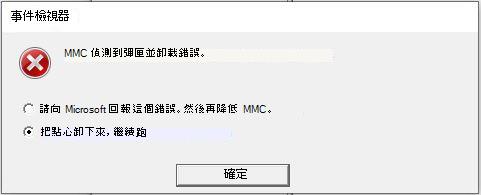
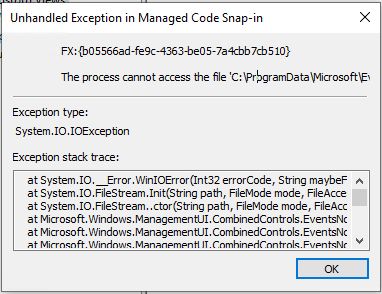
嘗試在事件檢視器中展開、檢視或建立自訂檢視時,您可能會收到錯誤「MMC 在嵌入式管理單元中偵測到錯誤,並將解除載入它。」並且應用程式可能會停止回應或關閉。 使用內建檢視或記錄的 [動作] 功能表中的 [篩選目前記錄] 時,也可能會收到相同的錯誤。 事件檢視器的內建檢視和其他功能應該如預期般運作。
因應措施
若要解決此問題,請將下列函式複製並貼上到 PowerShell 視窗中,然後執行它。 您現在可以在 PowerShell 提示字元中使用命令 get-EventViewer 來檢視 您的自訂檢視。 每次開啟新的 PowerShell 視窗時,您都需要重新輸入函數。 備註get-EventViewer 函式將僅允許您檢視先前定義的自訂檢視。 若要建立新的 自訂檢視,請參閱 使用 FilterHashtable 建立 Get-WinEvent 查詢。
function get-EventViewer {
                Write-Output "List of custom views on the machine"
                Write-Output ""
                Get-ChildItem "C:\ProgramData\Microsoft\Event Viewer\Views" -Filter *.xml | % { select-xml -Path $_.FullName -xpath "//Name" } | Select-Object -ExpandProperty Node | Select-Object -ExpandProperty InnerXml

                Write-Output ""
                $view_name = Read-Host "Enter the name of custom view to execute"


                # Get the file name of the view
                $ViewFile = Get-ChildItem "C:\ProgramData\Microsoft\Event Viewer\Views" -Filter *.xml | where-object { (Select-Xml -Path $_.FullName -xpath "//Name").Node.InnerXml -eq $view_name }

                Get-WinEvent -FilterXml ([xml]((Select-Xml -Path $ViewFile.FullName -XPath "//QueryList").node.OuterXml))
}
後續步驟
此問題現在已在下列更新中解決,適用於所有平台:
- KB4501375適用於 Windows 10 1903 版的 LCU。
- KB4501371適用於 Windows 10 版本 1809 和 Windows Server 2019 的 LCU。
- KB4503288適用於 Windows 10 1803 版的 LCU。
- KB4503281適用於 Windows 10 1709 版的 LCU。
- KB4503289適用於 Windows 10 1703 版的 LCU。
- KB4503294適用於 Windows 10 版本 1607 和 Windows Server 2016 的 LCU。
- KB4507458適用於 Windows 10 1507 版的 LCU。
- KB4503283適用於 Windows 8.1 和 Windows Server 2012 R2 的每月彙總套件預覽。
- KB4508773適用於使用僅限安全性更新之客戶的 Windows 8.1 和 Windows Server 2012 R2 更新。
- KB4503295適用於 Windows Server 2012 和 Windows Embedded 8 Standard 的每月彙總套件預覽
- KB4508776適用於使用僅限安全性更新的客戶的 Windows Server 2012 和 Windows Embedded 8 Standard 更新。
- KB4503277Windows 7 SP1 和 Windows Server 2008 R2 SP1 的每月彙總套件預覽。
- KB4508772適用於使用僅限安全性的客戶的 Windows 7 SP1 和 Windows Server 2008 R2 SP1 更新。
- KB4503271適用於 Windows Server 2008 SP2 的每月彙總套件預覽。
- KB4508774適用於僅使用安全性的客戶的 Windows Server 2008 SP2 更新。
受影響的更新
2019 年 6 月 11 日針對受影響平台而發行的下列最新累積更新 (LCU) 、每月彙總套件和僅限安全性更新可能會遇到此問題:
- KB4503293適用於 Windows 10 1903 版的 LCU。
- KB4503327適用於 Windows 10 版本 1809 和 Windows Server 2019 的 LCU。
- KB4503286適用於 Windows 10 1803 版的 LCU。
- KB4503284適用於 Windows 10 1709 版的 LCU。
- KB4503279適用於 Windows 10 1703 版的 LCU。
- KB4503267適用於 Windows 10 版本 1607 和 Windows Server 2016 的 LCU。
- KB4503291適用於 Windows 10 1507 版的 LCU。
- KB4503276適用於 Windows 8.1 和 Windows Server 2012 R2 的每月彙總套件。
- KB4503290適用於 Windows 8.1 和 Windows Server 2012 R2 的僅限安全性更新。
- KB4503285適用於 Windows Server 2012 和 Windows Embedded 8 Standard 的每月彙總套件
- KB4503263適用於 Windows Server 2012 和 Windows Embedded 8 Standard 的僅限安全性更新-
- KB4503292適用於 Windows 7 SP1 和 Windows Server 2008 R2 SP1 的每月彙總套件
- KB4503269適用於 Windows 7 SP1 和 Windows Server 2008 R2 SP1 的僅限安全性更新
- KB4503273適用於 Windows Server 2008 SP2 的每月彙總套件
- KB4503287適用於 Windows Server 2008 SP2 的僅限安全性更新