
You’ll receive an error message if you attempt to attach files larger than the maximum size limit. There are a few ways to work around this size limit, including using a file sharing service or compressing the file.
Outlook limits the size of files you can send. This limit prevents your computer from continually trying to upload very large attachments that exceed the limits of most Internet service providers. For Internet email account. such as Outlook.com or Gmail, the combined file size limit is 20 megabytes (MB) and for Exchange accounts (business email), the default combined file size limit is 10 MB.
Save your file to a cloud service and share a link
There are many cloud storage services to which you can upload and then share large files. Some popular cloud storage services include OneDrive, Dropbox, iCloud, and Google Drive. Once your file is stored in the cloud, you can include a link to the document in your email message.
-
Upload your file to a cloud service, such as OneDrive or Dropbox.
Note: The service you use generates a link to access your file. Your recipient can open the link to download your file.
-
After you upload the file, copy the link, and paste it into your email message.
Tip: For detailed information about uploading files and creating a download link in OneDrive, go to Upload photos and files and Share files and folders and change permissions.
Compress the file
When you compress, or zip, your file, it decreases its size, and it might decrease it enough to fit within the Outlook size limits for attachments. The following articles describe how to compress and extract files for different Windows operating systems.
Reduce the size of an image
If you’re sending large image files you can automatically resize them to reduce their file size.
-
Attach the images to your email message.
-
Click File > Info.
-
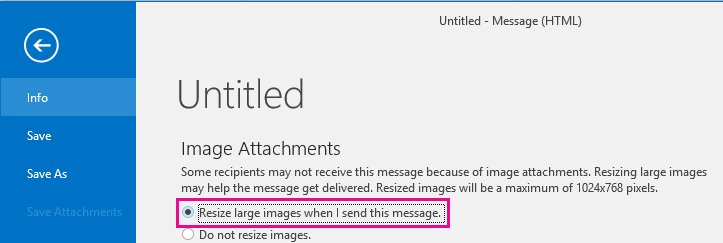
Under the Image Attachments section, select Resize large images when I send this message.
-
Return to your message, and click Send.
Save the file to a SharePoint server library
If you’re using Outlook in a business environment and use SharePoint, you can save a file to a SharePoint library and share a link to the file. See Share a document using SharePoint or OneDrive for instructions.
See Also
Reduce the size of pictures and attachments in Outlook email messages








