
When you try to install Office you may get an error message that says, We’re sorry, but we could not start your Office installation. Another installation is in progress, please try again later. Or the error message might contain one of these error codes 0-1018, 17003-2031, or 2035-0.
This error usually occurs if another installation, update, or uninstall was running before you tried to install Office.
Check for an Office icon in the Windows system tray and click it to check the install progress. If an install is already running, wait until it's done before you start your Office install.
If you can't find an Office icon in the system tray, follow the steps below to restart Office and then try the installation again. If that doesn't work run the uninstall too to clean up any full or partial Office installations and then reinstall Office.
Restart your computer and reinstall Office
-
Restart your computer.
-
Reinstall Microsoft 365.
To reinstall Office select the version you want to install and follow those steps.
Uninstall and reinstall Office
Use the Office uninstall support tool to completely uninstall Microsoft 365 from your computer and try reinstalling Microsoft 365 again.
-
Select the button below to download and install the Office uninstall support tool.
-
Follow the steps below to download the uninstall support tool according to your browser.
Tip: The tool may take a few minutes to download and install. After completing the installation, the Uninstall Office products window will open.
Edge or Chrome
-
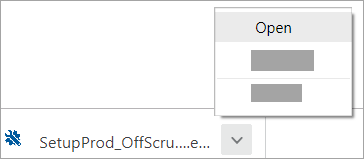
In the lower-lower left or upper-right corner, right-click SetupProd_OffScrub.exe > Open.
Edge (older) or Internet Explorer
-
At the bottom of the browser window, select Run to launch the SetupProd_OffScrub.exe.

Firefox
-
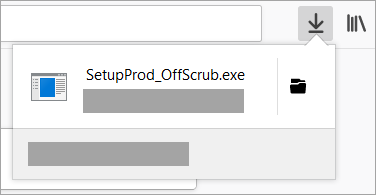
In the pop-up window, select Save File and then from the upper-right browser window, select the downloads arrow > SetupProd_OffScrub.exe.
-
-
Select the version you want to uninstall, and then select Next.
-
Follow through the remaining screens and when prompted, restart your computer.
After you restart your computer, the uninstall tool automatically re-opens to complete the final step of the uninstall process. Follow the remaining prompts.
-
Select the steps for the version of Office you want to install or reinstall. Close the uninstall tool.









