
When you receive an email message that has an Office attachment, Office reports the file as being corrupted and cannot be opened. You may receive one of the following error messages:
Error message details
Collapse this imageExpand this image
Excel:
"The file is corrupted and cannot be opened."
Word:
"Word Experienced an error trying to open the file."
PowerPoint:
"PowerPoint found a problem with content in <filename>. PowerPoint can attempt to repair the presentation."
Collapse this imageExpand this image
To fix the "This file is corrupt and cannot be opened” error message use one of the following methods:
Automatically set component security settings back to the default settings
- To fix this problem automatically, click the Fix it image below.
- Then click Run in the File Download dialog box, and follow the steps in the Fix it wizard.
Collapse this imageExpand this image
Fix this problem
(http://go.microsoft.com/?linkid=9787450)
Microsoft Fix it 50784Collapse this imageExpand this image
Notes:
- This wizard may be in English only, but the automatic fix also works for other language versions of Windows.
- If you are not on the computer that has the problem, you can save the Fix it file to a flash drive or a CD and then run it on the computer that has the problem.
Then, go to the "
Did this fix the problem?" section.
Let me fix it myself
If you want to manually set component security settings back to the default settings, follow these steps:
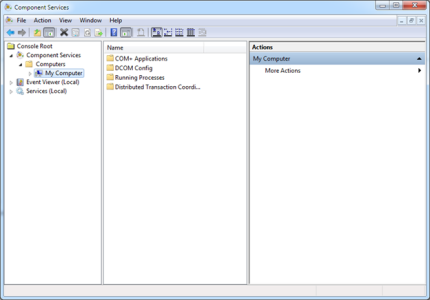
- Click Start, type dcomcnfg in the Search box, and then click dcomcnfg in the Programs list.
- In the navigation pane, expand Component Services, expand Computers, right-click My Computer, and then click Properties.
Collapse this imageExpand this image
- Open the Default Properties tab and set the following values:
- Default Authentication Level: Connect
- Default Impersonation Level: Identify
Collapse this imageExpand this image
- Click OK.
Did this fix the problem?
- If the problem is fixed, you are finished with this section. If the problem is not fixed, please contact support
(http://support.microsoft.com/contactus)
. - We would appreciate your feedback. To provide feedback or to report any issues with this solution, please leave a comment on the "Fix it for me
(http://blogs.technet.com/fixit4me/)
" blog or send us an email
(mailto:fixit4me@microsoft.com?Subject=KB)
message.
Article ID: 2387587 - Last Review: February 12, 2013 - Revision: 8.0
Applies to
- Microsoft Excel 2010
- Microsoft Word 2010
- Microsoft PowerPoint 2010
| consumeroff2010track kbmsifixme kbfixme kbsmbportal KB2387587 |




