
Support for Windows Vista Service Pack 1 (SP1) ends on July 12, 2011. To continue receiving security updates for Windows, make sure you're running Windows Vista with Service Pack 2 (SP2). For more information, refer to this Microsoft web page: Support is ending for some versions of Windows.
When an application dynamically loads a dynamic link library (DLL) without specifying a fully qualified path, Windows tries to locate the DLL by searching a well-defined set of directories. If an attacker gains control of one of the directories, they can force the application to load a malicious copy of the DLL instead of the DLL that it was expecting. These attacks are known as “DLL preloading attacks” and are common to all operating systems that support dynamically loading shared DLL libraries. The effect of such attacks could be that an attacker can execute code in the context of the user who is running the application. When the application is being run as Administrator, this could lead to a local elevation of privilege. We know about renewed interest in these attacks. To limit the effect that this issue has on our mutual customers, we are releasing this document to the developer community to make sure that they know about this issue and have the necessary tools to address the issue in their applications.
Summary
Description of DLL preloading attacks
LoadLibrary-based attacks
When an application dynamically loads a DLL without specifying a fully qualified path, Windows tries to locate this DLL by linearly searching through a well-defined set of directories, known as DLL Search Order. If Windows locates the DLL within the DLL Search Order, it will load that DLL. However, if Windows does not find the DLL in any of the directories in the DLL Search Order, it will return a failure to the DLL load operation. The following is the DLL Search Order for the LoadLibraryand LoadLibraryExfunctions, which are used to dynamically load DLLs:
-
The directory from which the application loaded
-
The system directory
-
The 16-bit system directory
-
The Windows directory
-
The current working directory (CWD)
-
The directories that are listed in the PATH environment variable
Consider the following scenario:
-
An application loads a DLL without specifying a fully qualified path that it expects to find in the CWD of the application.
-
The application is fully prepared to handle the case when it does not find the DLL.
-
The attacker knows this information about the application and controls the CWD.
-
The attacker copies their own specially crafted version of the DLL in the CWD. This assumes that the attacker has permission to do this.
-
Windows searches through the directories in the DLL Search Order and finds the DLL in the CWD of the application.
In this scenario, the specially crafted DLL runs within the application and gains the privileges of the current user.RecommendationTo prevent this attack, applications can remove the current working directory (CWD) from the DLL search path by calling the SetDllDirectory API by using an empty string (“”). If an application depends on loading a DLL from the current directory, please obtain the current working directory and use that to pass in a fully qualified path of LoadLibrary.We are also aware that some developers use LoadLibrary to validate whether a specific DLL is present in order to determine which version of Windows is being run by the user. You should be aware that this could make the application vulnerable. If the affected library indeed does not exist on the Windows release that the application is executed on, an attacker could introduce a library with that same name into CWD. We strongly recommend against using this technique. Instead, use the recommended techniques that are described in MSDN article, "Getting the System Version." An application that loads third-party plugins and that cannot force the plugins to use a qualified path for its LoadLibrary calls should call SetDllDirectory(“”) to remove CWD and then call SetDllDirectory(“plugin install location”) to add the plugin install directory to the DLL search path.
SearchPath-based attacks
A similar attack exists when an application uses the SearchPath API to locate a DLL and dynamically load the path that is returned by SearchPath. The following is the default search order for the SearchPath API:
-
The directory from which the application loaded
-
The current working directory (CWD)
-
The system directory
-
The 16-bit system directory
-
The Windows directory
-
The directories that are listed in the PATH environment variable
We do not recommend this pattern because it is not secure. We do not recommend the SearchPath function as a method of locating a .dll file if the intended use of the output is in a call to the LoadLibrary function. This can result in locating the wrong .dll file because the search order of the SearchPath function differs from the search order used by the LoadLibrary function. If you have to locate and load a .dll file, use the LoadLibrary function.
ShellExecute and CreateProcess
Variations of these issues can also exist when developers call similar functions such as ShellExecuteand CreateProcessto load external executables. We recommend that developers be careful when they are loading binaries and specify the fully qualified path. This should pose less complexity when you load a binary instead of a library.
Recommended steps for software developers
We recommend that developers do the following:
-
Validate their applications for instances of nonsecure library loads (examples of each are given later in this article). These include the following:
-
The use of SearchPath to identify the location of a library or component.
-
The use of LoadLibrary to identify the version of the operating system.
-
-
Use fully qualified paths for all calls to LoadLibrary, CreateProcess, and ShellExecute where you can.
-
Implement calls to SetDllDirectory with an empty string (“”) to remove the current working directory from the default DLL search order where it is required. Be aware that SetDllDirectory affects the whole process. Therefore, you should do this one time early in process initialization, not before and after calls to LoadLibrary. Because SetDllDirectory affects the whole process, multiple threads calling SetDllDirectory with different values could cause undefined behavior. Additionally, if the process is designed to load third-party DLLs, testing will be needed to determine whether making a process-wide setting will cause incompatibilities. A known issue is that when an application depends on Visual Basic for Applications, a process-wide setting may cause incompatibilities.
-
Use the SetSearchPathModefunction to enable safe process search mode for the process. This moves the current working directory to the last place in the SearchPath search list for the lifetime of the process.
-
Avoid using SearchPath to check for the existence of a DLL without specifying a fully qualified path, even if safe search mode is enabled, because this can still lead to DLL Preloading attacks.
Guidance on identifying nonsecure library loads
In source code, the following are examples of nonsecure library loads:
-
In the following code example, the application searches for “schannel.dll” by using the least secure search path. If an attacker can place schannel.dll in CWD, it will load even before the application searches the Windows directories for the appropriate library.
DWORD retval = SearchPath(NULL, "schannel", ".dll", err, result, NULL);
HMODULE handle = LoadLibrary(result);
-
In the following code example, the application tries to load the library from the various application and operating system locations described in the beginning of this document for the LoadLibrary() call. If there is any risk that the file is not present, the application may try to load the file from the current working directory. This scenario is slightly less dangerous than the previous example. However, it still exposes the application user to risk if the environment is not completely predictable.
HMODULE handle = LoadLibrary("schannel.dll");
The following are examples of better, more secure library loads:
-
In the following code example, the library is loaded directly by using a fully qualified path. There is no risk of the attacker introducing malicious code unless he already has write permissions to the application’s target directory.
HMODULE handle = LoadLibrary("c:\\windows\\system32\\schannel.dll");Note For information about how to determine the system directory, see the following resources:GetSystemDirectory
http://msdn.microsoft.com/en-us/library/ms724373%28VS.85%29.aspxSHGetKnownFolderPath
http://msdn.microsoft.com/en-us/library/bb762188%28v=VS.85%29.aspx
-
In the following code example, the current working directory is removed from the search path before calling LoadLibrary. This reduces the risk significantly, as the attacker would have to control either the application directory, the Windows directory, or any directories that are specified in the user’s path in order to use a DLL preloading attack.
SetDllDirectory ("");HMODULE handle = LoadLibrary("schannel.dll"); -
On all systems that have installed security update 963027 (described in MS09-014), the following code would permanently move CWD to the very last spot in the search order. Any later calls to the SetSearchPathMode function from inside that process that try to change the search mode will fail.
SetDllDirectory ("");HMODULE handle = LoadLibrary("schannel.dll"); -
In the following code example, the current working directory is removed from the search path before calling LoadLibrary. This reduces the risk significantly, as the attacker would have to control either the application directory, the windows directory, or any directories that are specified in the user’s path in order to use a DLL preloading attack.
SetSearchPathMode (BASE_SEARCH_PATH_ENABLE_SAFE_SEARCHMODE | BASE_SEARCH_PATH_PERMANENT );HMODULE handle = LoadLibrary("schannel.dll");
Using Process Monitor to dynamically detect nonsecure loads
Microsoft publishes a tool that is named Process Monitor. This tool enables developers and administrators to closely track the behavior of a running process. Process Monitor can be used to dynamically detect whether one of your applications may be vulnerable to this kind of issue.
-
To download Process Monitor, visit the following Microsoft webpage:
http://technet.microsoft.com/en-us/sysinternals/bb896645.aspx
-
Try to start your application by using CWD set to a specific directory. For example, double-click a file that has an extension whose file handler is assigned to your application.
-
Set up Process Monitor with the following filters:
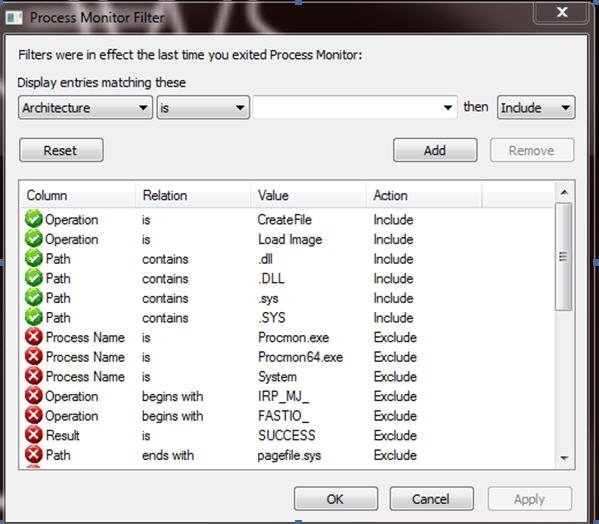
-
If a vulnerable path is being hit, you will see something that is similar to the following:

More Information
For more information, visit the following Microsoft webpages:Dynamic Link Library Search Order
http://msdn.microsoft.com/en-us/library/ms682586(VS.85).aspxMSDN documentation on the SearchPath function
http://msdn.microsoft.com/en-us/library/aa365527(VS.85).aspxMSDN documentation on the LoadLibrary function
http://msdn.microsoft.com/en-us/library/ms684175(VS.85).aspxMSDN documentation on the SetDllDirectory function
http://msdn.microsoft.com/en-us/library/ms686203(VS.85).aspxMSDN documentation on the SetSearchPathMode function
http://msdn.microsoft.com/en-us/library/dd266735(VS.85).aspxBlog post by David Leblanc, Principal Security Engineer with Microsoft Office
http://blogs.msdn.com/b/david_leblanc/archive/2008/02/20/dll-preloading-attacks.aspxBlog post by Andrew Roths, MSRC Engineering team on DLL preloading attacks








