
Summary
If you want to update Microsoft Security Essentials in a network that uses a proxy server, follow the steps below to configure your computer correctly.
More Information
Note Microsoft Security Essentials does not have a proxy configuration for updates. Therefore, you must configure the specific Internet options in Windows Internet Explorer. To do this, follow these steps:
-
Start Internet Explorer.
-
On the Tools menu, click Internet options.
-
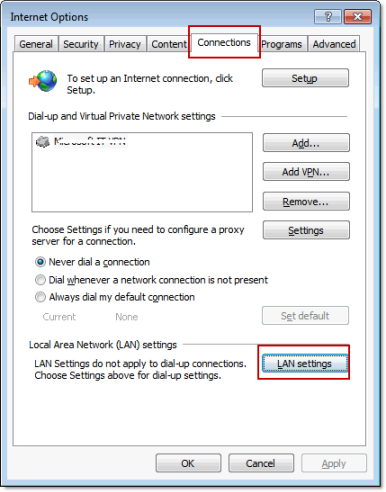
On the Connections tab, click LAN settings.
-
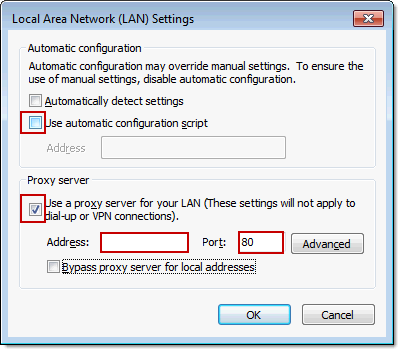
In the Local area network (LAN) settings dialog box, follow these steps:
-
Click to clear the Automatically detect settings check box.
-
Click to select the Use a proxy server for your LAN check box.
-
In the Address field, type the web address of the proxy server.
Note If you use an IP address for the proxy server, make sure that you do not include leading zeros. For example, use 130.25.0.1 instead of 130.025.000.001. -
In the Port field, type the port number that is assigned to the proxy server.
Important If you do not know the web address or port number of the proxy server, contact the network administrator. -
-
Update Microsoft Security Essentials again.








