
Filter for unique values or remove duplicate values

In Excel, there are several ways to filter for unique values—or remove duplicate values:
-
To filter for unique values, click Data > Sort & Filter > Advanced.

-
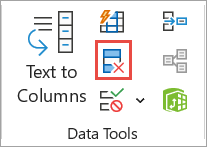
To remove duplicate values, click Data > Data Tools > Remove Duplicates.
-
To highlight unique or duplicate values, use the Conditional Formatting command in the Style group on the Home tab.
Filtering for unique values and removing duplicate values are two similar tasks, since the objective is to present a list of unique values. There is a critical difference, however: When you filter for unique values, the duplicate values are only hidden temporarily. However, removing duplicate values means that you are permanently deleting duplicate values.
A duplicate value is one in which all values in at least one row are identical to all of the values in another row. A comparison of duplicate values depends on the what appears in the cell—not the underlying value stored in the cell. For example, if you have the same date value in different cells, one formatted as "3/8/2006" and the other as "Mar 8, 2006", the values are unique.
Check before removing duplicates: Before removing duplicate values, it's a good idea to first try to filter on—or conditionally format on—unique values to confirm that you achieve the results you expect.
Follow these steps:
-
Select the range of cells, or ensure that the active cell is in a table.
-
Click Data > Advanced (in the Sort & Filter group).
Important: Insert alert text here.
-
In the Advanced Filter popup box, do one of the following:
To filter the range of cells or table in place:
-
Click Filter the list, in-place.
To copy the results of the filter to another location:
-
Click Copy to another location.
-
In the Copy to box, enter a cell reference.
-
Alternatively, click Collapse Dialog


-
Check the Unique records only, then click OK.
The unique values from the range will copy to the new location.
When you remove duplicate values, the only effect is on the values in the range of cells or table. Other values outside the range of cells or table will not change or move. When duplicates are removed, the first occurrence of the value in the list is kept, but other identical values are deleted.
Because you are permanently deleting data, it's a good idea to copy the original range of cells or table to another worksheet or workbook before removing duplicate values.
Follow these steps:
-
Select the range of cells or ensure that the active cell is in a table.
-
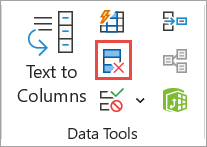
On the Data tab, click Remove Duplicates (in the Data Tools group).
-
Do one or more of the following:
-
Under Columns, select one or more columns.
-
To quickly select all columns, click Select All.
-
To quickly clear all columns, click Unselect All.
If the range of cells or table contains many columns and you want to only select a few columns, you may find it easier to click Unselect All, and then under Columns, select those columns.
Note: Data will be removed from all columns, even if you don't select all the columns at this step. For example, if you select Column1 and Column2, but not Column3, then the “key” used to find duplicates is the value of BOTH Column1 & Column2. If a duplicate is found in those columns, then the entire row will be removed, including other columns in the table or range.
-
-
Click OK, and a message will appear to indicate how many duplicate values were removed, or how many unique values remain. Click OK to dismiss this message.
-
Undo the change by click Undo (or pressing Ctrl+Z on the keyboard).
You cannot remove duplicate values from outline data that is outlined or that has subtotals. To remove duplicates, you must remove both the outline and the subtotals. For more information, see Outline a list of data in a worksheet and Remove subtotals.
Note: You cannot conditionally format fields in the Values area of a PivotTable report by unique or duplicate values.
Tip: When using the "Duplicate Values" formatting rule, if the "Office authoring languages and proofing" setting is set to a language that uses Double-byte character set (DBCS) encoding, such as Japanese, halfwidth and fullwidth characters are treated the same. If you need to differentiate between them, you can use the "Use a formula to determine where this formula is true" rule type with a COUNTIF formula. For example, to identify duplicate values in the range A2:A400, apply the formula "=COUNTIF($A$2:$A$400,A2)> 1" for conditional formatting.
Quick formatting
Follow these steps:
-
Select one or more cells in a range, table, or PivotTable report.
-
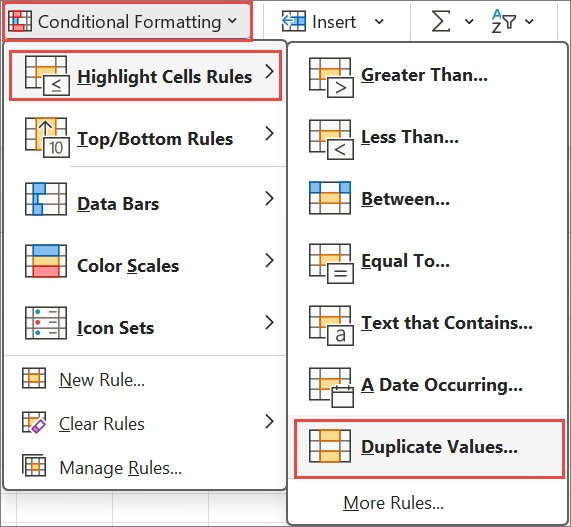
On the Home tab, in the Style group, click the small arrow for Conditional Formatting, and then click Highlight Cells Rules, and select Duplicate Values.
Important: Insert alert text here.
-
Enter the values that you want to use, and then choose a format.
Advanced formatting
Follow these steps:
-
Select one or more cells in a range, table, or PivotTable report.
-
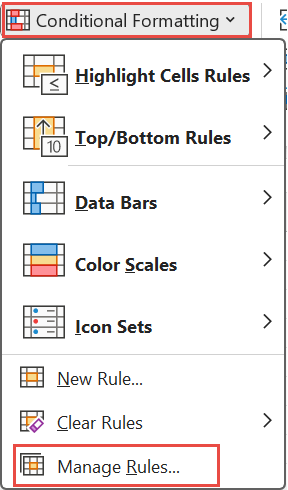
On the Home tab, in the Styles group, click the arrow for Conditional Formatting, and then click Manage Rules to display the Conditional Formatting Rules Manager popup window.
Important: Insert alert text here.
-
Do one of the following:
-
To add a conditional format, click New Rule to display the New Formatting Rule popup window.
-
To change a conditional format, begin by ensuring that the appropriate worksheet or table has been chosen in the Show formatting rules for list. If necessary, choose another range of cells by clicking Collapse
-
-
Under Select a Rule Type, click Format only unique or duplicate values.
-
In the Format all list of Edit the Rule Description, choose either unique or duplicate.
-
Click Format to display the Format Cells popup window.
-
Select the number, font, border, or fill format that you want to apply when the cell value satisfies the condition, and then click OK. You can choose more than one format. The formats that you select are displayed in the Preview panel.
In Excel for the web, you can remove duplicate values.
Remove duplicate values
When you remove duplicate values, the only effect is on the values in the range of cells or table. Other values outside the range of cells or table will not change or move. When duplicates are removed, the first occurrence of the value in the list is kept, but other identical values are deleted.
Important: You can always click Undo to get back your data after you have removed the duplicates. That being said, it's a good idea to copy the original range of cells or table to another worksheet or workbook before removing duplicate values.
Follow these steps:
-
Select the range of cells, or ensure that the active cell is in a table.
-
On the Data tab, click Remove Duplicates .
-
In the Remove Duplicates dialog box, unselect any columns where you don't want to remove duplicate values.
Note: Data will be removed from all columns, even if you don't select all the columns at this step. For example, if you select Column1 and Column2, but not Column3, then the “key” used to find duplicates is the value of BOTH Column1 & Column2. If a duplicate is found in Column1 and Column2, then the entire row will be removed, including data from Column3.
-
Click OK, and a message will appear to indicate how many duplicate values were removed. Click OK to dismiss this message.
Note: If you want to get back your data, simply click Undo (or press Ctrl+Z on the keyboard).
Need more help?
You can always ask an expert in the Excel Tech Community or get support in Communities.
See Also


Need more help?
Want more options?
Explore subscription benefits, browse training courses, learn how to secure your device, and more.




Communities help you ask and answer questions, give feedback, and hear from experts with rich knowledge.


