
Summary
The Microsoft Office Configuration Analyzer Tool (OffCAT) was removed from the Microsoft Download Center on June 11, 2018.
The Outlook scanning functionality of OffCAT is available in the Microsoft Support and Recovery Assistant for Office 365 (SaRA) tool. SaRA offers several improvements, including the ability to identify and fix specific issues in Outlook, Office Setup, OneDrive for Business, and several other Office programs. You can use the SaRA tool is used to scan for issues in Outlook.
For more information, see How to scan Outlook by using the Microsoft Support and Recovery Assistant tool.
More Information
-
Where can I get more information about the Support and Recovery Assistant (SaRA)?
Complete details about how to scan Outlook for known issues or configuration information are available in How to scan Outlook by using the Microsoft Support and Recovery Assistant tool. -
Do I need an Office 365 account to run SaRA?
To scan Outlook for known issues and to create a detailed report of your Outlook configuration, you do not need an Office 365 account. However, for most of the other scenarios provided in SaRA, you will need an Office 365 account. -
Will OffCAT be uninstalled during the SaRA installation?
If it’s already installed, OffCAT will not be automatically uninstalled when you install SaRA. OffCAT and SaRA use completely separate installations.
To uninstall OffCAT, follow these steps:-
Close all open Office programs.
-
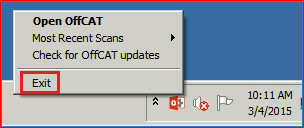
Right-click the OffCAT icon in the notification area, and then click Exit.
-
Open Control Panel.
-
In Control Panel under Programs, click Uninstall a program.
-
In the list of programs, select Microsoft Office Configuration Analyzer Tool 2.2, and then click Uninstall.
-
Click Yes to confirm that you want to uninstall Microsoft Office Configuration Analyzer Tool 2.2.
-
-
Will OffCAT rules continue to be updated?
Updated OffCAT rules will continue to be published to the Internet until August 31, 2018. After this date, OffCAT will continue to function, but your scan results may be out-of-date. -
Will I still be able to view existing OffCAT scans?
Yes. As long as you have OffCAT installed, you can view any scan. -
Which OffCAT features are not found today in SaRA?
-
ROIScan
The ROIScan tool is available here. -
CalCheck
See Information about the Calendar Checking Tool for Outlook (CalCheck). -
OffCAT add-in
-
Command-line version
-
Scanning Office applications other than Outlook
If you troubleshoot issues by using other Office applications, we recommend these alternative resources:Note Detailed configuration information for Excel, PowerPoint, and Word is available under the Miscellaneous section of the Outlook scan report created by SaRA.
-
KMS client activation
To troubleshoot KMS activation issues, we recommend these alternative resources: -
Real-time logging
-
-
How do I request features for SaRA?
We hope that SaRA can detect and possibly provide a fix for your Outlook issue. Regardless of the outcome, you can suggest features when you see the survey at the end of the scenario.








