
Symptoms
Consider the following scenario:
-
You install Windows 8.
-
You change the Hosts file by specifying custom IP-address-to-host-name mappings to prevent users from browsing to some websites.
-
You run a scan in Microsoft Windows Defender.
In this scenario, the Hosts file is detected as a SettingsModifier:Win32/PossibleHostsFileHijack malware threat by Windows Defender.
Cause
This issue occurs because Windows Defender may determine incorrectly that the Hosts file was changed by malware, such as adware or spyware. Typically, malware programs change the Hosts file to redirect users to malicious websites. Therefore, Windows Defender may detect the Hosts file as a security threat.
Resolution
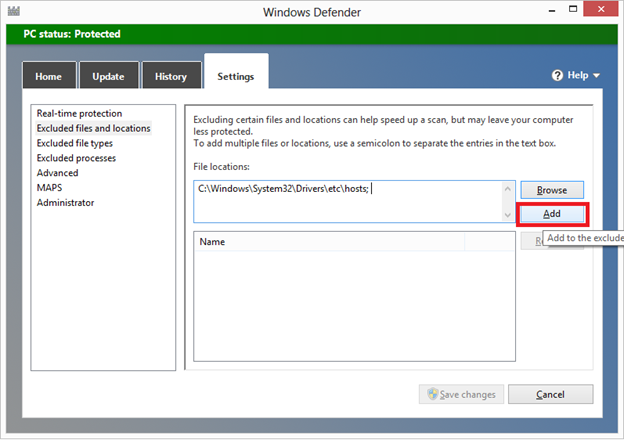
To resolve this issue, exclude the Hosts file from scanning in Windows Defender. To do this, follow these steps:
-
Open Windows Defender.
-
On the Settings tab, click Excluded files and locations.
-
Under File locations, click Browse.
-
Locate and then click the Hosts file.
Note By default, the Hosts file is located in the %systemroot%\system32\drivers\etc folder. -
Click Add, and then click Save changes.
-
Exit Windows Defender.
References
For more information about the SettingsModifier:Win32/PossibleHostsFileHijack malware threat, go to the following Microsoft Malware Protection Center encyclopedia entry:
SettingsModifier:Win32/PossibleHostsFileHijack
For information about how to reset the Hosts file to the default settings, click the following article number to go to the article in the Microsoft Knowledge Base:
972034 How can I reset the Hosts file back to the default?








