
Symptoms
As you add recipients to a new email message, Microsoft Outlook does not automatically suggest complete email addresses. You notice that after you send an email message to specific recipients, Outlook does not add those recipients to the Auto-Complete cache.
Cause
The Auto-Complete cache may be corrupted. When this occurs, Outlook may be unable add new recipients to the cache. If recipients are not added to the cache, Outlook cannot make a suggestion to automatically complete the email address.
Resolution
First, make sure that the Auto-Complete feature is enabled. To do this, follow these steps:
Outlook 2013 or Outlook 2010
-
Click File, and then click Options.
-
Select the Mail tab.
-
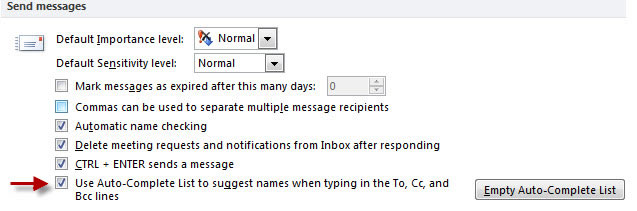
Scroll approximately halfway down until you see Send messages. Make sure that the Use Auto-Complete List to suggest names when typing in the To, Cc, and Bcc lines box is checked. The screen shot for this step is listed below).
Outlook 2007
-
Click Tools, and then click Options.
-
Click the E-mail options button.
-
Click the Advanced E-mail Options button.
-
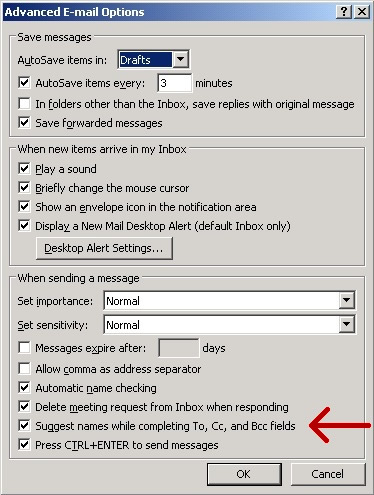
Make sure that the Suggest names while completing To, Cc, and Bcc fields box is checked. (The screen shot for this step is listed below).
If the Auto-Complete feature is enabled and you are experiencing the behavior that is mentioned in the "Symptoms" section, the Auto-Complete cache may be damaged. The Auto-Complete cache cannot be repaired. It must be deleted.
For more information about clearing the Auto-Complete cache, click the following article number to view the article in the Microsoft Knowledge Base:
287623 How to reset the nickname and the automatic completion caches in Outlook Note The steps in the article clears all recipients previously written to the cache.
More Information
Microsoft Outlook maintains a nickname cache that is used by both the automatic name checking feature and the AutoComplete feature. The nickname list is automatically generated as you send email messages from Outlook.








