
If you've imported contacts from multiple sources or inherited someone else's contact list, you might have duplicate contacts stored in Outlook. When you import new contacts from an external source like iCloud or Gmail, Outlook checks for duplicates and lets you choose whether to create a new contact record (a duplicate) or merge the duplicate contacts.
Unfortunately, once you have duplicate contacts in your contact folders, there is no automated process to remove them. However, you can export all of your contacts to a file, then re-import them into Outlook and take advantage of the built-in duplicate checking features.
If you only have a couple of duplicate contacts, you can sort your contact list and delete them manually, as described below.
Delete duplicate contacts one at a time
-
Click People.

-
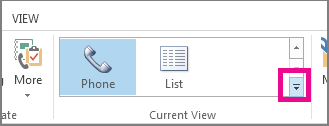
On the Home tab of the Ribbon, in the Current View group, click the bottom right corner of the views box, and then click Phone. This is the easiest view to use to scan your contact list for duplicates.
-
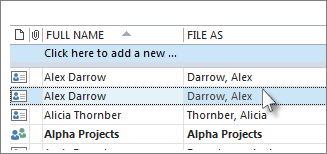
In your list of contacts, hold down Ctrl and click each contact you want to delete.
-
When you've selected all the duplicates, press Delete or Ctrl+D.
Delete a large number of duplicate contacts by using export and import
If you have a large number of duplicate contacts, deleting the duplicates one by one can be tedious and time-consuming. The fastest way to delete a large number of duplicate contacts is to export them to a file, then import them into a new folder. To take advantage of the duplicate detection feature in the Outlook import process, use the following steps:
-
Click People.
-
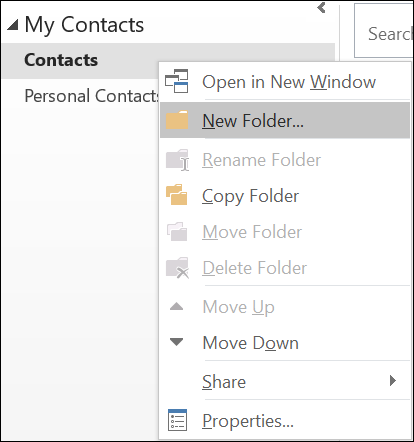
Right-click on your current Contacts folder and select New Folder.
-
Give your new folder a name, for example Duplicates.
-
Click back into your main Contacts folder.
-
Press Ctrl+A to select all of your contacts.
-
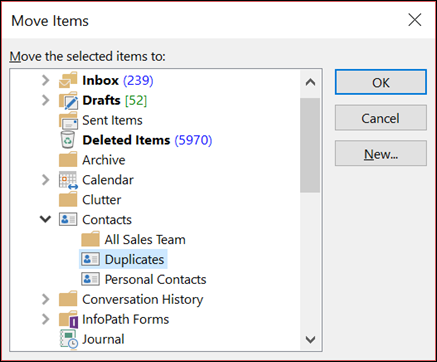
Either drag and drop your contacts into the Duplicates folder or use Ctrl+Shift+V to open the Move to Folder dialog and select your Duplicates folder.
-
Your primary contacts folder should now be empty.
-
Select File > Open & Export > Import/Export.
Note: In Outlook 2010, select File > Open > Export and skip to step 10.

-
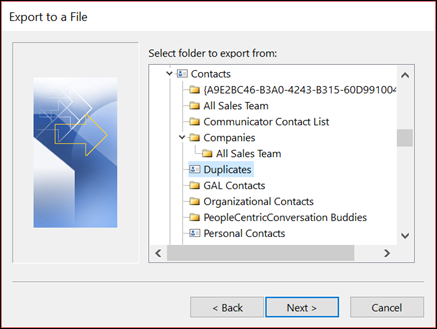
Select Export to a File.
-
Select Comma Separated Values (Windows).
-
Select the Duplicates folder you created in Step 3.
-
Save the file somewhere you'll be able to find it again.
-
Click Finish.
Import your contacts back into Outlook
-
Select File > Open & Export > Import/Export.
Note: In Outlook 2010, select File > Open > Import and skip to step 3.
-
Select Import from another program or file.
-
Select Comma Separated Values (Windows).
-
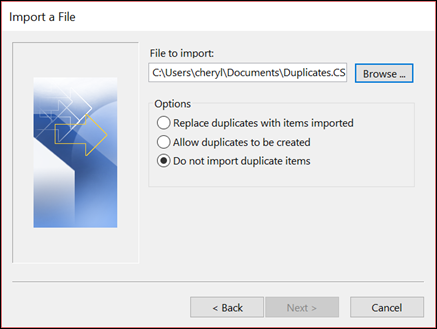
Browse to find the file you created in the procedure above.
-
Select the option Do not import duplicate items.
-
Choose your main contacts folder as the destination folder. This is the folder that is currently empty.
-
Select Finish.
Copy the contacts from the Duplicates folder back into your main Contacts folder
-
Select the Duplicates contact folder.
-
Single-click one of the contacts in the folder, then press Ctrl+A to select all of the contacts.
-
Move the selected contacts into your main Contacts folder. You can drag and drop them or press Ctrl+Shift+V to use the Move to Folder dialog box.
-
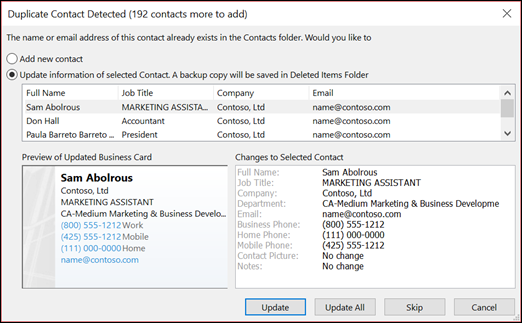
Every time Outlook encounters a duplicate contact, you'll see a prompt with two choices.
-
Select Add new contact if the contact isn't a duplicate.
-
Select Update information of selected contact if the contact is a duplicate.
Once you've made your choice, select Update. If you want to repeat the same choice for all duplicated contacts, select Update All.
-
-
When the move to folder process is done, you can delete the Duplicates folder.








