
Summary
Microsoft Outlook 2016, Outlook 2013, Outlook 2010, Outlook 2007, and Outlook 2003 support American National Standards Institute (ANSI) and UNICODE personal folders (.pst) and offline folder (.ost) files. This article describes how to use the following four registry entries to limit the size of both the .pst and the .ost files:
-
The MaxFileSize registry entry
-
The WarnFileSize registry entry
-
The MaxLargeFileSize registry entry
-
The WarnLargeFileSize registry entry
Note The WarnLargeFileSize and WarnFileSize registry entries do not enable Outlook to warn you before the file size limit is reached.
The MaxFileSize registry entry
The MaxFileSize registry entry determines the absolute maximum size that both the .pst and the .ost files can grow to. After this maximum size is reached, Outlook does not permit the size of the file to grow beyond this size.
The WarnFileSize registry entry
The WarnFileSize registry entry determines the maximum data that both the .pst and the .ost files can have. After this maximum data is reached, neither the .pst nor the .ost files are permitted to add any more data. However, the size of the physical file may still increase because of internal processes.
In the following table, the MaxLargeFileSize registry entry and the WarnLargeFileSize registry entry refer to a UNICODE formatted (new Large format) file, and the MaxFileSize registry entry and the WarnFileSize registry entry refer to an ANSI formatted (an earlier Microsoft Outlook format) file. The UNICODE values are set in megabyte (MB) increments, while the ANSI values are set in byte increments.
Outlook 2016, 2013, and 2010
|
Name |
Type |
Valid Data Range |
Default |
|---|---|---|---|
|
MaxLargeFileSize |
REG_DWORD |
0x00000001 – 0x0000C800 |
0x0000C800 51,200 (50 GB) |
|
WarnLargeFileSize |
REG_DWORD |
0x00000000 – 0x0000BE00 |
0x0000BE00 48,640 (47.5 GB) |
|
MaxFileSize |
REG_DWORD |
0x001F4400 – 0x7C004400 |
0x7BB04400 2,075,149,312 (1.933 GB) |
|
WarnFileSize |
REG_DWORD |
0x00042400 – 0x7C004400 |
0x74404400 1,950,368,768 (1.816 GB) |
Outlook 2007 and Outlook 2003
|
Name |
Type |
Valid Data Range |
Default |
|---|---|---|---|
|
MaxLargeFileSize |
REG_DWORD |
0x00000001 – 0x0000C800 |
0x00005000 20,480 (20 GB) |
|
WarnLargeFileSize |
REG_DWORD |
0x00000000 – 0x0000BE00 |
0x00004C00 19,456 (19 GB) |
|
MaxFileSize |
REG_DWORD |
0x001F4400 – 0x7C004400 |
0x7BB04400 2,075,149,312 (1.933 GB) |
|
WarnFileSize |
REG_DWORD |
0x00042400 – 0x7C004400 |
0x74404400 1,950,368,768 (1.816 GB) |
|
Office Version |
The policy location for the registry entries is located in the following path in Registry Editor |
The user preference location for the registry entries is located in the following path in Registry Editor |
|---|---|---|
|
Outlook 2013 |
HKEY_CURRENT_USER\Software\Policies\Microsoft\Office\15.0\Outlook\PST |
HKEY_CURRENT_USER\Software\Microsoft\Office\15.0\Outlook\PST |
|
Outlook 2010 |
HKEY_CURRENT_USER\Software\Policies\Microsoft\Office\14.0\Outlook\PST |
HKEY_CURRENT_USER\Software\Microsoft\Office\14.0\Outlook\PST |
|
Outlook 2007 |
HKEY_CURRENT_USER\Software\Policies\Microsoft\Office\12.0\Outlook\PST |
HKEY_CURRENT_USER\Software\Microsoft\Office\12.0\Outlook\PST |
|
Outlook 2003 |
HKEY_CURRENT_USER\Software\Policies\Microsoft\Office\11.0\Outlook\PST |
HKEY_CURRENT_USER\Software\Microsoft\Office\11.0\Outlook\PST |
|
Outlook 2016 |
HKEY_CURRENT_USER\Software\Policies\Microsoft\Office\16.0\Outlook\PST |
HKEY_CURRENT_USER\Software\Microsoft\Office\16.0\Outlook\PST |
More Information
Follow these steps to configure the size limit for both the .pst and the .ost files.
Note The settings that are discussed in this article apply to both .ost and .pst files. If you modify these registry values, this can affect .ost files that are used with Cached Exchange Mode, with AutoArchive, and with .pst. files. If Outlook is configured to download shared folders, the contents of shared folders are stored in the local Offline Outlook Data (.ost) file. If the shared folders contain many items or large attachments, the size of the .ost file may grow significantly. Additionally, Outlook 2013 introduced support for Site Mailboxes. If an Outlook 2013 client is working in a Microsoft Exchange Server 2013/Microsoft SharePoint 2013 environment and is granted permission to a site mailbox, the site mailbox is automatically added to the Outlook 2013 profile. If Download Shared Folders is enabled, the site mailbox contents are synchronized to the local .ost file. This can result in the .ost file exceeding the set limit. For more information about the Download Shared Folders setting in Outlook, click the following article number to view the article in the Microsoft Knowledge Base:
982697 By default, shared mail folders are downloaded in Cached mode in Outlook 2010 and Outlook 2013
Important This section, method, or task contains steps that tell you how to modify the registry. However, serious problems might occur if you modify the registry incorrectly. Therefore, make sure that you follow these steps carefully. For added protection, back up the registry before you modify it. Then, you can restore the registry if a problem occurs. For more information about how to back up and restore the registry, click the following article number to view the article in the Microsoft Knowledge Base:
322756 How to back up and restore the registry in Windows
-
Click Start, and then click
Run. -
In the Open box, type
regedit, and then click OK. -
In the left pane, expand My Computer, and then expand HKEY_CURRENT_USER.
-
Expand Software, and then expand
Policies. -
Expand Microsoft, and then expand
Office. -
Expand 11.0 for Outlook 2003, 12.0 for Outlook 2007, or 14.0 for Outlook 2010, 15.0 for Outlook 2013, or 16.0 for Outlook 2016, and then expand Outlook.
-
Click PST, and then right-click
MaxFileSize in the right pane. -
Click Modify, and then type the value in the Value data box.
-
Click OK.
-
Right-click WarnFileSize, and repeat steps 8 through 9.
-
Right-click MaxLargeFileSize, and repeat steps 8 through 9.
-
Right-click WarnLargeFileSize, and repeat steps 8 through 9.
Note You may have to create the registry values if they do not exist. If the registry values do not exist, follow these steps to create them.
-
Click Start, click Run, type Regedit, and then click OK.
-
In the left pane, expand the following registry key:
For Outlook 2016HKEY_CURRENT_USER\Software\Policies\Microsoft\Office\16.0\Outlook For Outlook 2013
HKEY_CURRENT_USER\Software\Policies\Microsoft\Office\15.0\Outlook
For Outlook 2010HKEY_CURRENT_USER\Software\Policies\Microsoft\Office\14.0\Outlook
For Outlook 2007HKEY_CURRENT_USER\Software\Policies\Microsoft\Office\12.0\Outlook
For Outlook 2003HKEY_CURRENT_USER\Software\Policies\Microsoft\Office\11.0\Outlook
-
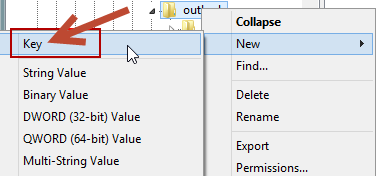
Right click Outlook, point to New, and then click Key. (The screen shot for this step is listed below).
-
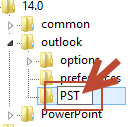
Type PST, and then press ENTER. (The screen shot for this step is listed below).
-
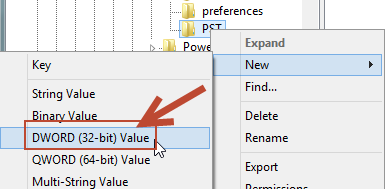
Right click PST, point to New, and then click DWORD value. (The screen shot for this step is listed below).
-
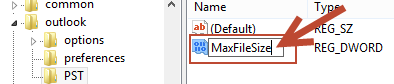
Type MaxFileSize, and then press ENTER twice. (The screen shot for this step is listed below).
-
In the Edit DWORD Value window, choose Decimal and type the value in the Value data box, and then click OK.
Note 1GB=1*1024*1024*1024byte; 1MB=1*1024*1024byte; 1KB=1*1024byte, the example below is for 1GB. (The screen shot for this step is listed below).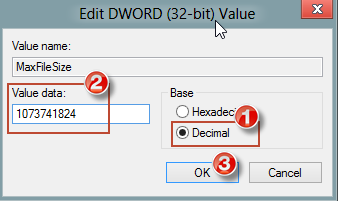
-
Repeat steps 3 through 7 to create another DWORD WarnFileSize.
-
Repeat steps 3 through 7 to create another DWORD MaxLargeFileSize.
-
Repeat steps 3 through 7 to create another DWORD WarnLargeFileSize, and then close the registry.
Note For mass deployment of these registry keys on end-user machines, the ORK tool can be used.
To automate the registry creation on end-user machines, use ORK for deployment scenarios.
It is recommended that the values between the MaxFileSize registry entry and the WarnFileSize registry entry, and the values between the MaxLargeFileSize registry entry and the WarnLargeFileSize registry entry be at least 5 percent (%) so that internal processes are not hindered from continuing.
If the value of the MaxFileSize registry entry ever exceeds the ANSI 2 gigabyte (GB) limit on either the .pst or the .ost files, the value will be ignored to limit the size to 2 GB to prevent corruption. The default value for the WarnFileSizeregistry registry entry is calculated to be 95% of the MaxFileSize registry entry for a UNICODE file, and it remains at 1,950,368,768 bytes for small ANSI files.
Note You can set the UNICODE limits beyond the values that are listed in the table. However, we do not recommend doing this because performance can decrease.
If .ost files or .pst files reach the limit that is specified in the WarnFileSize or the WarnLargeFileSize registries, the compaction function is triggered to try to reduce the size of the file to a usable level. When the WarnFileSize or the WarnLargeFileSize limit is reached, e-mail messages cannot be sent (provided that sent e-mail messages are stored in the Sent Items folder), and items cannot be copied or moved within the file. If the file is an archive .pst file that is used for AutoArchive, the AutoArchive operation will fail. However, e-mail messages can be deleted or archived from a .pst or from an .ost file that is currently being used as the default delivery location.
The following are some of the errors that may occur when files reach the maximums specified in the registries:
-
When you try to move items to a .pst or an .ost file that has reach the limit, you receive the following error message:
Can't move the items. The file <path>\<filename>.pst has reached its maximum size. To reduce the amount of data in this file, select some items that you no longer need, and then permanently delete them.
-
When e-mail messages are delivered to a .pst or an .ost file that are using Cached Exchange Mode, and the file has reached the limit, the Mailbox Cleanup wizard launches.








