
Symptoms
When you press a function key on a Microsoft keyboard, the function key does not work as expected. Alternatively, certain keys do not work when you press them. These keys may include the following:
-
The NUM LOCK key
-
The INSERT key
-
The PRINT SCREEN key
-
The SCROLL LOCK key
-
The BREAK key
-
The F1 key through the F12 FUNCTION keys
Note This article only described and resoved the issue on a Microsoft keyboard which equipped with an F LOCK toggle key, issue with other types of keyborad may not applied to this article.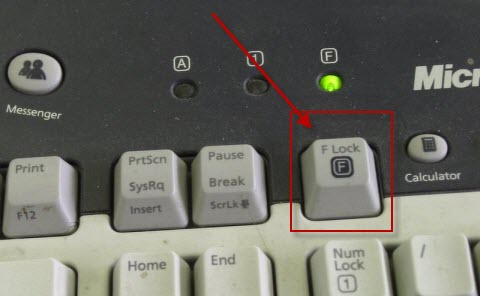
Cause
This behavior may occur if the keyboard is equipped with an F LOCK toggle key, and the F LOCK key has been turned on.
Depending on the keyboard model, the following keys may be alternate function keys:
-
NUM LOCK
-
INSERT
-
PRINT SCREEN
-
SCROLL LOCK
-
BREAK
-
F1 through F12 FUNCTION
The F LOCK key toggles the alternate function keys. An alternate function key is a key that has two possible commands depending on the F LOCK toggle key state.
Workaround
To work around this behavior, press the F LOCK key. The F LOCK key switches between the standard function key commands and the Microsoft keyboard enhanced command.
More Information
Alternate command keys give the keyboard additional functionality by providing two command modes for the top row of standard F LOCK keys.
The F LOCK key and the alternate command keys are available on certain keyboard models only, and the types of alternate commands that are available vary depending on the keyboard model.
The F LOCK key switches between the standard commands that are labeled on the front of the keys, such as F1 or INSERT, and the alternate commands that may or may not be labeled on the keys. When the F LOCK light is on, the F LOCK key is on and these keys perform their standard commands. When the F LOCK light is off, the alternate commands are enabled. You can choose the mode that you prefer to work in, or you can switch the F LOCK key on and off to access the commands that you use most frequently.
The F1 through F12 FUNCTION keys have special alternate commands. These keys are called enhanced function keys. Enhanced function keys provide quick access to frequently used commands that can increase your productivity. These commands are typically printed above or on the keys.
The following table specifies the default enhanced-function key assignments that are available for Microsoft keyboards. However, you can reassign many of the keys by using the Microsoft IntelliType Pro keyboard software. Keyboards differ in what additional keys they provide. For example some keyboards provide keys for such things as Calculator, Volume control, Internet Home page, Internet Search page, Mail, and so on.
|
Enhanced function key |
What it does |
|---|---|
|
Close |
F6: Closes the document or the file in the active window. |
|
Forward |
F8: Forwards the e-mail in the active window. |
|
Function Lock (F LOCK) |
Switches between the standard function key commands (F LOCK light on) and the Microsoft keyboard enhanced commands (F LOCK light off). Leave it on or off, or alternate between modes for increased key press functionality. |
|
Help |
F1: Opens the Help system for the active window. |
|
New |
F4: Creates a new document in programs that support this command. |
|
Office Home |
Starts the Web browser and goes to the Microsoft Office Web site. (This is not available on all keyboards.) |
|
Open |
F5: Opens a document in programs that support this command. |
|
|
F12: Prints the file in the active window. |
|
Redo |
F3: Cancels the previous undo action. |
|
Reply |
F7: Replies to the e-mail in the active window. |
|
Save |
F11: Saves the file in the active window. |
|
Send |
F9: Sends the e-mail in the active window. |
|
Spell |
F10: Starts the spell checking program in the active document, if the document's program has this feature. |
|
Task Pane |
Shows or hides the Office task pane that was previously displayed. (This is not available on all keyboards.) |
|
Undo |
F2: Cancels the previous action. |
To download the latest software for the keyboard, visit the following Microsoft Web site:








