
The customizable Quick Access Toolbar contains a set of commands that are independent of the currently displayed tab on the ribbon. You can move the Quick Access Toolbar from one of the two possible locations, and you can add buttons that represent commands to the Quick Access Toolbar.

Notes:
-
You cannot increase the size of the buttons representing the commands by an option in Microsoft Office. The only way to increase the size of the buttons is to lower the screen resolution you use.
-
You cannot display the Quick Access Toolbar on multiple lines.
-
Only commands can be added to the Quick Access Toolbar. The contents of most lists, such as indent and spacing values and individual styles, which also appear on the ribbon, cannot be added to the Quick Access Toolbar. However, you can Customize the ribbon in Office to personalize the ribbon the way that you want it. For example, you can create custom tabs and custom groups to contain your frequently used commands.
What do you want to do?
Show or hide the Quick Access Toolbar
Right-click in the ribbon and do either of the following:
-
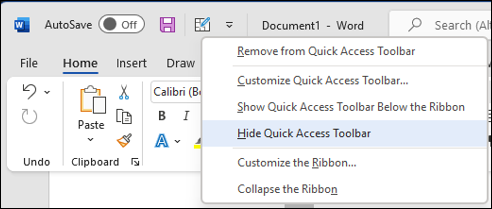
If the Quick Access Toolbar is shown, select Hide Quick Access Toolbar.
-
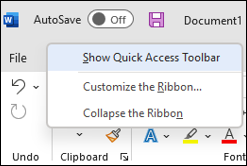
If the Quick Access Toolbar is hidden, select Show Quick Access Toolbar.
Note: You can also hide the Quick Access Toolbar in the Customize Quick Access Toolbar menu by selecting Hide Quick Access Toolbar.
Move the Quick Access Toolbar
Location
The Quick Access Toolbar can be located in one of two places:
-
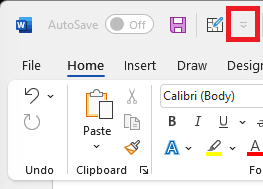
Above the ribbon, on the title bar (default location)
-
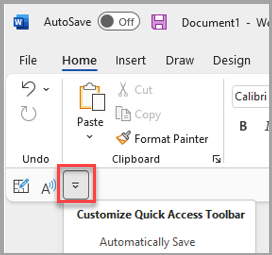
Below the ribbon
Change the location
You can move the location of the Quick Access Toolbar from one location to another.
-
Select Customize Quick Access Toolbar.
-
In the list, select Show Below the Ribbon.
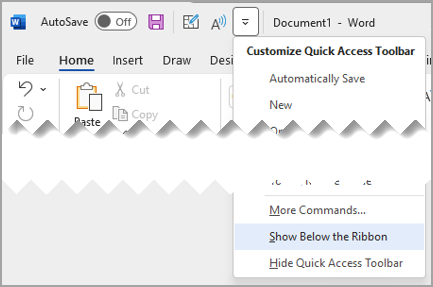
or Show Above the Ribbon.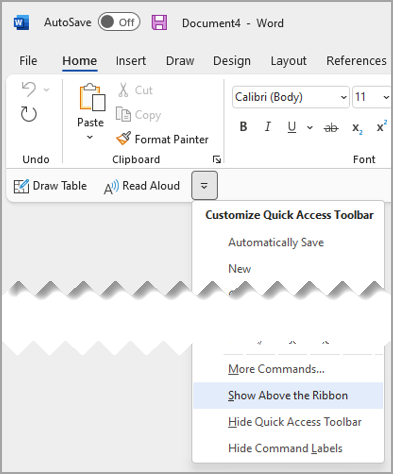
Notes:
-
You can set the location commands in Options.
-
Select File > Options > Quick Access Toolbar>Toolbar Position.
-
Show or Hide command labels on the Quick Access Toolbar
If the Quick Access Toolbar is set below the ribbon, you can show or hide the command labels.
Important: The Quick Access Toolbar MUST be set below the ribbon to show or hide the command labels.
-
Select Customize Quick Access Toolbar.
-
In the list, select either Show Command Labels
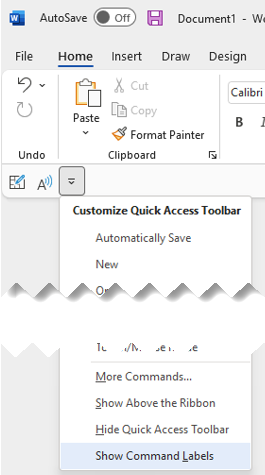
or Hide Command Labels.

Add a command to the Quick Access Toolbar
-
On the ribbon, select the appropriate tab or group to display the command that you want to add to the Quick Access Toolbar.
-
Right-click the command, and then select Add to Quick Access Toolbar on the shortcut menu.
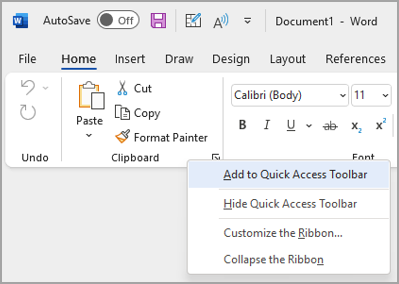
Add a command to the Quick Access Toolbar that isn’t on the ribbon
-
Select Customize Quick Access Toolbar > More Commands.
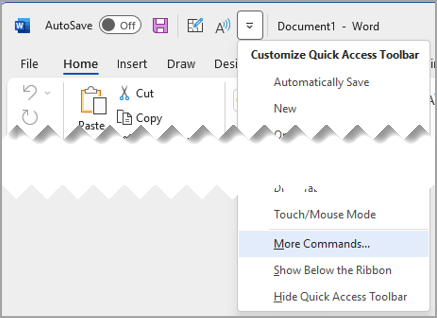
-
In the Choose commands from list, select Commands Not in the Ribbon.
-
Find the command in the list, and then select Add.
Tip: If you can't find the command you want on the Commands Not in the Ribbon list, try setting Choose commands from to All commands.
Remove a command from the Quick Access Toolbar
-
Right-click the command you want to remove from the Quick Access Toolbar.
-
Select Remove from Quick Access Toolbar on the shortcut menu.
Change the order of the commands on the Quick Access Toolbar
-
Right-click the Quick Access Toolbar then select Customize Quick Access Toolbar on the shortcut menu.
-
Under Customize Quick Access Toolbar, select the command you want to move.
-
Select the Move Up or Move Down arrow.
Customize the Quick Access Toolbar by using the Options command
You can add, remove, and change the order of the commands on the Quick Access Toolbar by using the Options command.
-
Select File > Options > Quick Access Toolbar.
-
Use the Add and Remove buttons to move items between the Customize the657 Access Toolbar list and the Choose command from list.
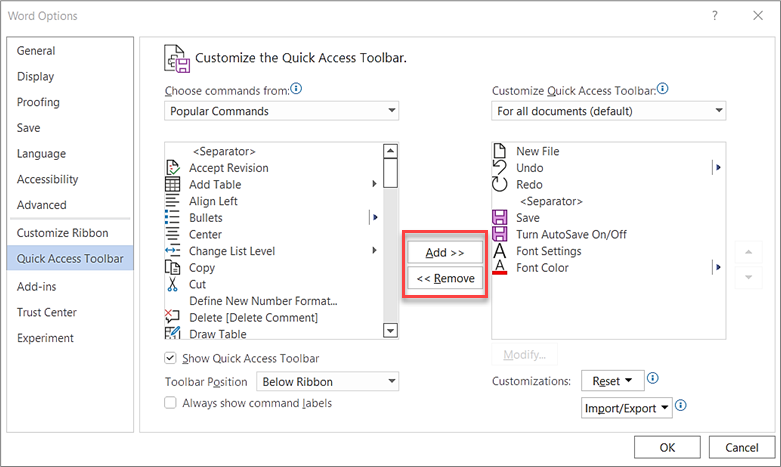
Notes: To find an item in the Choose commands from list, it may be helpful to first confirm its location and name within the app. Commands that are no longer visible in the app could still be listed here under All commands. To help identify this type of command, a more descriptive tooltip name may appear in parentheses next to the legacy command name in this form:
-
Address [Document Location]
-
Formatting [Paste Formatting]
-
Formulas [Paste Formulas]
-
Values [Paste Values]
Reset the Quick Access Toolbar to the default settings
-
-
Open the Quick Access Toolbar short-cut menu, and then select Customize Quick Access Toolbar.
-
In the Customize the Quick Access Toolbar window, select Reset > Reset only Quick Access Toolbar.
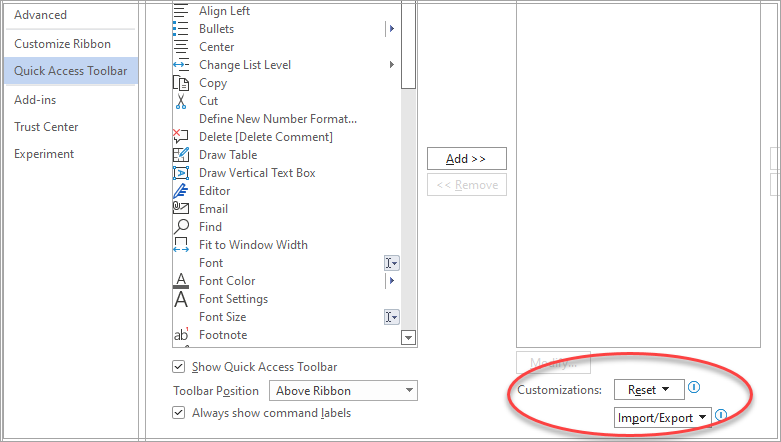
Export a customized Quick Access Toolbar
You can export your ribbon and Quick Access Toolbar customizations into a file that can be imported and used by a coworker or on another computer.
-
Select File > Options > Quick Access Toolbar.
-
Select Import/Export > Export all customizations.
For more information about how to customize the ribbon, see Customize the ribbon in Office.
Import a customized Quick Access Toolbar
You can import customization files to replace the current layout of the ribbon and Quick Access Toolbar. By being able to import the customization, you can keep Microsoft Office programs looking the same as your coworkers or from computer to computer.
Important: When you import a ribbon customization file, you lose all prior ribbon and Quick Access Toolbar customizations. If you think that you might want to revert to the customization you currently have, you should export them before importing any new customizations.
-
Select File > Options > Quick Access Toolbar.
-
Select Import/Export > Import customization file.
For more information about how to customize the ribbon, see Customize the ribbon in Office.
When custom groups show a green or blue ball on the Quick Access Toolbar
Icons represent custom groups of commands on the Quick Access Toolbar when an icon is chosen. If a custom group on the Quick Access Toolbar displays a green or blue ball for an icon, it means that an icon has not been selected for that custom group. You can add an icon for a custom group after the group has already been created and displays on the Quick Access Toolbar.
-
In the Quick Access Toolbar drop-down, select More Commands.
-
In the left navigation bar, select Customize Ribbon.
-
In the Customize the Ribbon column on the right, select the custom group.
-
Select Rename.
-
Select an icon.
-
Select OK > OK.
Note: To create a custom group of commands, refer to Customize the ribbon in Office.








