
Bug: #50003826 (SQL Hotfix)
Microsoft distributes Microsoft SQL Server 2008 fixes as one downloadable file. Because the fixes are cumulative, each new release contains all the hotfixes and all the security fixes that were included with the previous SQL Server 2008 fix release.
Symptoms
In SQL Server 2008, you run a query that inserts data into a temporary table. The insert statement contains a subquery that references the same temporary table. When you run the query, you may receive an error message that resembles the following:
Msg 605, Level 21, State 3, Line 1
Attempt to fetch logical page (1:225) in database 2 failed. It belongs to allocation unit 281474980315136 not to 504403158513025024.
If you run the query again, you receive an error message that resembles the following:
Msg 824, Level 24, State 2, Line 1
SQL Server detected a logical consistency-based I/O error: incorrect checksum (expected: 0x50758180; actual: 0x15658bfc). It occurred during a read of page (1:336) in database ID 2 at offset 0x000000002a0000 in file 'C:\Program Files\Microsoft SQL Server\MSSQL10.SQL2008\MSSQL\DATA\tempdb.mdf'. Additional messages in the SQL Server error log or system event log may provide more detail. This is a severe error condition that threatens database integrity and must be corrected immediately. Complete a full database consistency check (DBCC CHECKDB). This error can be caused by many factors; for more information, see SQL Server Books Online.
In some cases, you may also receive an error message that resembles the following:
Msg 601, Level 12, State 3, Procedure procedure name, Line line number
Could not continue scan with NOLOCK due to data movement.
A possible query construct that can produce these errors is as follows:
insert #table1
select s.col1, s.col2
from #table2 s inner loop join #table1 t
on s.col3 = t.col3
Resolution
The fix for this issue was first released in Cumulative Update 3. For more information about how to obtain this cumulative update package for SQL Server 2008, click the following article number to view the article in the Microsoft Knowledge Base:
960484 Cumulative update package 3 for SQL Server 2008Note Because the builds are cumulative, each new fix release contains all the hotfixes and all the security fixes that were included with the previous SQL Server 2008 fix release. We recommend that you consider applying the most recent fix release that contains this hotfix. For more information, click the following article number to view the article in the Microsoft Knowledge Base:
956909 The SQL Server 2008 builds that were released after SQL Server 2008 was releasedAfter you install this cumulative update package, you have to enable trace flag 4135. To do this, you can add the -T4135 startup parameter. Or, you can use the dbcc traceon(4135) statement for a specific session.
Workaround
To work around this issue, add a column that has both a clustered primary key and an identity property to the temporary table. For example, run the following statement to change the temporary table:
ALTER TABLE #TempTable
ADD id integer IDENTITY(1,1) CONSTRAINT id PRIMARY KEY CLUSTERED
Status
Microsoft has confirmed that this is a problem in the Microsoft products that are listed in the "Applies to" section.
More Information
Although you encounter error message 824 or 605, the database does not become corrupted. Also, these error messages reference pages from the tempdb database.
For more information about what files are changed, and for information about any prerequisites to apply the cumulative update package that contains the hotfix that is described in this Microsoft Knowledge Base article, click the following article number to view the article in the Microsoft Knowledge Base:
960484 Cumulative update package 3 for SQL Server 2008
SQL Server 2008 R2 BPA information
The SQL Server 2008 R2 Best Practice Analyzer (SQL Server 2008 R2 BPA) provides a rule to detect situations in which you do not have the cumulative update or the trace flag enabled to address this issue. The SQL Server 2008 R2 BPA supports both SQL Server 2008 and SQL Server 2008 R2.
If you run the BPA tool and encounter a "Database Engine - tempdb errors fix or trace flag missing" warning, you have to check the version of SQL Server and the trace flags that are configured to enable this fix.
References
|
Rule software |
Rule title |
Rule identifier |
|
SQL Server 2008 R2 BPA Rule |
tempdb errors fix or trace flag missing |
RID3808 |
Note You can enable trace flag 4135 or trace flag 4199 to enable this fix. Trace flag 4135 was introduced in Cumulative Update package 3 for SQL Server 2008. Trace flag 4135 is also available in SQL Server 2008 Service Pack 1, in SQL Server 2008 Service Pack 2, and in SQL Server 2008 R2. Trace flag 4199 was introduced in Cumulative Update package 7 for SQL Server 2008, in Cumulative Update package 7 for SQL Server 2008 Service Pack 1, and in Cumulative Update package 1 for SQL Server 2008 R2. For more information about trace flag 4199, click the following article number to view the article in the Microsoft Knowledge Base:
974006 Trace flag 4199 is added to control multiple query optimizer changes previously made under multiple trace flags Because the fix for this problem involves a combination of a specific hotfix build and a trace flag to enable the fix, we are including the following table to show the different scenarios and the recommended action for you to take for each scenario.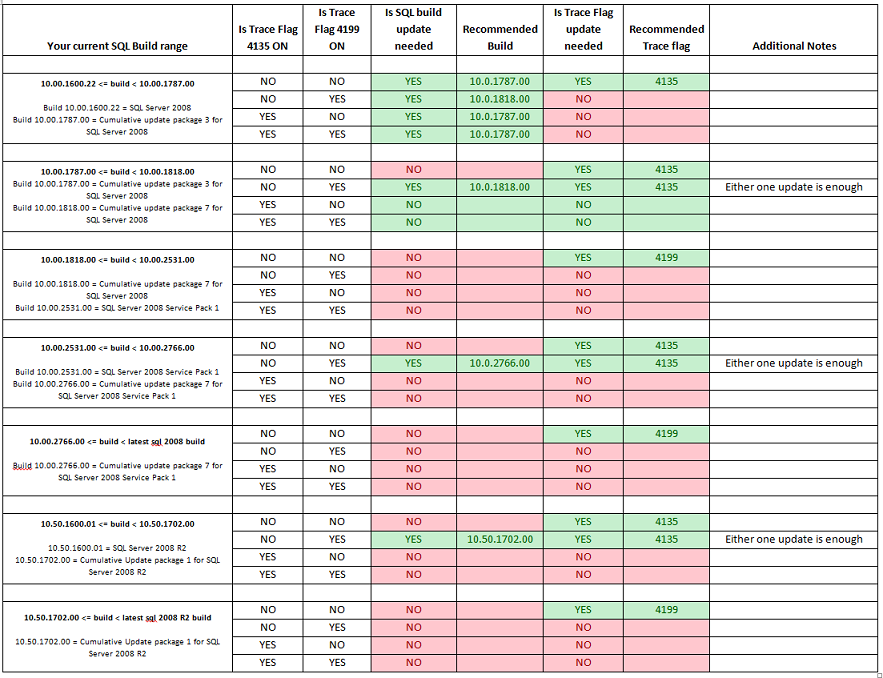
For more information about the latest SQL Server builds, click the following article number to view the article in the Microsoft Knowledge Base:
957826 Where to find information about the latest SQL Server builds
References
For more information about the list of builds that are available after the release of SQL Server 2008, click the following article number to view the article in the Microsoft Knowledge Base:
956909 The SQL Server 2008 builds that were released after SQL Server 2008 was released
For more information about the Incremental Servicing Model for SQL Server, click the following article number to view the article in the Microsoft Knowledge Base:
935897 An Incremental Servicing Model is available from the SQL Server team to deliver hotfixes for reported problems
For more information about the naming schema for SQL Server updates, click the following article number to view the article in the Microsoft Knowledge Base:
822499New naming schema for Microsoft SQL Server software update packagesFor more information about software update terminology, click the following article number to view the article in the Microsoft Knowledge Base:
824684 Description of the standard terminology that is used to describe Microsoft software updates








