
Uninstall Office from a PC
The following steps describe how to uninstall Microsoft 365 products on a PC (laptop, desktop, or 2-in-1). For Mac, see Uninstall Office for Mac.
Tip: Uninstalling Microsoft 365 only removes the Microsoft 365 applications from your computer, it doesn't remove any files, documents, or workbooks you created using the apps.
Uninstall Microsoft 365 for your installation type
The steps to uninstall Microsoft 365 depend on the type of installation you have. The most common installation types are Click-to-Run and Microsoft Windows Installer (MSI). The other type is an Microsoft 365 installation from the Microsoft Store app.
Select the Click-to-Run or MSI or Microsoft Store tab below and follow those uninstall steps for your installation type.
Not sure which type of install you have?
Open an Microsoft 365 app to check your installation type
Note: If you can't open an app to check your installation type, try the more common Click-to-Run or MSI uninstall steps first.
-
Create or open an existing file and select File > Account (or it might say Office Account).
-
Under Product information, find the About button and check for the following:
Click-to-Run

Click-to-Run installations have a Version and Build number, and include the phrase Click-to-Run.
Follow the Click-to-Run or MSI steps below.
MSI

An MSI installation doesn't have a Version or Build number.
Follow the Click-to-Run or MSI steps below.
Microsoft Store
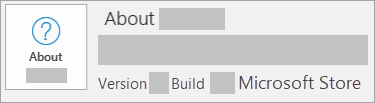
Microsoft Store installations have a Version and Build number, and include the phrase Microsoft Store.
If you have this installation type, select the Microsoft Store tab.
If you have a Click-to-Run or an MSI installation, uninstall Microsoft 365 using the Control Panel or download the uninstall support tool.
-
Press the Windows logo key (or select the search bar on the taskbar) and type control panel. Select Control Panel from the list of results.
-
Select Programs > Programs and features. Select your Microsoft 365 product and choose Uninstall.
-
Tip: If you installed the Microsoft 365 apps as part of a suite, such as Office Home and Student or Microsoft 365, search for the suite name. For stand-alone apps search by the app name, such as Project or Visio.
In most cases you can't uninstall an individual app if it's included in your Microsoft 365 suite. The only way to uninstall an individual app is if you purchased it as a stand-alone app. -
Follow the prompts to complete the uninstall.
Note: If Microsoft 365 isn't listed in the Control Panel you could have a Microsoft Store installation type. Select the Microsoft Store tab above and follow those uninstall steps instead.
-
To reinstall Microsoft 365 see Install or reinstall Office on a PC.
-
Select the button below to download the Microsoft 365 uninstall support tool.
-
Follow the steps to open the download according to your browser, and when you're prompted in the Application Install window, select Install, and then I agree for the Microsoft Services Agreement.
Tip: The tool may take a few minutes to download and install. After completing the installation, the Uninstall Microsoft 365 products window will open.
Edge or Chrome
-
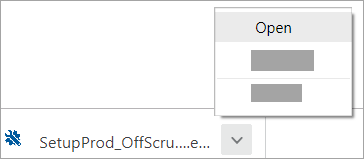
In the lower-lower left corner right-click SetupProd_OffScrub.exe > Open.
Edge (older)
-
At the bottom of the browser window, select Run to launch the SetupProd_OffScrub.exe.

Firefox
-
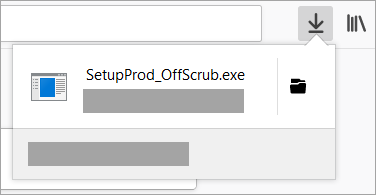
In the pop-up window, select Save File and then from the upper-right browser window, select the downloads arrow > SetupProd_OffScrub.exe.
-
-
From the Uninstall Office products window, select the version of Microsoft 365 you want to uninstall, and then select Next.
-
Follow the prompts on the remaining screens and when prompted, restart your computer.
-
After you restart your computer, the uninstall tool automatically re-opens to complete the final step of the uninstall process. Follow the remaining prompts.
-
To reinstall Microsoft 365 see Install or reinstall Office on a PC.
Tip: If the Microsoft 365 uninstall tool doesn't completely uninstall Microsoft 365 from your PC, you can try to manually uninstall Office.
Uninstall Microsoft 365 from Settings
-
Press the Windows logo key (or select the search bar on the taskbar) and type control panel.
-
Select Control Panel from the list of results.
-
Select Programs > Programs and features.
-
Select your Microsoft 365 product and choose Uninstall.
Note: If you installed an Microsoft 365 suite such as Office Home and Student or you have an Microsoft 365 subscription, search for the suite name. If you bought an individual Microsoft 365 application, such as Word or Visio, search for the application name.
Tip: If you can't uninstall your Microsoft Store installation using Settings try to uninstall Office manually using PowerShell following the steps below.
Uninstall Microsoft 365 manually using PowerShell
Remove Microsoft 365
-
Right-click

-
In the Windows PowerShell window, type the following:
Get-AppxPackage -name “Microsoft.Office.Desktop” | Remove-AppxPackage
-
Press Enter.
This takes a few minutes. Once it's done, a new command prompt appears.
Verify Microsoft 365 was removed
-
In the Windows PowerShell window, type the following:
Get-AppxPackage -name “Microsoft.Office.Desktop”
-
Press Enter.
If only a command prompt appears and no additional information, it means you successfully removed Microsoft 365 and you can close the Windows PowerShell window.
Reinstall Microsoft 365
To reinstall Microsoft 365 see Install or reinstall Office on a PC.
Note: If you're not sure what operating system you have, see Which Windows operating system am I running?
Tip: If you're a small business owner looking for more information on how to get Microsoft 365 set up, visit Small business help & learning.


Need more help?
Want more options?
Explore subscription benefits, browse training courses, learn how to secure your device, and more.




Communities help you ask and answer questions, give feedback, and hear from experts with rich knowledge.



Find solutions to common problems or get help from a support agent.
