
Note: Are you using Outlook for Mac? Visit I can't send or receive messages in Outlook for Mac for help.
If you see messages piling up in your Outlook outbox or people you're sending messages to aren't receiving them, try the following methods to fix the issue.
Important: If your Microsoft cloud storage is full, you cannot send or receive email. Check your mailbox storage to see what's taking up space. Learn more about recent changes.
To troubleshoot issues you're having with sending or receiving emails in Outlook, use our guided support tool below.
Still need help?


If you’re using Microsoft 365 for business, let us fix the problem for you
You can run Microsoft Support and Recovery Assistant to let us fix the problem for you. If you’re not using Microsoft 365 for business, or the Support and Recovery Assistant app doesn’t resolve your problem, see the next section. We've presented the methods in order of quickest to most in-depth.
Note: The Microsoft Support and Recovery Assistant is not applicable to new Outlook for Windows. Check to see if the new Outlook toggle is turned on or off. If it's on, please go to Troubleshooting Outlook issues.
|
|
Let us fix your issue |

We recommend trying the following solutions in the order listed. Select a heading below to expand it and see details about specific steps to take:
On the Outlook status bar, if you see Disconnected, Working Offline, or Trying to connect…, then Outlook can't reach the email server to send your mail.

To fix this problem, on the ribbon, select the Send/Receive tab, then, in the Preferences group, select Work Offline to toggle between offline mode and online mode. You may need to open the message and send it again or choose Send/Receive.

If that doesn’t fix the problem, see the next section.
If you lose your connection to the internet, Outlook won't be able to send your messages.
-
Open a browser, such as Microsoft Edge or Google Chrome.
-
Try entering one of the following websites in the address bar:
-
http://www.microsoft.com
-
http://www.bing.com
-
-
If you can't reach either of those two websites, see Fix network connection issues in Windows.
If that doesn't fix the problem, see the next section.
Some email providers (such as your ISP or even Gmail) won't let you send messages larger than a certain size. Adding pictures and large attachments to your message can prevent you from sending that message (and any messages sent after the large message).
Go to your Outbox and then open the stuck email messages. Start with the oldest message first. If that message has an attachment that’s larger than 5MB, delete the attachment and either attach a smaller file or attach a link to the attachment. See Attach a file to an email in Outlook for more information on attachments.
Now try to send the message again. If that doesn’t fix the problem, see the next section.
If you've changed your password on the website for your email account, you'll need to change it in Outlook, too.
-
Choose File > Account Settings > Account Settings.
-
On the E-mail tab, choose your email account, and then select Change.
-
Enter your new password in the Password box, then choose Next > Close > Finish.
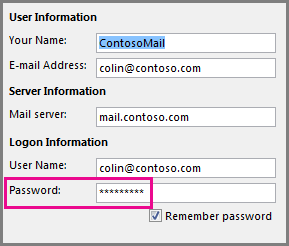
Note: If you sign in to your mail account with the same credentials that you use to log on to your network, you won't see the screens shown here. You'll need to change your email password by changing your Windows network password. Press Ctrl+Alt+Delete, choose Change a Password, and follow the instructions Windows provides.
Once you’ve changed your password, you might need to open and send the message again.
Some antivirus programs perform email scanning. If a virus is found, your antivirus software may prevent you from sending or receiving further email until you clean the virus.
Occasionally, the Outlook program may need to be repaired. Repairing is a simple process, but may take as long as half an hour to complete. For more information, see Repair an Office application.
A profile is a group of settings that controls how Outlook works. It includes a listing of your accounts, autocomplete information, and your name and initials. To repair your Outlook profile or create a new one, see Fix your Outlook email connection by repairing your profile.
Sometimes, an Outlook add-in will crash and prevent your email messages from sending. To disable all add-ins, you can start Outlook in safe mode. If you can send email while Outlook is in safe mode, creating a new Outlook email profile should allow you to send email again.
To start Outlook in safe mode, press the Windows key on your keyboard. In the search box, type outlook.exe /safe, then press Enter.
For more information on creating a new email profile, see Create an Outlook profile.
For many types of email accounts, Outlook stores your messages in a Personal Folders File (.pst file). You can repair this file by running the Inbox Repair Tool. This repair should take approximately fifteen minutes. For more information, see Repair your Outlook personal folders file (.pst).
Still need help?









