
If you don't want content reviewers to accidentally change a Word document or an Excel spreadsheet, you can use formatting and editing restrictions.
Note
To further restrict reviewers from making changes to your document or spreadsheet, you can make the file read-only or you can password protect it. For more information, see Restrict changes to files and Make a document read-only.
Restrict changes in Excel
On the Review tab, in the Protect group, review the following protection options:
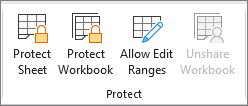
- Protect Sheet Protect the worksheet and contents of locked cells.
- Protect Workbook Protect the workbook for structure and Windows.
- Allow Edit Ranges Determine what ranges can be edited.
For more protection options, click File > Info > Protect Workbook.
