
By default, forms or quizzes you create in Microsoft Forms can only be shared with educators and students at your school. If you'd like to grant guest access to a parent or guardian, follow the steps below.
Sign in to https://forms.office.com with your school log-in.
Select the form or quiz you'd like to share in the My forms tab.
Select Share.
Beneath Send and collect responses, select Anyone with the link can respond.
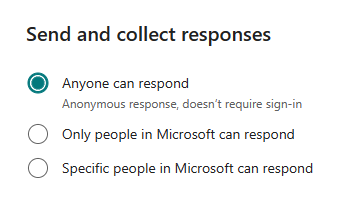
Choose how you'd like to share the link:
- Copy as a link: To post to your school website or personal page.
- Create a QR code: Have parent or guardian use their mobile device to download the form or quiz.
- Embed: Get the HTML code so you can put it on your website.
- Email: Send a link to your Parent via email.
Learn more
Create a quiz with Microsoft Forms
Check and share your quiz results
Create a math quiz in Microsoft Forms
Assign quizzes to students through Microsoft Teams for Education